85% higher click-through rate in newsletters thanks to personalized category-based recommendations at babymarkt.de
babymarkt.de increased its click-through rate by 85% through personalized, category-specific newsletters.

Newsletters are a powerful tool that can help you strengthen customer loyalty and increase sales. Once someone has subscribed to your newsletter, you shouldn't miss the opportunity to convince them of the merits of your product range. In this blog article, we have compiled some helpful newsletter tips on how you can enhance your newsletters with valuable content, a coherent layout, and a personalized approach.
Here's what you can expect to find in this blog article:
Our newsletter tips for writing
Give your newsletter a framework
Subject line: Spark your recipients' interest
Personal greeting
The fine art of writing
Our newsletter tip on personalized content
Our newsletter tips on layout and design
Focus attention on your CTA
Incorporating images correctly
The most important tips as a checklist
Conclusion: Highlight added value in a targeted manner and offer relevance
Before we get started with the newsletter tips, we would like to briefly review the characteristics of a newsletter.
The newsletter
This differs from email marketing, for example. Here, only information about a specific promotion is sent out, and only to a selected target group.
Here you can already see that you are serving a broad audience with different interests in your newsletter. At the same time, you also have a platform here to address multiple topics.
This means you now face the challenge of teasing the individual content in a catchy and concise way so that everyone can quickly find the content that interests them. In addition, you should incorporate a degree of personalization so that your recipients do not feel like they are part of a mass mailing and each individual recipient receives unique content.
Stay up to date on personalization: Sign up for the Epoq newsletter. Register now!
Now that the requirements are clear, we can get started with the newsletter tips:
As described in most guides, the subject line is the linchpin of your newsletter. This is where your recipients decide whether to open the email or not. Spark your recipients' interest with an exciting phrase. You should putthe most important content right at the beginning of your subject line, as this is often only skimmed over. To ensure that everything can be read on a smartphone, you should also keep it as short as possible. Avoid spam-prone words such as "free" to avoid ending up in the spam folder.
Take advantage of this opportunity right from the start and address your recipients personally. Simply insert a variable or tag in your email program at the intended location of the name. This allows the program to automatically insert the respective name of the recipient when sending.
The biggest challenge when writing a cover letter is developing your own writing style. However , there are a few simple rules you can follow:
→Short paragraphs, short sentences, short words —in short: write simply and clearly. Personally, nothing puts me off more than a long email with continuous text, without any subheadings or divisions. I'm sure I'm not the only one who feels this way. That's why you should structure your text clearly and keep it as short as possible.
→ Also remove any duplicate content from your newsletters.
→ Clearly highlight the added value your customers receive from your newsletter. This is because your recipients will only skim through your newsletters rather than reading them word for word. As with the subject line, the most important information should therefore be at the beginning.
→ Another tip that is easy to implement: Address your recipients directly. This makes your text easier to read and prevents any artificial distance from developing between you and your recipients.
However, we would also like to give you a tip for your own writing style:
→ Your writing style should be aligned with your corporate identity. This means that if your company uses a casual tone on its website, this should also be reflected on social media channels and in emails. Work with your team to find your own style and create a recognizable brand image.
Addressing your recipients personally is no longer rocket science. Now it's all about integrating individualized and personalized content into your newsletters.
This is possible if you know more about your recipients than just their names. You can achieve this by tracking your customers’ click-through and purchase behavior in your online store. With email personalization, you can offer personalized recommendations to each individual recipient of your newsletter. These recommendations should be thematically relevant to your newsletter. In your e-commerce backend , you should be able to select the topic for which the personalized recommendations are calculated and displayed. You can narrow down the products by selecting specific categories, colors, and, for example, sales promotions.
Here you can see an example from baumarkt direkt with personalized recommendations from the leaf remover category:
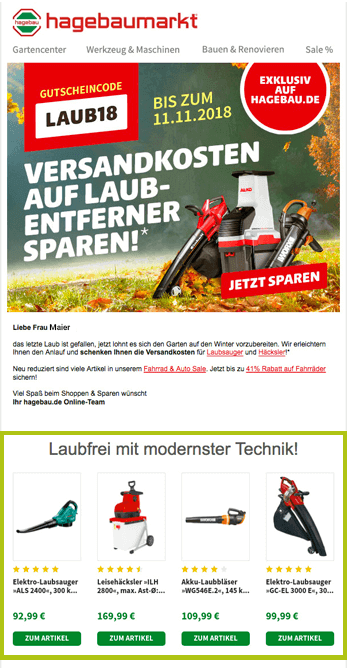
Personalized recommendations matching the newsletter topic (source: screenshot of email from hagebau.de)
The green area with recommendations looks different for each recipient with an existing click and purchase history. A fallback strategy with top sellers can also be stored.
If the GDPR alarm bells are ringing for you right now: tracking customer behavior is subject to strict data protection guidelines. Personal data is not required for this purpose.
Not only should your text make people want more, but your design should too. There are many creative ways to get your customers to scroll to the end. These can be graphic elements that lead from the beginning of the newsletter to the end and encourage scrolling. t3n has compiled some good newsletter examples that encourage readers to scroll through their design.
The design also allows you to influence your recipients to interact with your call-to-actions. You can direct your recipients' gaze and visually highlight certain elements. So choose a contrasting color for your primary buttons.
You can also take advantage of the priming effect from psychology. This involves preparing your readers for the call-to-action with visual elements or text so that they are ready for it. In a discount campaign, for example, you can design the discount offered in the same color as the call-to-action so that the association can be made quickly.Ryteprovides an excellent explanation of the priming effect.
The content of your images also influences where your recipients look. For example, if there is a person in your image, their gaze should ideally be directed toward an important element and not toward the trash can in the email inbox ;-).
Stay up to date on personalization: Sign up for the Epoq newsletter. Register now!
When using images, it is important that you include ALT text. This appears when the email program prevents images from being displayed in emails. Here you briefly describe what the image represents. If the image links to a page, also describe where it links to.
You should also make sure that your images do not cause long loading times. Therefore, only embed images in the maximum size in which they will be displayed.
As mentioned at the beginning, newsletters bundle and convey a significant amount of content with the goal of bringing customers back to the online store. To ensure this doesn’t overwhelm your readers, you need to keep a few things in mind when writing your text so that your readers can quickly recognize the value it offers. In addition, it is now possible to personalize the newsletter for each individual recipient, thereby ensuring high relevance. To further support the goal of your newsletter, you can also use visual elements that influence your recipients.
Find out how babymarkt.de increased the click-through rate in its category-specific newsletter by 85%:
Read the case study now!

You are currently viewing placeholder content from HubSpot Embedded Content. To access the actual content, click the button below. Please note that doing so will result in data being shared with third-party providers.
More InformationYou are currently viewing placeholder content from HubSpot. To access the actual content, click the button below. Please note that doing so will result in data being shared with third-party providers.
More InformationYou are currently viewing placeholder content from HubSpot Meetings. To access the actual content, click the button below. Please note that doing so will result in data being shared with third-party providers.
More Information