The AI Optimizer – Intelligent search optimization that makes your store smarter

What is the AI Optimizer and how can it help your online store?

The AI Optimizer is a feature of Smart Search that determines whether a customer stays or leaves. Imagine this: A customer visits your online store and searches for “scarves,” but your product catalog only recognizes the term “neck warmer.” The result? No relevant results, no clicks, no purchases. It’s precisely these kinds of gaps that often go unnoticed in day-to-day business—not because they don’t matter, but because manual analysis is simply too time-consuming.

The AI Optimizer automatically fills these gaps. It analyzes your store customers’ search queries on a daily basis, identifies where terms don’t match, and suggests appropriate synonyms and variations that lead to better search results. You can find specific suggestions for improvement right in your Control Desk, Epoq’s digital control interface. This way, your search function continuously improves without you having to spend hours analyzing data.

The result: Relevant results lead to more clicks, fewer bounce rates, and faster purchases. Customers find what they're looking for—and buy it. Your store benefits directly.


With or without the AI Optimizer—the difference is clear

Without AI Optimizer With AI Optimizer
Search terms without clicks go unnoticed; you don't know why customers are leaving without buying anything ✓ Search terms with no clicks are automatically identified every day, and you immediately receive specific suggestions for improvement
Synonyms and alternative terms must be researched and maintained manually, which is time-consuming ✓ The AI automatically identifies appropriate synonyms and corrections, which are immediately available for use
Opportunities for optimization get lost in the day-to-day grind, while search efforts stagnate and lose relevance ✓ Search performance improves every day without requiring any additional manual effort from your team

Did you know that…

70%

All e-commerce search systems fail when customers use a different name for an item than the store does (Source: Baymard Institute, 2024)

69%

All online shoppers go to the search bar first—and leave if they can’t find what they’re looking for (Source: Baymard Institute, 2024)

41%

Most online stores are unable to accurately answer their customers' most common search queries (Source: Baymard Institute, 2024)

The AI features of the AI Optimizer

AI Synonyms

The system automatically identifies relevant synonyms for search terms. The AI Optimizer determines which terms effectively expand the search results to include relevant products, thereby significantly reducing the amount of manual work required.

AI Typos

Search terms are checked for typos and spelling errors after they are entered. Future search queries are automatically corrected, so all optimizations are based on the correctly spelled term.

The benefits of using the AI Optimizer

Daily Analysis

The AI Optimizer analyzes the most relevant search terms on a daily basis and automatically identifies opportunities for optimization.

Less manual work

Specific suggestions appear directly in Control Desk; all you have to do is decide whether to accept, reject, or modify them.

Continuous improvement

Search quality is constantly improving; the more suggestions are implemented, the more relevant the search results become for your customers,

What Ex Libris says:

“Personally, I think it’s a really useful feature because it also offers suggestions that you wouldn’t necessarily optimize in a recurring analysis, but which are still valuable and reveal additional potential.”

Tiziana Belmonte | E-Commerce Project Manager | Ex Libris

Here's how the AI Optimizer improves search functionality in your store

Search term is recognized

Every day, the AI Optimizer identifies search terms that return results but do not generate clicks—for example, because the product name in the store is different.

AI analyzes & suggests

Large language models (LLMs) automatically check whether appropriate synonyms or expansions would meaningfully improve the set of results.

It's up to you

In the Control Desk, you can view all suggestions and accept, reject, or edit them individually.

Active immediately

Accepted suggestions are added directly as thesaurus entries and are immediately available for searching.

Real-world example: "scarves" yields results but no clicks

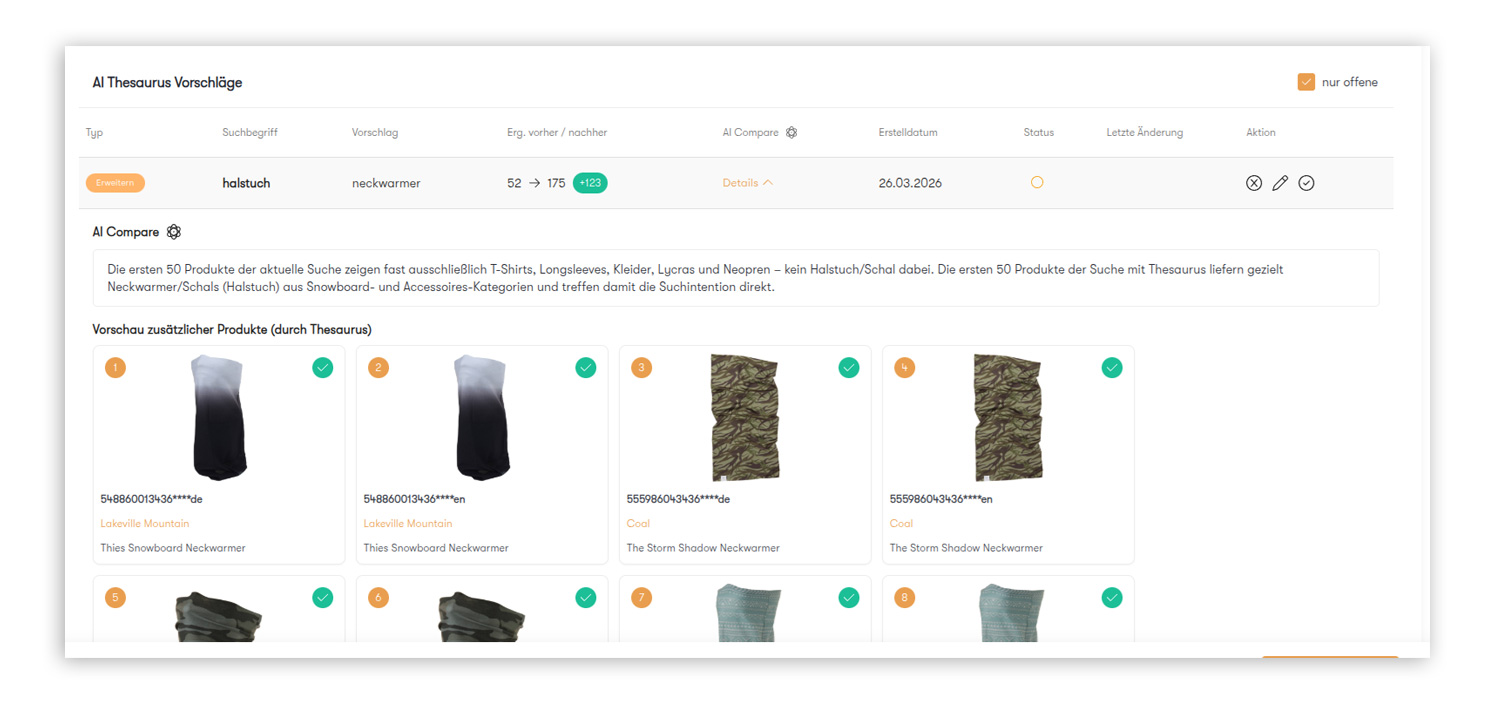
Here’s a typical scenario: Users search for “scarves,” but your product catalog only recognizes the term “neck warmer.” The AI Optimizer detects this gap, suggests the thesaurus entry, and automatically validates the newly added products. All you have to do is confirm the suggestion.

AI Optimizer detail view with the thesaurus suggestion "neckwarmer" for the search term "scarf," including a comparison of the number of results, an AI Compare explanation, and a product preview.

Ready for smart search optimization?

Get to know the AI Optimizer in a personalized demo and see for yourself how much time and effort you can save.

FAQs about the AI Optimizer

Popular blog posts about the AI Optimizer

The picture shows a person sitting on a couch at a small table, playing Scrabble.
Reduce Bounce Rate
How to semantically enrich search results using the thesaurus in Control Desk, and how AI can help you do this

As an e-commerce professional, you strive to make it as easy as possible for your customers to find products in your online store. Your keywords are undoubtedly of particular importance in this regard. After all, search results that don’t match what customers are looking for—or a page with no results at all—are often caused by slight variations in search queries. With the help of the thesaurus in Control Desk, you can prevent this problem by semantically optimizing your keywords according to your specific needs. In this article, you’ll learn how this works and how AI can provide targeted support in this process.

Learn more
The image shows a person working in Epoq Control Desk.
Reduce Bounce Rate
Guide to Analyzing and Optimizing Your ecommerce search engine in Control Desk – Now AI-Powered

Would you like to delve deeper into your search analytics to accurately interpret customer intent based on search queries and identify opportunities for optimization? The Search Analytics section in Control Desk offers a wide range of tools to closely examine search queries, identify trends, and boost your search performance through optimizations at the keyword and product levels. We’ll guide you through the Search Analytics section in Control Desk, provide you with valuable insights, and show you how AI can specifically support you in your analysis.

Learn more
The picture shows an office room with an advertising banner.
Reduce Bounce Rate
Banner management in the Control Desk for campaign promotion

Banner management makes it possible to integrate graphics and content into the results page of specific product listings or search queries in the online shop. Once activated, these can appear in various positions, e.g., on the respective search results page, the results page of the corresponding product listing, or in the typeahead. But that's not all—there are various ways to attract the attention of online shoppers and use banners in different ways for marketing campaigns. You can find out more about the use of digital banners and how they work in the Control Desk in this blog article.

Learn more
The Link Finder in the Control Desk is visualized by a signpost in nature.
Reduce Bounce Rate

With Link Finder, you can redirect search terms to specific pages or highlight a link on the search results page. This is because your online shoppers are not only looking for products via the search function, but also for informative pages. That's why Link Finder lets you optimize the service for your online shoppers by redirecting them to service pages, campaign pages, or brand pages, or by drawing their attention to them. In this blog post, you'll learn about the options available when creating Link Finder and the use cases for which it is useful.

Learn more
Two women are sitting in front of a laptop displaying a product overview page with a search function on an online store.
Reduce Bounce Rate
AI Optimizer: Reduced manual effort through AI-powered analysis and optimization of search results in Control Desk

Optimizing your search results is one of the most important—but also one of the most time-consuming—tasks in e-commerce. It becomes particularly challenging when search queries return results but don’t generate clicks, or when terms are referred to differently depending on spelling, season, or product range. Analyzing such cases often takes a lot of time and can easily get overlooked in day-to-day operations. This is exactly where the AI Optimizer comes in: It analyzes the most relevant search terms daily, automatically identifies optimization potential, and suggests specific improvements. This gives you a solid foundation for a more precise, efficient, and user-friendly search—with significantly less manual effort. In this blog post, we’ll show you exactly what the AI Optimizer is all about and how you can use it to support your efforts.

Learn more
The picture shows a clothing store with discount offers.
Control Desk
7 control desk tips for a high-revenue Black Friday in e-commerce

On Black Friday, online shop operators compete for online shoppers' purchases with the best offers and promotions. This is because both Black Friday and Cyber Monday are becoming increasingly relevant for e-commerce.¹ That's why you should start preparing your online shop in good time. Wondering what adjustments you can make? In this blog article, we give you seven tips for a high-revenue Black Friday that you can implement in no time via the Control Desk.

Learn more
01 / 8