
62% lower bounce rate through the use of intelligent search at NKD
The use of ecommerce search engine in NKD's online shop had a positive effect on the performance of the online shop and significantly reduced the bounce rate by 62%.


Did you know that...
of eCommerce search engines fail when shoppers use a different term for a product than the store does—resulting in lost revenue? (Source: Baymard Institute, 2024)
of online shoppers go straight to the search bar—and leave the site if they can’t find what they’re looking for? (Source: Baymard Institute, 2024)
of online stores can’t correctly answer their customers’ most common search queries? (Source: Baymard Institute, 2024)
of consumers want search and filtering options in online stores? (Source: Statista, 2018)
Intelligent Search (also called smart search) provides guidance during the awareness phase of your online store and helps your customers quickly and efficiently find the right product. Epoq Search combines two search modes to achieve this: Keyword Search (AI-powered) for traditional search terms and keyword combinations with maximum performance—and Agentic Search (LLM-based) for natural language queries, allowing users to search using complete sentences.
Search results and category listings are calculated in milliseconds and displayed with 1:1 personalization. In addition, numerous standard and AI features are available that continuously improve the search experience—for example, the detection and correction of typos, suggestions during input, the entry of product attributes, and the automatic expansion of search terms with relevant synonyms. At the same time, targeted merchandising and customer targeting can be flexibly implemented in the online store.
This leads to a more efficient start to the shopping process, a lower bounce rate, and faster purchase completion. That’s exactly what Epoq Search offers.


The system automatically identifies relevant synonyms and alternative terms for relevant search terms. It then reviews and evaluates which of these terms effectively expand the results set with relevant products. This results in targeted optimizations that improve search quality and significantly reduce the amount of manual work required.
Search terms are checked for typos and spelling errors after they are entered. Future search queries are automatically corrected, which improves the quality of search results. This ensures that existing and new optimizations of other features are based on the correctly spelled search term.
You can find more information here: AI Optimizer
Ecommerce search engine is part of our personalization platform, which is powered by an AI engine. It uses artificial intelligence techniques to calculate relevant search results for each individual customer. This allows it to quickly and easily guide your store’s customers to the product they’re looking for and help them start the shopping process without any detours. This is because the search results list displays exactly the products that match your shop customer’s personal preferences at that moment. For example, after a customer enters “pants” into the ecommerce search engine, they’ll see “Tom Tailor” pants in size 40 displayed first. Why? Because the ecommerce search engine has detected that your shop customer has already searched for the “Tom Tailor” brand, for example, via a category’s faceted navigation. Similarly, the semantic AI search function understands natural language inputs such as “I’m looking for a gift for my father, who likes to read thrillers” and also takes individual preferences into account to deliver highly relevant results.
You are currently viewing a placeholder content from Default. To access the actual content, click the button below. Please note that doing so will share data with third-party providers.
More Information“With Epoq’s help, we’ve been able to improve our search results much more easily and quickly. As a result, we’ve seen a significant increase in revenue.”
Dr. Marc Wagner | Data Mining Manager | Villeroy & Boch AG

Our ecommerce search engine is tailored not only to your users' interests, but also to your business requirements. With flexible merchandising options, you can specifically control which products, brands, or categories are displayed and highlighted in the search results. This allows you to strategically promote important items, boost sales of remaining stock, or optimally present new products – tailored to your product range strategy, current campaigns, and KPIs.

Determine which products, brands, or categories should be displayed preferentially and highlighted specifically.

Define which business objectives – such as inventory clearance, margin strength, or new products – should be taken into account when displaying products.

Define which rules should apply to specific use cases or target groups.
With Customer Targeting, you can control exactly who sees which search results—whether it’s all store visitors, a specific segment, or based on a particular product. What each visitor sees is always 100% personalized.

If you want to highlight a specific brand or category for all your store visitors, our AI engine ensures that everyone receives personalized results.

Our AI engine automatically identifies customers who share similar interests and uses this information to create segments. Customers who like a particular brand will automatically see it appear higher in the results for relevant search queries.

You start with a product or brand—our AI automatically identifies which customers and search queries this prioritization is most relevant for.
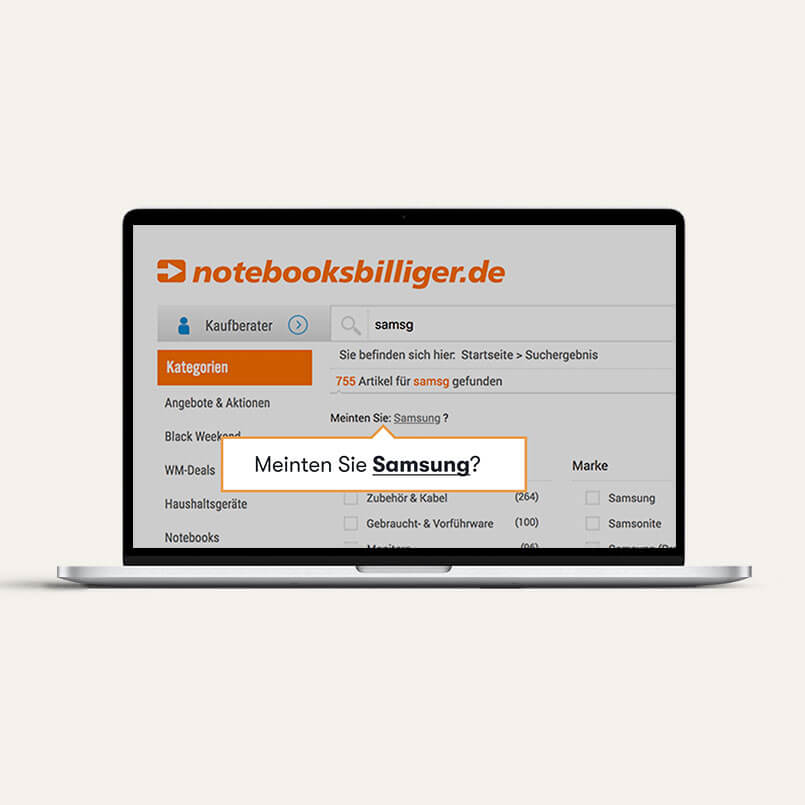 Don't let negative emotions arise and keep your customers in your online shop
Zero-hit pages lead to negative emotions, which can cause customers to leave the online shop. Typos are often the cause, leaving the searcher in the dark. Automatic detection of input errors and the opening of a preview window allow an ecommerce search engine to efficiently guide the visitor and improve usability at the same time.
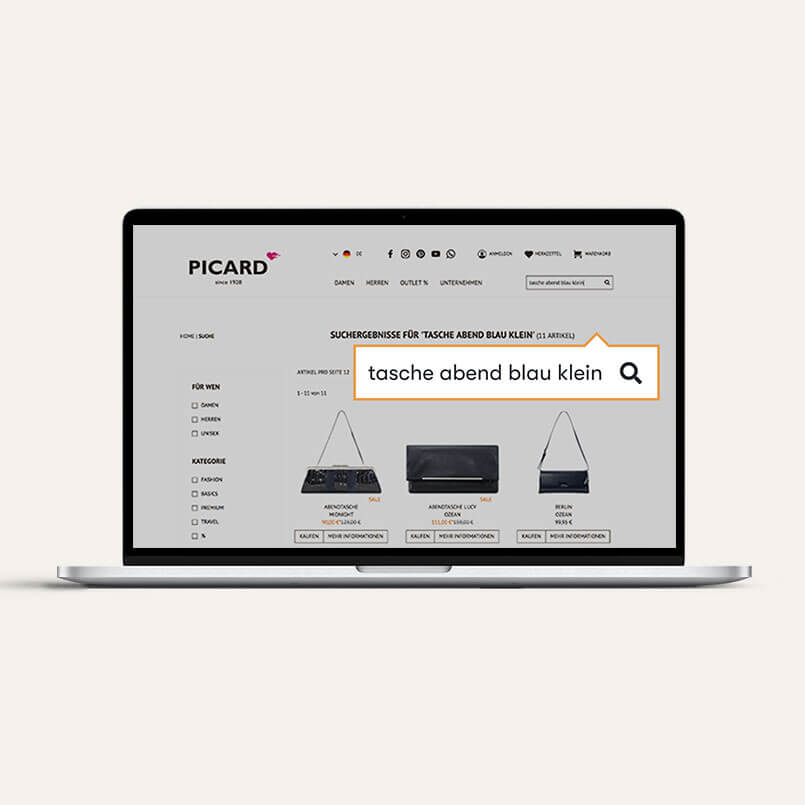 Enable your shop customers to enter product attributes in the search field
If an online shopper searches for "small blue evening bag," this is a search term combination that includes characteristics in the search field. ecommerce search engine captures the meaning of the search term combination, also known as semantics, and returns the correct search results.
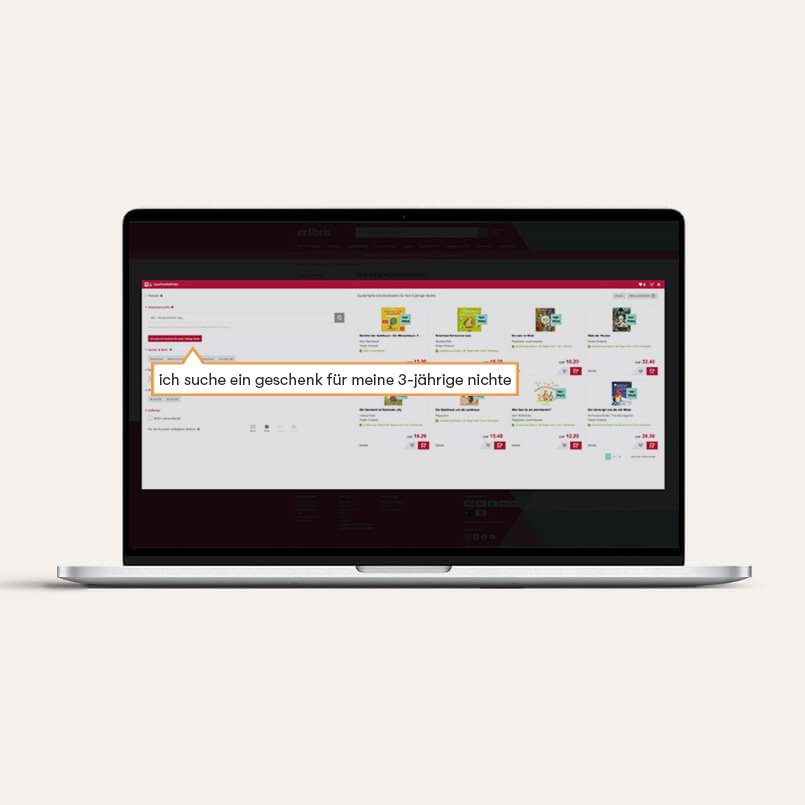 Let your online store customers ask questions in natural language
When a user enters a complex phrase such as “I’m looking for a gift for my 3-year-old niece,” the Agentic Search Mode automatically recognizes the context, intent, and relevant attributes. This allows it to deliver the right result even for individual or longer queries—without any additional interaction via chat windows or filters.
 Ensure the correct list of results for each search term
There are different names for certain products. Shop customers may search for a laptop and enter notebook in the search function. Both terms should lead to a list of results. That is why it is important to define synonyms for search terms, for example. However, it may also be the case that there are different interpretations of a search term. That is why it is equally important that the list of results allows for alternatives, for example. In our example, notebooks would also be displayed in the results list for the search query "notebook," since notebook is also used to refer to a notebook in everyday language. An ecommerce search engine makes exactly that possible.
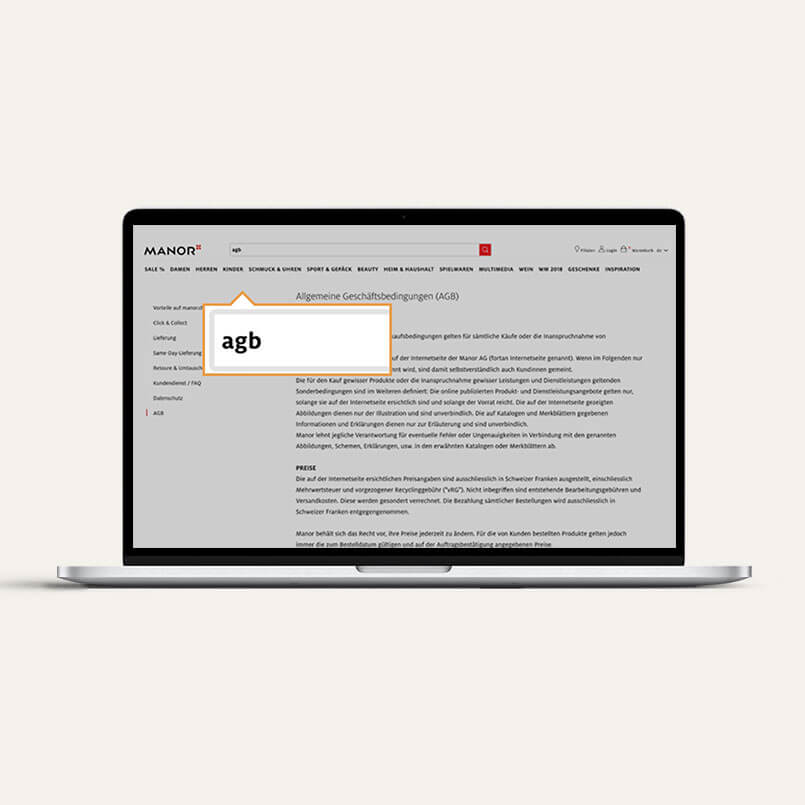 Make it easier for your customers to complete their purchase
In addition to product information, content pages such as legal notices, payment terms, and delivery conditions play an important role in completing a purchase. With an ecommerce search engine function, you can guide customers to important content pages that will ultimately convince them to make a purchase.
 Draw your shop customers' attention to interesting items
The ecommerce search engine function allows actions to be highlighted in the form of banners above the results list. The banner can, for example, highlight certain brands to boost sales or draw attention to discounts. Banners can also be displayed in the preview window, guiding customers to the right product before the results list is displayed.
 Offer multiple ways to find the desired product
In the B2B sector, people often search for item numbers. ecommerce search engine can be designed for this purpose and can detect and correct input errors in the item number field. This allows customers to find exactly the products they are looking for.
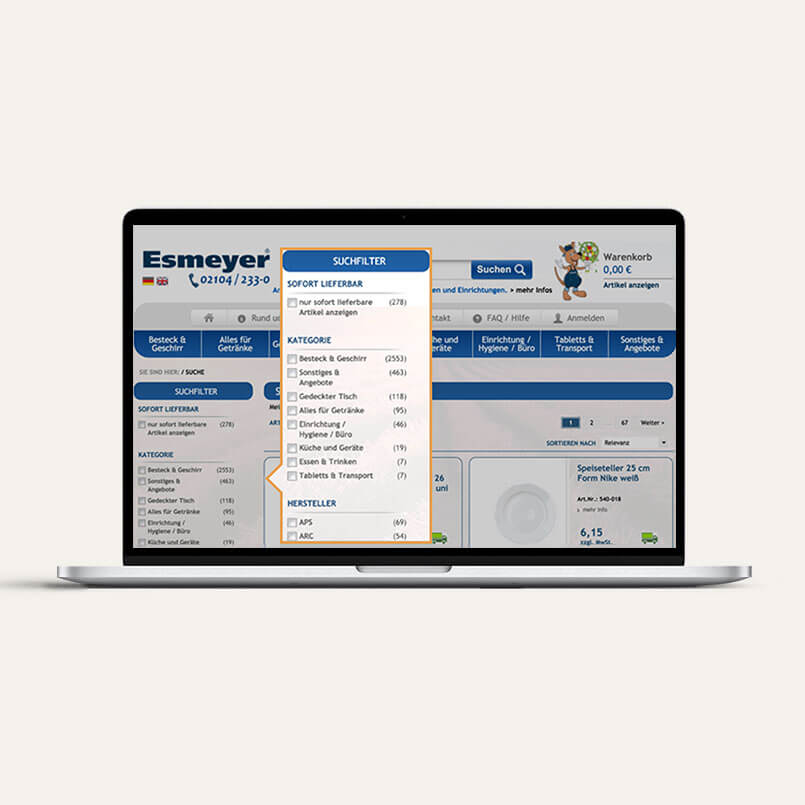 Make it easier for your shop customers to find products
Once the results list for a product search has been displayed, it can be narrowed down click by click. For example, by selecting the color, size, brand, etc. in the faceted filter. This means that online shoppers only see products that match the selected criteria. The faceted filter can also be positioned as desired and customized.
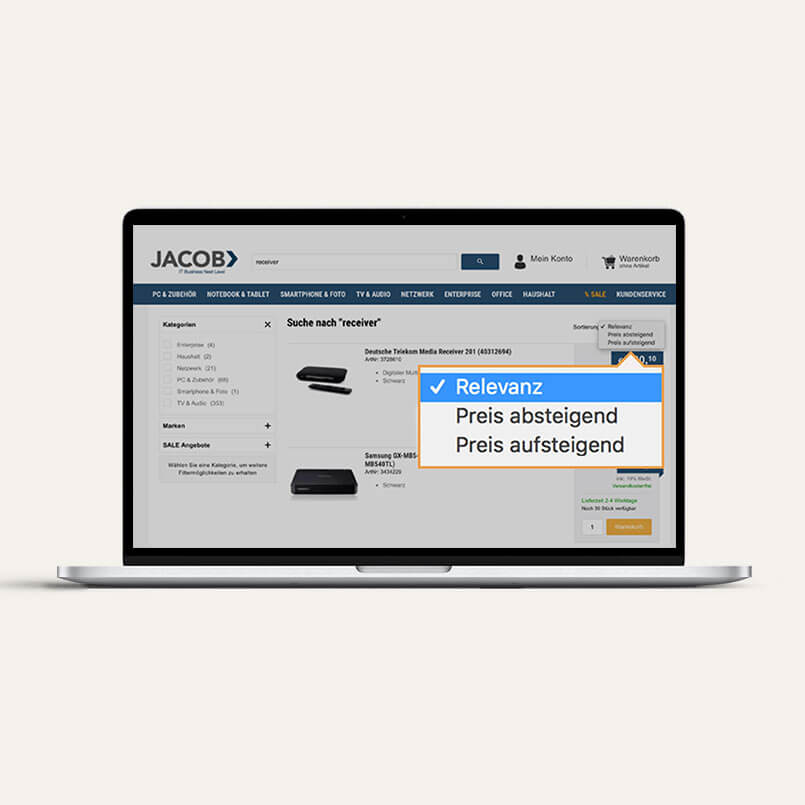 Offer your shop customers the opportunity to incorporate their preferences
After the results list has been displayed and the faceted filter has been used, if applicable, online shoppers still have the option of sorting the results list according to their preferences, e.g., by relevance, ascending or descending price, or sale items. This makes it easier to find the right product quickly.
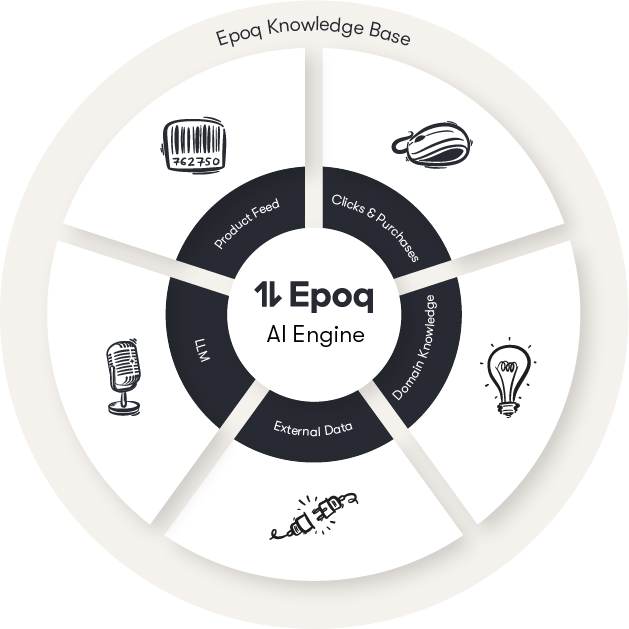
Before ecommerce search engine is implemented in your shop, we first use our AI engine to generate a knowledge base for your online shop. To do this, our AI engine uses your product catalog, the click and purchase behavior of your shop customers, and our and your expert knowledge. It links the data to knowledge and thereby calculates the relevant search results for your shop customers and displays them. Since the ecommerce search engine is located on our personalization platform, which is designed to personalize the entire customer journey of your shop customers, you have the option of activating additional touchpoints in your online shop and using the knowledge already generated by the ecommerce search engine (modular structure) to further enrich the knowledge base for your online shop. Would you like to learn more about the AI engine? Then head over to E-commerce Technology.

Consideration of spelling errors and integrated "Did you mean" function.

Language usage and colloquial terms are taken into account.

Intelligent product and content suggestions for search entries via preview window.

Filter options allow customers to narrow down products and make searching easier.

The search understands both keyword combinations and longer, natural-language queries, and returns contextually relevant results—powered by Agentic Search Modes.

Individual products can be promoted or hidden in the results list.
“Epoq’s intelligent ranking helps us show our customers the most relevant products at all times, even with a diverse product range. This was particularly evident in the significant increase in the click-through rate during the test.”
Claas Hemmje | Team Leader Data & Shop Management | A-Z Gartenhaus GmbH


Your product catalog is cleaned up, prepared, and aggregated in terms of the desired search functionality, e.g., the color designation is included in a separate column or missing attributes are added.
The search algorithm is adjusted, for example, with regard to error tolerance, field weighting, and ranking, e.g., selection of the fields to be searched, determination of the field weighting, and setting of the sensitivity level for error tolerance.

Both functional and visual configuration takes place. Functionally, this includes selecting filters, sorting, and autosuggest previews. Visually, it includes the graphic design of your online shop.
To generate a knowledge base, we need your product catalog in XML or CSV format and the click and purchase behavior of your shop customers. The latter is recorded in compliance with data protection regulations via a tracking code in your online shop. The shop system is irrelevant here.
We discuss your visual ideas together and send you the div element as a placeholder for the front end of the ecommerce search engine. You integrate this into your test system. Now the search algorithm is fine-tuned and the necessary configuration is carried out.
After setup in the test system and successful functional testing, the ecommerce search engine is activated in your live system and is available to your shop customers as a guide to the desired product. If necessary, we will perform fine-tuning during live operation.
We will introduce you to our backend, the Control Desk, and train you in the various analysis and configuration options as well as feature usage. This will enable you to monitor and control the ecommerce search engine.
Your shop customers receive relevant search results and are directed to their desired product. This helps them navigate their product search and reduces the bounce rate, which has a positive effect on your conversion rate and sales.
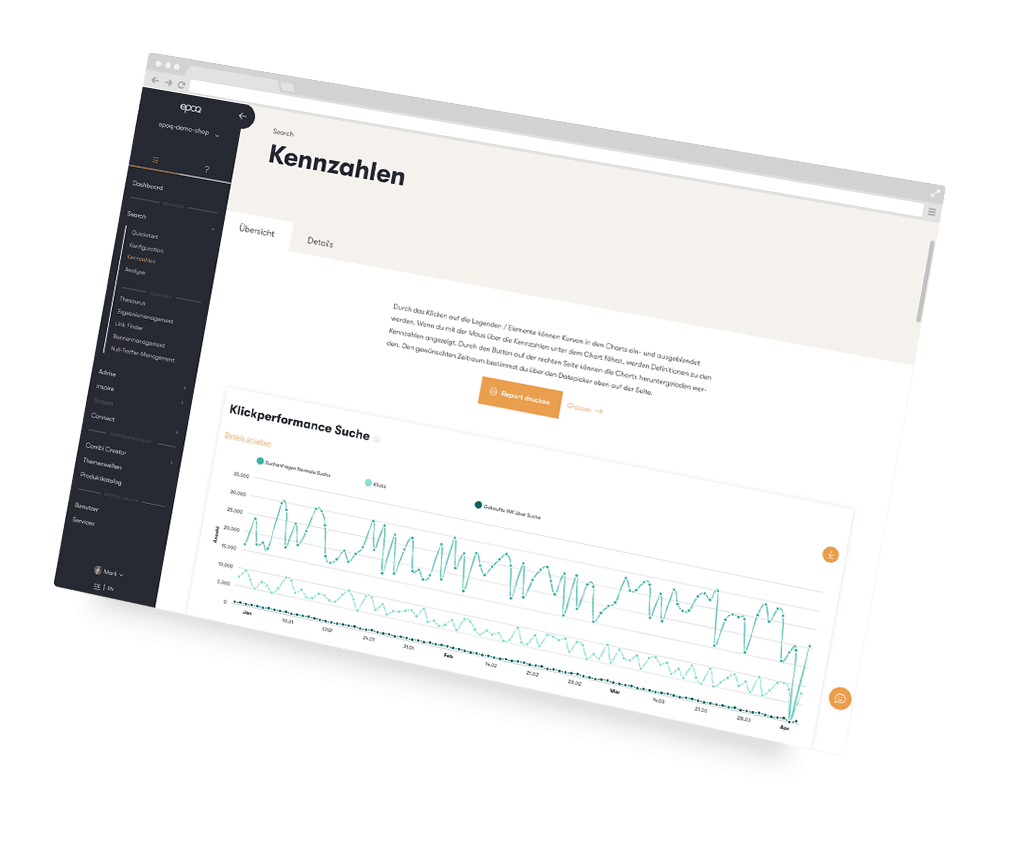
The Epoq Control Desk gives you extensive options for monitoring and controlling the ecommerce search engine.
Checking the relevance of search results for specific search terms from the customer's perspective. Relevance here refers to the match between the content of the visited page and the product or information the user is actually looking for.
Review of various ecommerce search engine metrics, such as click and revenue performance.
Here you can configure the current settings and other search algorithm settings, such as error tolerance, weighting of individual search fields, facet filters, and sorting.
Applications and configuration of various ecommerce search engine features, such as the thesaurus, Link Finder, and banner management. This also includes theAI Optimizer, which automatically analyzes frequently used search terms and suggests relevant extensions or synonyms. You can accept, edit, or reject the suggested optimizations directly in the Control Desk.

You already run an online store or similar and have all the basic features covered, and now you want to optimize your standard search.
You have more than 5,000 searches per month in your online store.
Your product range includes more than 500 products.
Our ecommerce search engine ensures that your
online shoppers don't bounce so easily.
Smart Search—also known as intelligent search—goes far beyond a traditional search function. While a standard search only finds exact terms, Smart Search recognizes typos, understands combinations of search terms, and interprets natural language queries such as “gift for my dad.” Epoq Search thus delivers personalized, relevant results in milliseconds, tailored to the individual behavior of each online shopper.
Smart Search is ideal for any online store, from fashion boutiques and B2B retailers to large catalogs with thousands of products. It is particularly valuable wherever customers start their shopping journey with the search bar: 69% of all online shoppers go straight to the search bar first—and leave immediately if they don’t find what they’re looking for there. Epoq Search can be integrated independently of the store system and adapts to any product range size and industry.
There is currently no fixed price, as costs are calculated based on each shop's specific needs. You can request a custom quote for Epoq Search by clicking the "Request a Quote" button.
You can request a demo of our intelligent search directly through Epoq; the quickest way is via the following link: Web Demo Request
You are currently viewing placeholder content from HubSpot Embedded Content. To access the actual content, click the button below. Please note that doing so will result in data being shared with third-party providers.
More InformationYou are currently viewing placeholder content from HubSpot. To access the actual content, click the button below. Please note that doing so will result in data being shared with third-party providers.
More InformationYou are currently viewing placeholder content from HubSpot Meetings. To access the actual content, click the button below. Please note that doing so will result in data being shared with third-party providers.
More Information