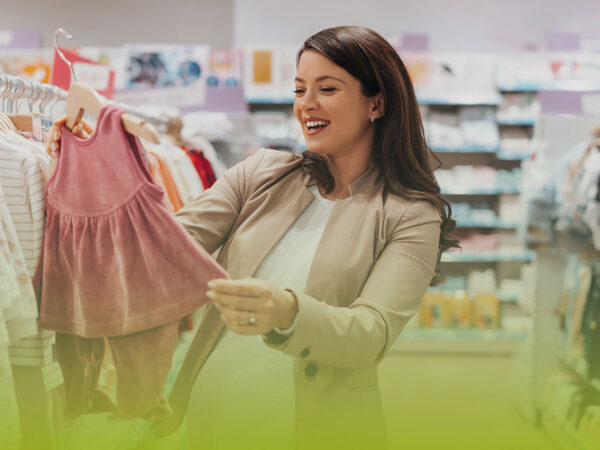
85% higher click-through rate in newsletters thanks to personalized category-based recommendations at babymarkt.de
babymarkt.de increased its click-through rate by 85% through personalized, category-specific newsletters.

Trigger emails are an effective way to get in touch with your online shoppers and encourage them to visit your online store. Once set up, they run virtually on their own and increase traffic to your online store, among other things. In this blog article, we would like to introduce you to 5 popular trigger emails and give you information on how to implement them.

Here's what you can expect to find in this blog article:
Popular variants of a trigger email
#1 Welcome email
#2 Birthday email
#3 Product follow-up email
#4 Abandoned cart email
#5 Feedback email
Implementation of a trigger mail
Conclusion: Trigger emails are part of successful shop management
A trigger email is an email that is triggered by a specific event. Email automation plays an important role here, as the trigger email is sent automatically as soon as the planned event occurs. Trigger emails are therefore a great way to connect with your online shoppers and encourage them to return to your online store. They also save you time, as you only need to plan and create them once.
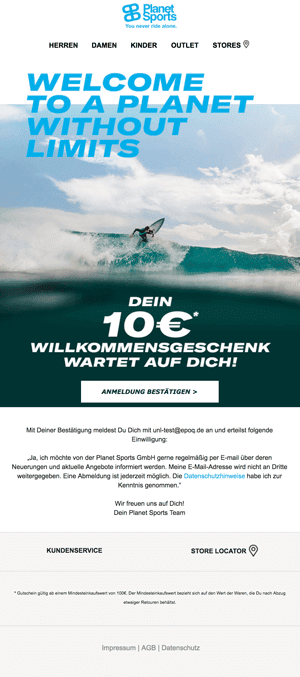
A simple example is the welcome email. When an online shopper signs up for your newsletter or creates an account, you can automatically welcome them to your online shop. A welcome email is pretty much the standard among trigger emails. At the same time, your online shopper knows that their registration was successful. On top of that, you can include a welcome gift, such as a $10 voucher for their first purchase. This is how Planet Sports encourages its potential customers to make their first purchase.
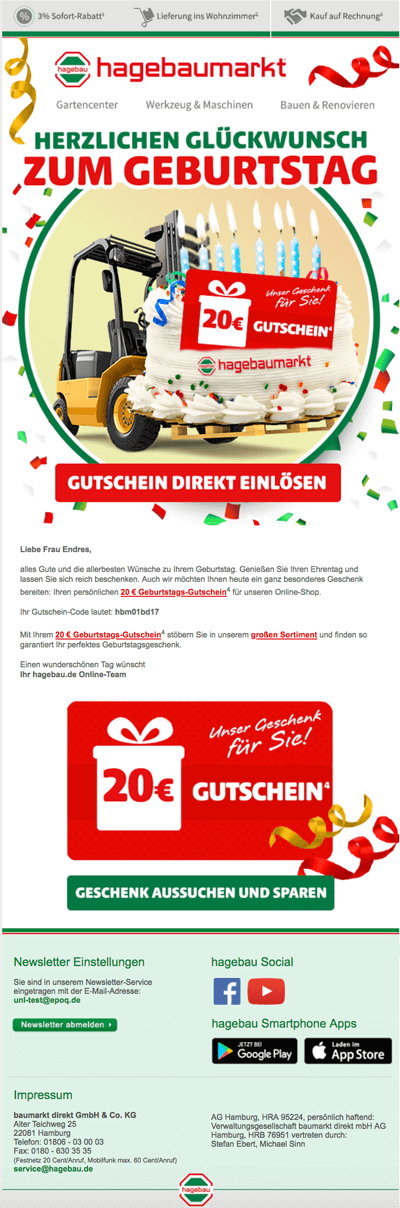
A good business relationship should be nurtured. That's why birthday emails are an important tool for expressing your appreciation to your customers. They can also generate more sales, as you can use them to offer incentives, such as vouchers. This makes it easy for your customers to visit your online store again. And that's exactly what hagebaumarkt does.
If you would like more information about birthday emails, check out our blog article: Using birthday emails in e-commerce to increase customer loyalty and traffic.
Stay up to date on personalization: Sign up for the Epoq newsletter. Register now!
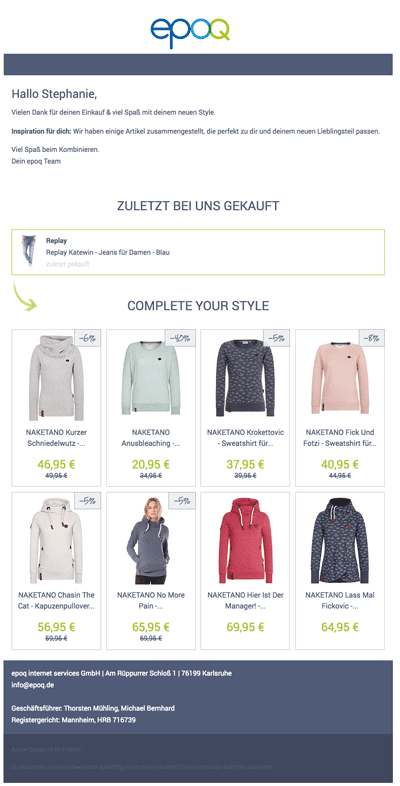
Another variant of trigger mail is product follow-up mail. If a customer has purchased jeans, for example, you can automatically offer them matching hoodies shortly afterwards. You're probably wondering how this can be automated, since every customer buys something different. It's simple. By using intelligent algorithms that determine the right cross-selling items for each customer individually in real time and automatically display them in your trigger mail. But more on that in the Implementation section.
A trigger email can also be defined for shopping cart abandonment. If your online shopper has left their shopping cart and not accessed it in the following days, you can remind them with a trigger email. To do this, you can offer a discount or point out that stock is low, thereby encouraging your online shopper to make a purchase after all. Once set up, the shopping cart abandonment email is always sent automatically when the set parameters are met. Zalando does this really well. And it starts right in the subject line: "An item in your shopping cart is on sale."
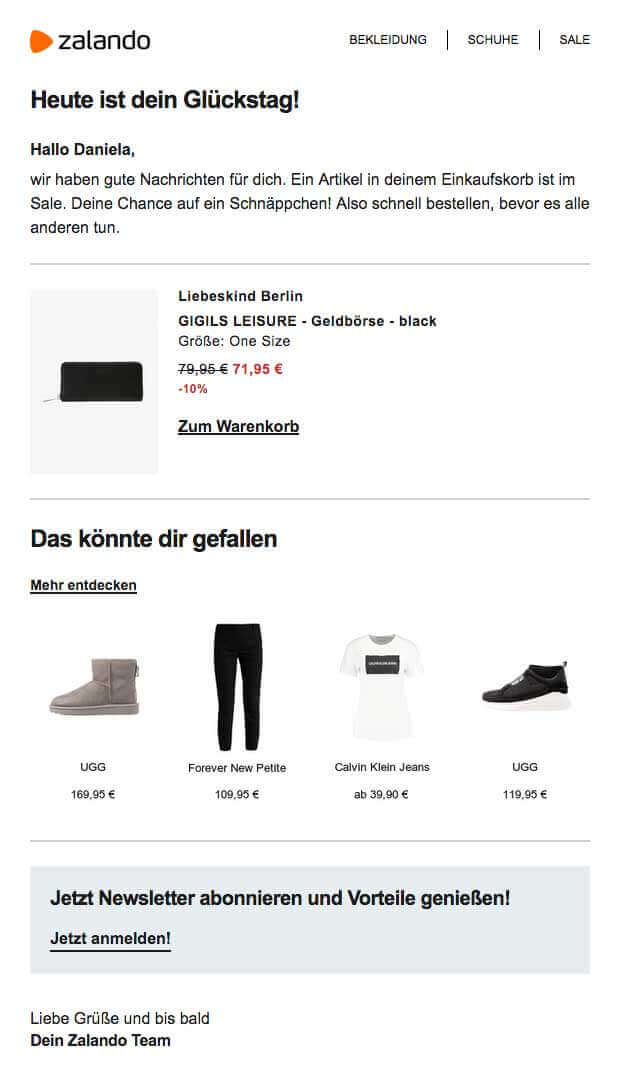
In addition, you can place product suggestions in the shopping cart abandonment email to inspire online shoppers to fill their shopping carts with suitable items. However, these should correspond to the individual click and purchase behavior of your online shoppers and be displayed in real time, as relevance is key here.
You can find more information about shopping cart abandonment emails in the blog article Increase sales with personalized shopping cart abandonment emails.
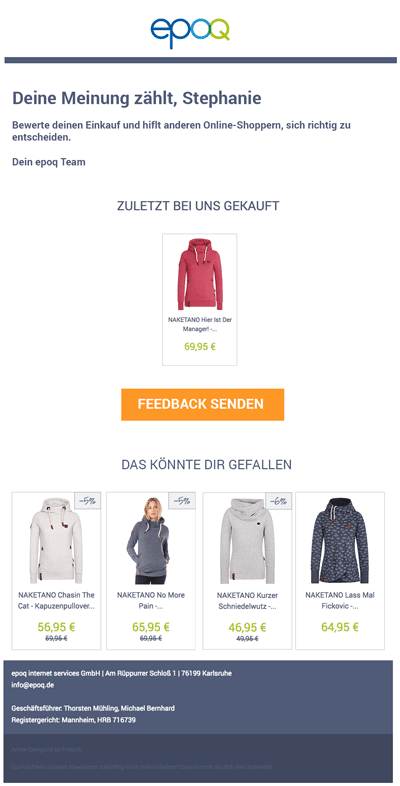
Customer reviews are an important factor in purchasing decisions these days. That's why you should regularly ask for feedback on purchased products. Writing to each customer individually is very tedious and ineffective, especially for an online shop with many customers. To do this, create a trigger email that automates product feedback. You can also schedule this individually so that it lands in your customers' inboxes a week after purchase, for example, rather than immediately. Relevant product suggestions can also be sent in this context to whet their appetite for more.
Stay up to date on personalization: Sign up for the Epoq newsletter. Register now!
As you have seen, there are many ways to use a trigger email. Now the question remains: how can you implement a trigger email?
The first step is to consider the occasion for which you want to set up a trigger email. Then select an automation option in your email delivery system.
In the second step, you formulate your content, structure it, and add the images and merge tags. You basically proceed as you would in email marketing. Then you select the trigger for sending your trigger mail (hence the name) and save the whole thing.
The procedure may vary from one email delivery system to another, but the basic principle remains the same. We work with MailChimp, for example.
In the last step, you provide individual product suggestions in the trigger emails. This gives you additional incentives to buy. In this step, we are dealing with email personalization. For this, you need placeholders in your email and a tracking code in your online shop. This allows you to generate a knowledge base that provides individual product recommendations using intelligent algorithms. The product recommendations are then displayed in real time, i.e., when the email is opened.
Trigger emails are an essential part of successful shop management these days. Once set up, they offer you a range of effective benefits. For example, they allow you to generate more traffic to your online shop, which increases your conversions; you can gather feedback on your products, which you can use for optimization; and you can show your appreciation to each customer, thereby increasing customer loyalty. Overall, you create a connection to your online shoppers and stay in touch with them—automatically.
A trigger email is an automated email that is triggered by a specific event. Examples include newsletter sign-up, a birthday, an abandoned shopping cart, a completed purchase, or a feedback request.
Since trigger emails only need to be created and scheduled once, they save time. They also help maintain contact with customers, increase traffic, encourage repeat purchases, and enable personalized communication at relevant times.
Popular types include welcome emails, birthday emails, product follow-up emails, abandoned cart emails, and feedback emails. Each type serves a different purpose along the customer journey.
A product follow-up email is sent after a purchase and can recommend related products. For example, if a customer has purchased a pair of jeans, the email can suggest matching hoodies or accessories.
Abandoned cart emails remind customers of items they left behind and can bring them back to the store with discounts, availability updates, or relevant product recommendations.
Trigger emails can be personalized using customer data, purchase history, click behavior, merge tags, and product recommendations calculated in real time. This makes the content more relevant and effective.
It depends on the goal: Welcome emails are ideal for initial contact, abandoned cart emails for conversion recovery, follow-up emails for cross-selling, and feedback emails for reviews and optimization.
Discover how babymarkt.de increased the click-through rate in its category-specific newsletter by 85%.
Read the case study now!

You are currently viewing placeholder content from HubSpot Embedded Content. To access the actual content, click the button below. Please note that doing so will result in data being shared with third-party providers.
More InformationYou are currently viewing placeholder content from HubSpot. To access the actual content, click the button below. Please note that doing so will result in data being shared with third-party providers.
More InformationYou are currently viewing placeholder content from HubSpot Meetings. To access the actual content, click the button below. Please note that doing so will result in data being shared with third-party providers.
More Information