
4.23% higher click-through rate on product overview pages thanks to self-learning ranking at A-Z Gartenhaus
A-Z Gartenhaus increased the click-through rate on product overview pages by more than 4% using a self-learning ranking system.

A user-friendly experience is an important criterion for most visitors when shopping online. When searching for products, many users today expect support, e.g., in the form of faceted navigation that allows them to filter search results in a targeted and flexible manner. In our blog article, we show you what you should definitely consider when creating a professional faceted search in your online store.

Here's what you can expect to find in this blog article:
Individual selection options: What sets faceted search apart
Clarity in the online shop: When does it make sense to use it?
Creating a professional faceted search: Here's how
The structure: Support your users with a clear structure
The content: Formulate relevant facets
The presentation: Choose suitable selection options
Placement: Orient yourself towards proven placement options
The user experience: Design a pleasant user experience
Filter search results: Application in the online store
Conclusion: A faceted search in the online shop is worthwhile
Faceted search refers to a search principle in which search results can be narrowed down by filtering according to specific criteria or facets. In an online shop, this allows each user to narrow down the product selection in the search results list in a targeted and flexible manner according to their individual requirements using faceted navigation. Of course, this also works via the navigation level when an online shopper arrives at a category page.
If you are using ecommerce search engine, the characteristics entered in the search query can be taken into account directly when displaying the product results and applied to the faceted navigation. This ensures that the user only receives products that are relevant to their search query.
Stay up to date on personalization: Sign up for the Epoq newsletter: Register now!
Are you interested in learning more about the general aspects of faceted search, or would you like to know what exactly characterizes faceted search and how online shoppers can use it to filter their search results in a targeted and flexible way? Then you should definitely take a look at our blog article Why you shouldn't do without faceted navigation!
In short: integrating a faceted search only makes sense if your online shop's product range is of a certain size and it is no longer possible to guarantee complete clarity. To help your online shoppers find the right product despite the extensive range on offer, you can support them by offering them the option of filtering the search results in the shop in a targeted and flexible manner. In practice, it is assumed that the use of faceted search always makes sense when there are at least three different facets, such as size, material, and color, each with several attributes, e.g., black and white for color.
When creating a faceted search that should be user-friendly, there are a few things to consider. To ensure you don't forget anything, we have compiled the most important points below.
A well-structured layout is half the battle when developing faceted navigation. After all, you want to make it easy for your visitors to get started and narrow down their search intuitively, right? Therefore, you should not ignore the following points:¹
When designing the content of a faceted search, i.e., formulating facets and attributes, there are no universal guidelines. This is because which facets and attributes are actually suitable always depends on the product range of your online store. For example, different facets and attributes are normally used for technical devices than for clothing. Nevertheless, one aspect should always be guaranteed: the relevance of your facets.
For this purpose, it is advisable to carry out a facet analysis, in which you identify matches in your product range that would be suitable as facets. An online shoe store could, for example, define the following facets:
Intuitive operation should be the goal of every faceted search so that your customers can quickly and easily find the product they want by filtering their search results. The display of facets and attributes plays an important role here. The following selection options have become established in e-commerce:
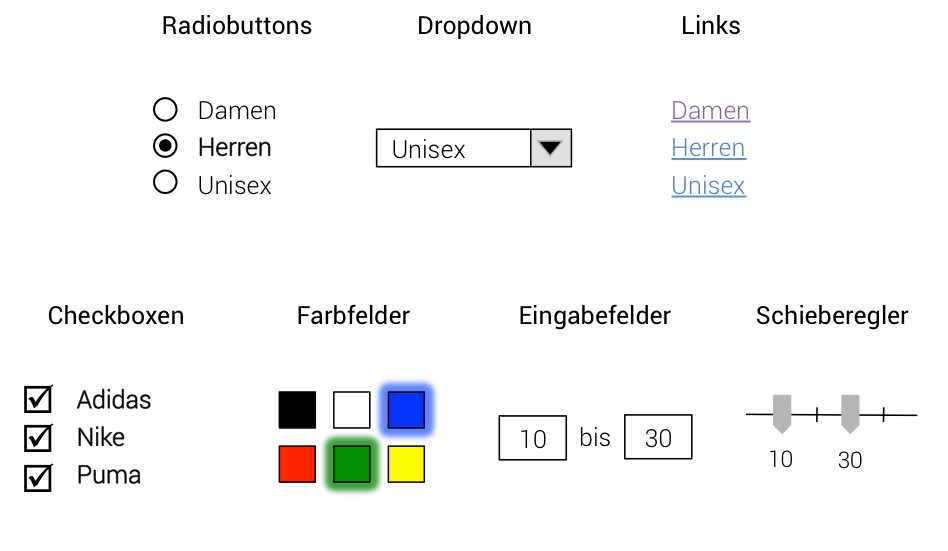
Of course, these options can be combined as desired, and it is not necessary to use all of the options presented in your faceted search. Depending on which facets you have specified for your search, you must select the appropriate display formats.
To ensure that users discover your faceted search right away and use it accordingly, it is also important to choose its positioning in the online shop carefully. In practice, two placements in particular have proven successful:
Only the positioning on the right-hand side of a page is unusual, at least in Germany.
Faceted search makes it easier to search online shops with a large number of products. This flexible product search option and the ability to easily narrow down search results have a positive impact on the user experience. To ensure that your customers have a pleasant user experience, you need to meet a few requirements:
A fast loading speed is essential for a good user experience. The loading time when narrowing down a user's product selection via faceted search should therefore be as short as possible. In addition, every selection made by your customers should be visible directly on the page by showing or hiding specific products. Appropriate animations, such as smooth fade-ins and fade-outs or loading animations, can be used to visualize the changes on the page in a pleasant way. In addition, the selection of features and a sensible prioritization of facets are also crucial for a good user experience.
The following example from the iba online shop illustrates how the search results displayed on the page change immediately as soon as the user narrows down their selection using specific facets.
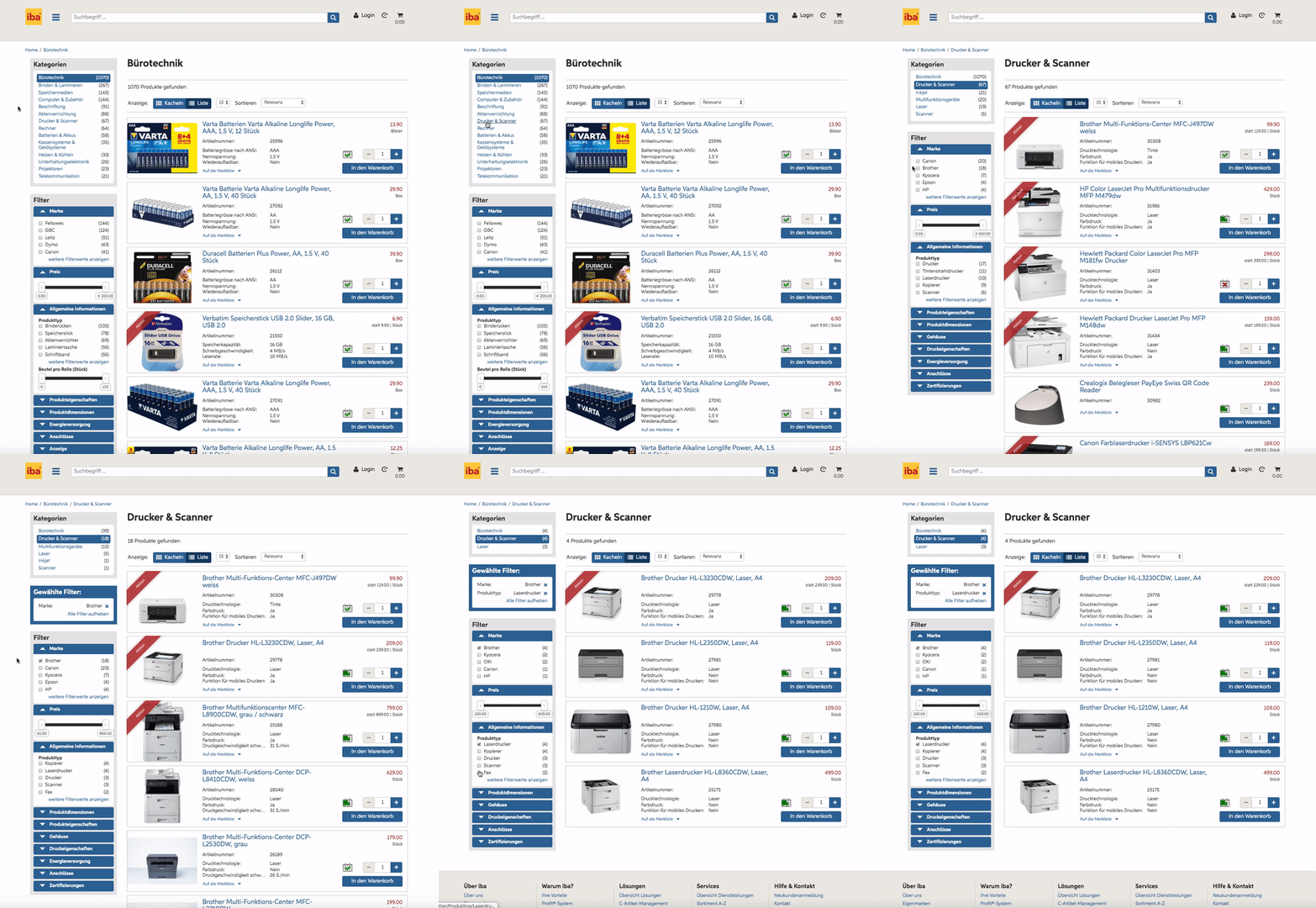
Before your new faceted search goes live, you should definitely conduct a usability test . After all, each case is unique, and user preferences can vary greatly depending on the online store or product range.
Stay up to date on personalization: Sign up for the Epoq newsletter: Register now!
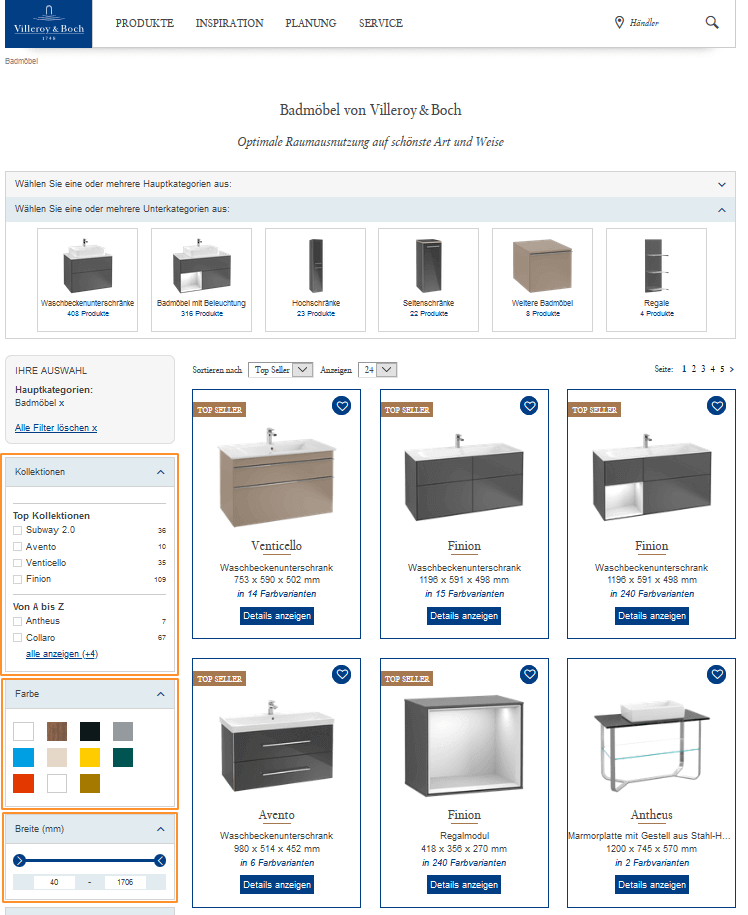
The following example shows how faceted search can look in the application. Villeroy & Boch offers users of its online shop various options for finding the ideal product via faceted navigation. The faceted search display combines several of the selection options presented. If, for example, a user is looking for new bathroom furniture, they can narrow down the search results using various facets. Online shoppers can select the desired collections using checkboxes, as well as other characteristics such as style, material, etc. In addition, customers can choose the desired product color using color fields. The appropriate dimensions in terms of width, depth, and height can also be specified using a slider.
The faceted navigation from Villeroy & Boch is located on the left-hand side of the online shop. This is one of the placement options that has proven itself in practice.
In summary, it is clear that integrating a faceted search into e-commerce often makes sense, especially for large product ranges. The ability to filter search results in a targeted and flexible manner allows customers to find the product they want quickly and intuitively. However, many shop operators shy away from the expected effort—but that doesn't have to be the case! Taking into account the most important criteria, such as structure, content, design, placement, and user experience, creating a professional faceted search is incredibly easy.
Source:¹konversionsKRAFT
A faceted search allows search results to be narrowed down using filters, known as facets. Users can filter products according to criteria such as size, color, or brand. Faceted navigation works on both search results pages and category pages. With ecommerce search engine, the characteristics entered are applied directly to the filters so that only relevant results are displayed.
A faceted search is useful as soon as your product range becomes so large that it becomes difficult to maintain an overview. It is particularly helpful if there are at least three different facets, such as size, material, and color, with several variations. This allows users to filter specifically and find the right product more quickly.
A user-friendly faceted search is clearly structured, sensibly grouped, and tailored to user behavior. Make sure the order is logical, avoid duplicate filters, and keep the number of facets balanced. Fast loading times, visible filter effects, and subtle animations also contribute to a positive user experience.
The appropriate filter option depends on the attribute: for mutually exclusive values such as gender, a single selection (e.g., dropdown) is suitable. For combinable values such as brands, a multiple selection (e.g., checkboxes) is useful. Intervals such as price are best filtered using a slider or input field.
The faceted search should be clearly visible and easily accessible. Two positions have proven effective: to the left of the search results or above the results list.
Discover how Gartenhaus increases click-through rates by 4.23% on product overview pages
Read the case study now!

You are currently viewing placeholder content from HubSpot Embedded Content. To access the actual content, click the button below. Please note that doing so will result in data being shared with third-party providers.
More InformationYou are currently viewing placeholder content from HubSpot. To access the actual content, click the button below. Please note that doing so will result in data being shared with third-party providers.
More InformationYou are currently viewing placeholder content from HubSpot Meetings. To access the actual content, click the button below. Please note that doing so will result in data being shared with third-party providers.
More Information