
4.23% higher click-through rate on product overview pages thanks to self-learning ranking at A-Z Gartenhaus
A-Z Gartenhaus increased the click-through rate on product overview pages by more than 4% using a self-learning ranking system.

The search function is extremely important for both shop customers and shop operators. In the best case scenario, it enables users to quickly and easily find the product they want to buy. If the onsite search returns no results or inappropriate results, online shoppers will quickly abandon the search process and leave the site. To prevent this, an intelligent onsite search is required. In this blog article, we reveal why you should rely on optimized onsite search and what features it should include.

Here's what you can expect to find in this blog article:
Why is an optimized onsite search so important?
What do integrated onsite searches of shop systems offer?
Standard search with important basic functions
Greater satisfaction when using an ecommerce search engine
What features should an optimal onsite search offer?
Thesaurus for taking language usage into account
Error tolerance to avoid zero-hit pages
Semantics for search term combinations with properties
Autosuggest for displaying product suggestions
Result management for manual configuration options
Link Finder for implementing content commerce
Faceted navigation and sorting function for narrowing down and sorting results
Conclusion: Optimize your onsite search and provide important functions—it's worth it!
Onsite search is often referred to as site search or internal search. But whatever you call it, it always refers to theinternal search function of a website or online shop. Shop customers can use this search field to quickly search through all of the content on the site. It is often used to save time, but also when the site is confusing or unstructured, or when a customer already knows what they want and can search for it specifically.
Instead of spending a long time clicking through an online store, many visitors immediately use the internal search function to quickly find what they are looking for. However, if the search is unsuccessful, they may leave the online store immediately—and you lose potential sales. This clearly demonstrates the importance of optimized onsite search in e-commerce.
Stay up to date on personalization: Sign up for the Epoq newsletter. Register now!
According to a study by eCommerce-Leitfaden (2016), 80% of online retailers surveyed consider the search function in online shops to be "very important."¹ And rightly so, because if the search does not find a suitable result, the likelihood of users immediately leaving the site is high. An immature onsite search therefore often leads to high abandonment rates, as customers cannot find what they are looking for and may even end up on a zero-hit page. There are therefore plenty of reasons why online shops should actively optimize their site search. Because an optimized onsite search
Overall, an ecommerce search engine function ensures a lower bounce rate and satisfied customers in the online shop. It can therefore be said that the search function—regardless of the industry—is of great importance. However, the weighting of the individual search functions may vary from shop to shop.
Example: In an online shop that sells electronic goods, the onsite search requires a comprehensive facet filter, which helps shop visitors find exactly the right item from countless, diverse products, is of great importance. In a fashion shop, on the other hand, functions such as type ahead with preview images or banners are more important. The items in a fashion shop are also subject to seasonal fluctuations, which is why intelligent ranking is an advantage.
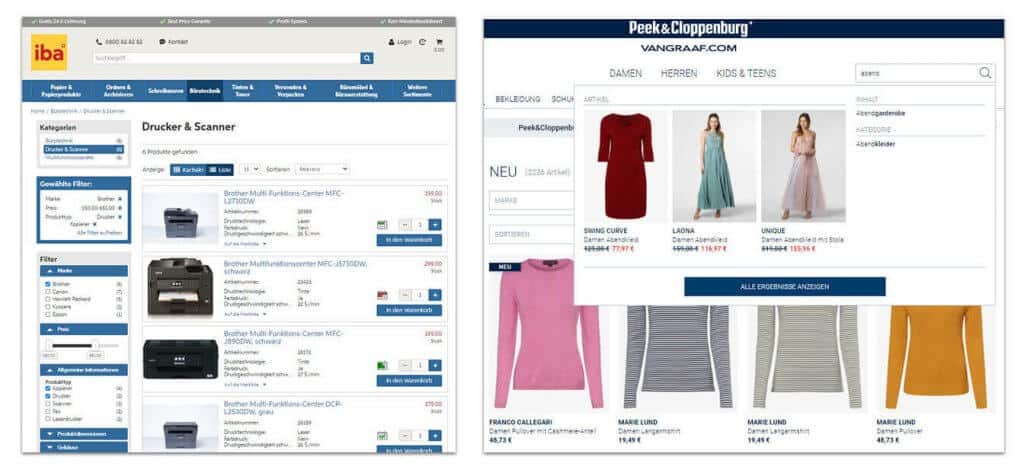
Example of faceted navigation in the iba online shop (left) and a type-ahead function with preview images in the Peek & Cloppenburg Hamburg fashion shop (right) (source: screenshot from iba.ch and peek-und-cloppenburg.de)
According to the study by eCommerce-Leitfaden, around 23% of online shops use thestandard search function provided by their shop system.³ These are usually included in the purchase price free of charge and are easy to integrate.
Standard searches vary greatly in sophistication depending on the shop system, but usually offer essential basic functions such as full-text search and simple filters.Efficient and user-oriented functions such as error tolerance, autosuggest, or the ability to weight search results yourself are usually missing. But this is exactly what shop operators expect from an onsite search: a high-quality search function and many search functionalities.
Standard searches also reach their limits when it comes to implementing individual shop requirements. These can include, for example, the mapping of business-specific processes or the adaptation of the search to the shop's own product data model.⁶
As a shop operator, you need to weigh up whether the advantages (no additional costs and no additional integration effort) outweigh the disadvantages (usually inefficient). However, especially for smaller shopsandbeginners, an onsite search of the shop system is a good option so that a search can be offered in the online shop at all. But at the latest when the search function has to be customized due to individual requirements, there is no way around an intelligent onsite search.
Only 10% of shop operators who use the standard search function of their shop system are "very satisfied." Already 60% of shop operators rely on additional modules from third-party providers. These providers show a significantly higher level of satisfaction: at 52%, providers who use an additional module or ecommerce search engine instead of the standard search function are the most satisfied.⁷
The high level of satisfaction among shop operators using ecommerce search engine shows that optimizing onsite search is worthwhile and that its potential should be exploited. We will now take a closer look at the important features that intelligent onsite search should include.
There are many guides and tips for optimizing onsite search. In addition to the "right" placement in the online shop, the color used, or the search icon used, functionality plays a particularly important role. This is because it determines how quickly and easily shop customers can ultimately find the products they want using the search function.
An onsite search should meet the following criteria: accuracy, user-friendliness, and speed. This is also confirmed by the eCommerce Guide study. Here, 73% of respondents stated that they primarily expect high search quality (e.g., very error-tolerant, very accurate, and very fast). Speed ensures that search results are calculated and displayed within a very short time (usually within milliseconds) and that autosuggest is loaded immediately. An ecommerce search engine also includes an intelligent algorithm that calculates search results in a targeted manner, takes automatic and manual adjustments into account, and thus displays the appropriate results. Your onsite search should also have the following functions so that your shop customers can find what they are looking for:
Every shop customer searches differently. This depends on their level of knowledge, but also on geographical or demographic differences and personal preferences. The search algorithm must therefore be able to cope with different terms and spellings and understand the search input. This starts with singular and plural differences, but also affects the recognition of synonyms (e.g., socks = stockings). To avoid problems here, the thesaurus can help. This function can be used to set synonyms or alternative terms, for example.
Even the most attentive user makes typos sometimes.Error-tolerant searchhas therefore long been a must in e-commerce. It recognizes errors (e.g., careless mistakes and incorrect spellings) in the search entry and suggests alternative search terms to the customer that they might have meant with their incorrect entry. This prevents shop customers from landing on a zero-hit page.
For example , if a customer enters "black shirt ironing" in the ETERNA online shop, they will not be directed to a zero-results page despite several spelling errors, but will instead be shown the desired products.
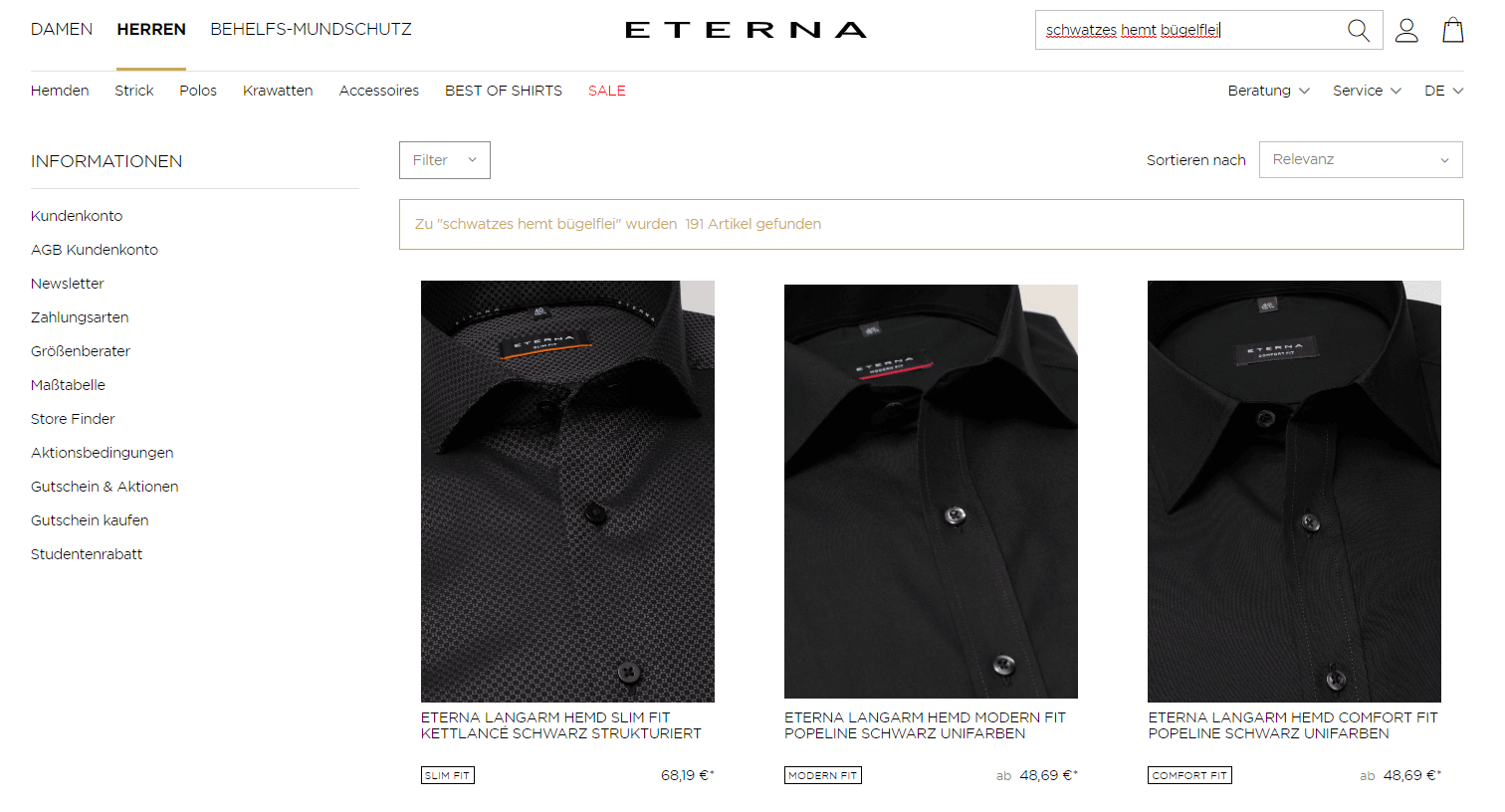
Example of error tolerance in the onsite search function of the ETERNA online shop (source: screenshot from eterna.de)
When customers search for a specific product, their search query may include various aspects that the product should have (e.g., black long-sleeved T-shirt). In this case,semantic searchensures that your onsite search also understands thecontext of a search queryinstead of just paying attention to the exact wording. Semantics thus enables search term combinations with properties.
Autocomplete generatessuitable suggestionsfor previously entered letter combinations as soon as the search term is entered directly below the search bar, making it a welcome aid for many online shoppers. This helps to avoid spelling mistakes and improves usability. By also displaying preview images directly, shop customers get a good idea of the products in the range and can navigate more quickly to the desired product detail page.
If a customer searches for water glasses in the Fackelmann online shop and starts typing the term into the search field, matching suggestions are displayed directly below the search bar. In addition to search suggestions, shop customers can also view products with preview images and additional information such as the respective price.
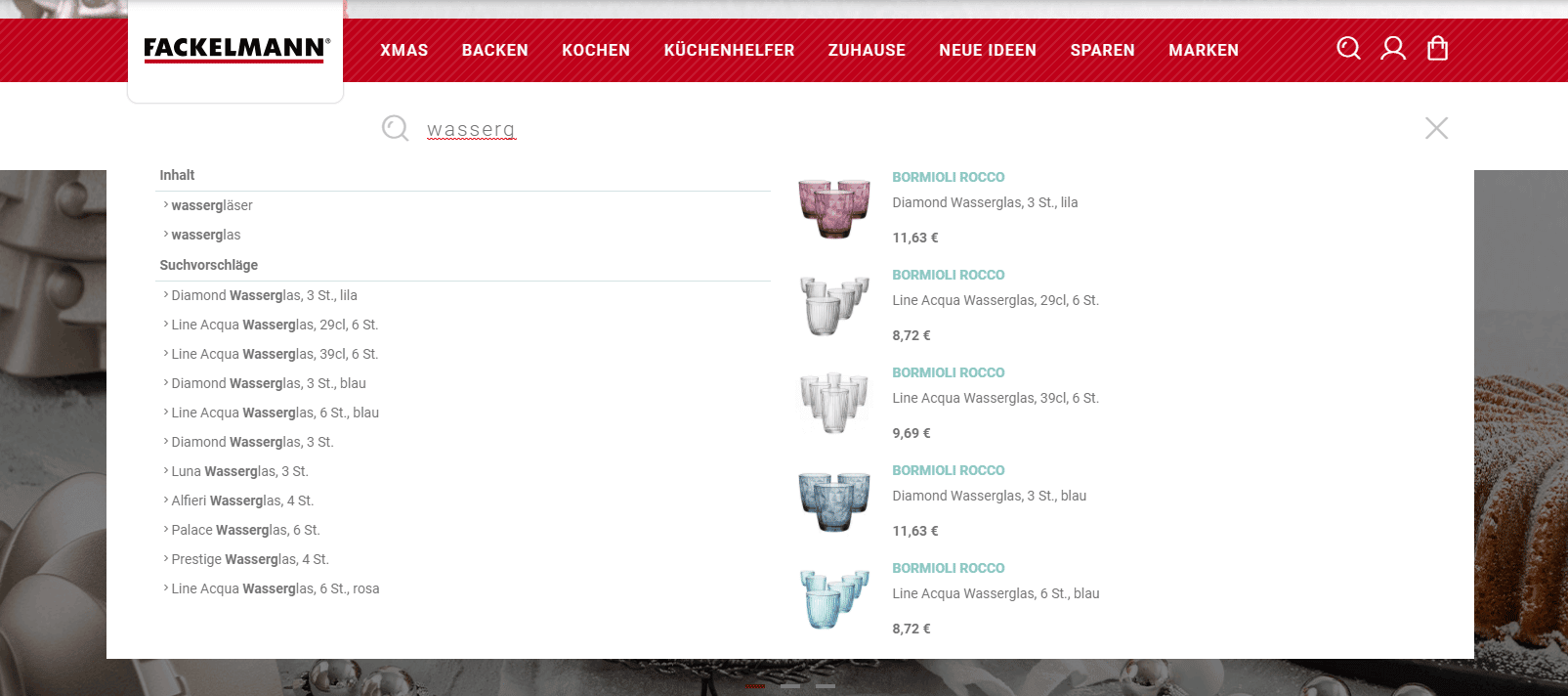
Example of the autosuggest function for onsite search in the Fackelmann online shop (source: screenshot from fackelmann.de)
Despite intelligent algorithms, it is sometimes desirable to make manual adjustments to search results, e.g., to support specific marketing campaigns. These can be implementedusing results management. For example, this allows you to change the order, weighting, and prioritization of certain products in the search results, or to remove them altogether.
Stay up to date on personalization: Sign up for the Epoq newsletter. Register now!
Not every user searches exclusively for products and categories in online shops. Instead, site search is often used to find useful content. There is also a function for this, called Link Finder, which can be used to easily find the imprint, terms and conditions, blog articles, etc. This can be particularly helpful in the B2B sector, where many products require explanation and further content is therefore welcome.
In the Villeroy & Boch online shop, customers can find numerous products as well as useful care instructions for various products.
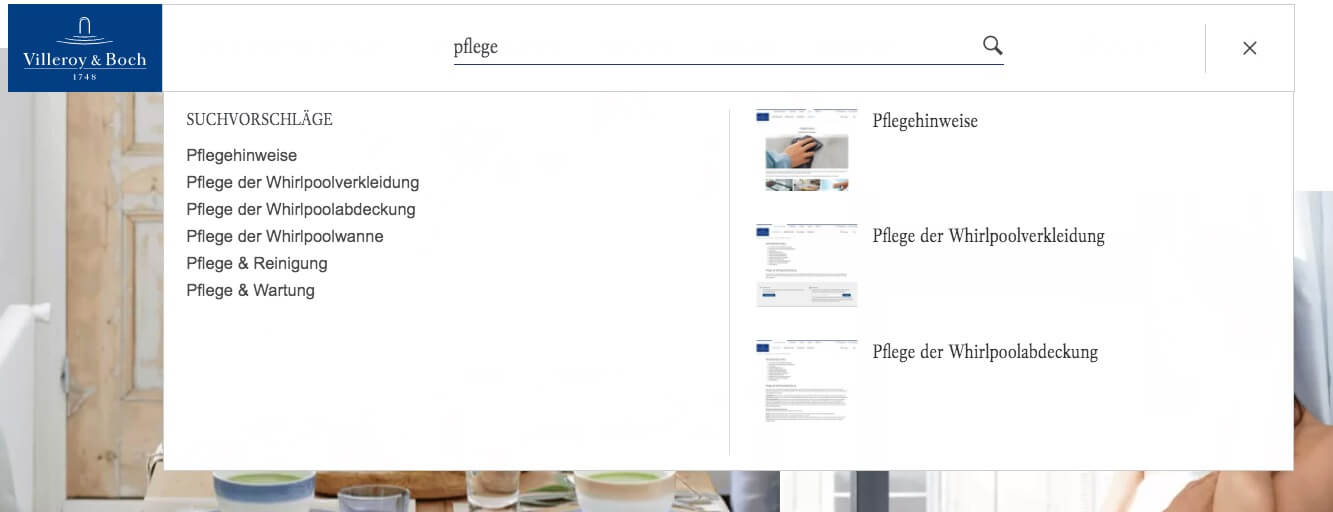
Example of finding content using the onsite search function in the Villeroy & Boch online shop (source: screenshot from villeroy-boch.de)
After Search Navigation includes the sorting and filter functions of the onsite search. Dynamic facet filters narrowdown the search results according to specific criteria. Examples of facet filters are filtering by color, size, and brand. Once the filter has been applied, only those products that match the selected characteristics are displayed.
The sorting function, on the other hand, only rearranges the search results according to specific criteria such as price, offer, and release date. Both functions give the searcher a quicker overview of the products that match their search query.
Shop customers browsing the A-Z Gartenhaus online shop can use various after-search navigation options for their product research. On the product overview pages, they will find a faceted navigation feature that allows them to narrow down products according to specific criteria with just a few clicks. Shop customers have access to many different filters, some of which are visual. Customers can also use the sorting function to reorder products (e.g., by popularity or rating).

Example of sorting and filter functions for onsite search in the online shop of A-Z Gartenhaus (source: screenshot from gartenhaus-gmbh.de)
Would you like to learn more about the ecommerce search engine function and see how it works in practice? Then take a look at our short explanatory video!
You are currently viewing a placeholder content from Default. To access the actual content, click the button below. Please note that doing so will share data with third-party providers.
More Information
In addition to all the features presented, it is important to customize the onsite search for your online shop. This is because every shop has different requirements based on its products, their descriptions, and its customers and their search behavior, which can be implemented through an intelligent onsite search.
A search function is a basic feature of your online store. However, there are significant differences between them. By using an optimized onsite search in your online store and providing the most important functions, you can quickly and easily guide your store customers to the product they want and thus to a purchase. An optimized onsite search not only ensures fast and accurate search results, but also improves the user experience. This results in lower bounce rates and ultimately more sales. You should not miss out on this potential.
Sources: ¹eCommerce Guide (2016), ² IONOS (2017), ³ eCommerce Guide (2016), ⁴ Internet World (2017), ⁵ eCommerce Guide (2016), ⁶Internet World (2017), ⁷ eCommerce Guide (2016), ⁸ eCommerce Guide (2016)
Studies show that up to 69% of all online shoppers use the search bar first—and immediately leave the site if they don’t find what they’re looking for there. A powerful search function increases conversion rates and customer satisfaction; a poor search function directly costs revenue. (Source: Baymard Institute, 2024)
The most common problems are: lack of tolerance for typos, lack of synonym recognition, no natural language processing, insufficient filtering options, and a lack of personalization in search results.
A keyword-based search matches search terms with product data; it works well with exact terms but reaches its limits with more complex search queries. An AI-based search understands intent and context and delivers relevant results even for incomplete queries.
Through personalization, search results are not only sorted by relevance to the search term but are also weighted based on the user’s individual behavior. A sports fan searching for “shoes” will see athletic shoes first, while a fashion enthusiast will see sneakers from their favorite fashion brand first.
Zero-result searches occur when a user enters a term for which the store returns no results—for example, due to typos, synonyms, or brand names. An AI-based search with error tolerance and a “Did you mean…?” feature significantly reduces this rate.
The most important metrics are: search entry rate, zero-hit rate, click-through rate on search results, and the conversion rate of search users compared to non-search users. The most common search queries that yield no results directly indicate which products or keywords are missing from the store. Often, the product is already in the catalog but isn’t displayed due to poor data quality—incomplete product attributes, typos in product names, or inadequate categorization are common causes. A regular audit of product data quality is therefore just as important as analyzing the search metrics themselves.
Learn how A-Z Gartenhaus was able to achieve a higher click-through rate on product overview pages thanks to the self-learning ranking of the ecommerce search engine function.
Request the case study now!

You are currently viewing placeholder content from HubSpot Embedded Content. To access the actual content, click the button below. Please note that doing so will result in data being shared with third-party providers.
More InformationYou are currently viewing placeholder content from HubSpot. To access the actual content, click the button below. Please note that doing so will result in data being shared with third-party providers.
More InformationYou are currently viewing placeholder content from HubSpot Meetings. To access the actual content, click the button below. Please note that doing so will result in data being shared with third-party providers.
More Information