
5.04% increase in sales per session thanks to new personalization strategy at Outletcity Metzingen
Outletcity Metzingen puts its personalization strategy to the test and increases revenue per session by 5.04%.

By optimizing your shopping cart, you can ensure customer satisfaction and increased sales. There are strategies you can use to simplify the checkout process, increase the value of the shopping cart, and prevent cart abandonment. We have summarized the strategies you can use for this in our blog article.

Here's what you can expect to find in this blog article:
Why shopping cart optimization is particularly important
Strategies for simplifying the checkout process
Strategies for increasing shopping cart value
Strategies for preventing shopping cart abandonment
Shopping cart optimization is an important part of shop management. When an online shopper adds products to their shopping cart, the purchase is not far off, and neither is the desired revenue. However, a lot can still go wrong with the shopping cart if it is not optimally designed from the customer's point of view.
According to a 2016 study by Händlerbund, 88% of respondents have abandoned an online purchase at least once. There are many reasons for this, such as:
As a shop operator, you should therefore constantly check all activities relating to your shopping cart and optimize it. This ensures that the checkout process is simplified and the shopping cart value is increased. It also prevents abandoned purchases shortly before the goal is reached.
Stay up to date on personalization: Sign up for the Epoq newsletter. Register now!
Customers don't want to waste unnecessary time when shopping online and want to be able to keep an eye on the items in their shopping cart at all times. Find out exactly what you can do to achieve this below:
Your online shoppers want to be able to add items to their shopping cart quickly and easily from the product detail page. The same applies to other pages, such as the category page or the home page. To ensure that this works smoothly, it is a good idea to have a prominent shopping cart button on these pages as well. Of course, this only applies to products that online shoppers have purchased frequently, e.g., in an online grocery store. If you have already purchased a certain product (pasta, oil, pesto...) several times, you no longer need to look at the product detail page. The same applies to cosmetics (mascara, shampoo, toothpaste...) or pet supplies (dry food, litter, treats...). Shopping cart optimization therefore makes sense at this point and enables products to be added quickly.
The shopping cart icon in the top right corner of the online shop is familiar to every online shopper. It navigates your online shoppers to the checkout, but it can also be used to orientate them to the items in their shopping cart. For this purpose, the shopping cart icon can be enriched with the following information:
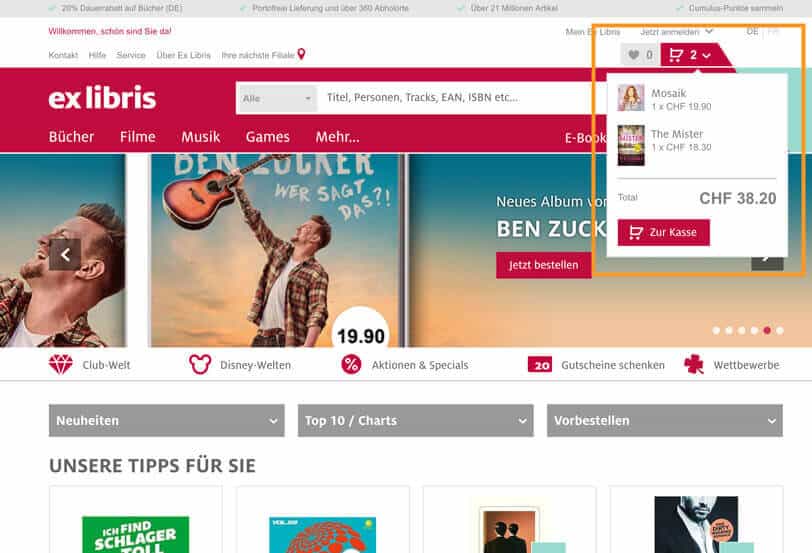
Shopping cart preview in the Ex Libris online shop (source: screenshot from exlibris.ch)
Online shoppers like to use the shopping cart as a wish list function if there is no separate wish list function or if this can only be used after registering. Nevertheless, it is important to have a separate wish list function. If online shoppers add products to their shopping cart but only want to buy some of them, the other products have to be deleted and may be lost as a result.
A separate wish list function allows you to optimize your shopping cart by saving products and simply moving them to the shopping cart when you want to buy them. A wish list can also be shared with other people, for example, to create a birthday wish list for the next children's birthday party, as is already possible on Amazon. The wish list function also makes sense for products that require more consultation and have a longer sales cycle, such as bathroom installations. The required products can be moved to the wish list until the necessary details have been clarified.
We are interested in hearing about your experience! Are there any other strategies you use to simplify the checkout process in your online store? Share your experiences with us in the comments section!
Product recommendations are an important tool for increasing the value of the shopping cart. They inspire your online shoppers with additional products.
Your shop system usually offers the option of displaying product recommendations. However, these recommendations are mostly based on top sellers or recently viewed products. If you want to go one step further, you can personalize the product recommendations and display them individually for each customer.
To do this, you use the click and purchase behavior of the respective customer and all online shoppers. This works via a recommendation system that is connected to a knowledge base and uses artificial intelligence methods. Customer responses to individual product recommendations are also transferred to the knowledge base, leading to optimization of product recommendations. This increases the relevance of the recommended products. Various strategies, such as upselling or cross-selling, can also be used as a basis for this.
Stay up to date on personalization: Sign up for the Epoq newsletter. Register now!
Product recommendations can be placed on various pages of the online shop. On the shopping cart page, for example, it is advisable to offer additional products that complement the original product or inexpensive cross-sell items that are often purchased together with it. Ankerkraut (known from "Höhle der Löwen") increased the shopping cart value in the shopping cart layer through the use of cross-selling recommendations. Try the Cart Layer Widget in the shopping cart layer and increase your shopping cart value.
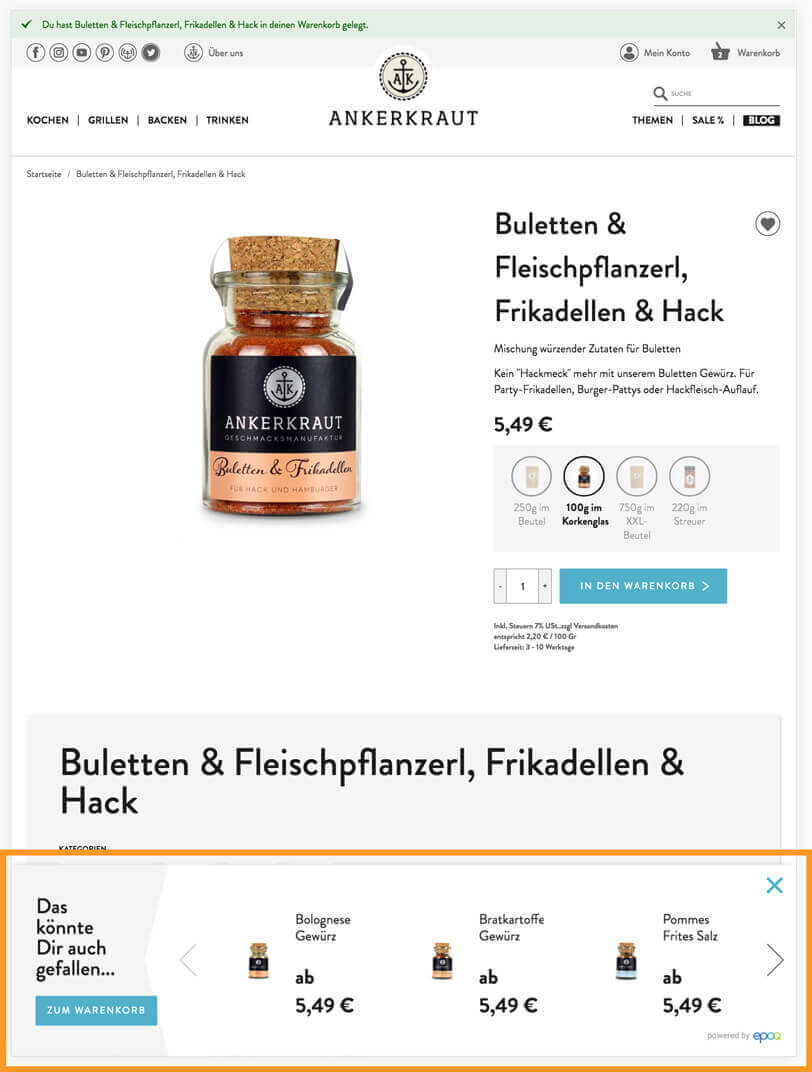
Cart layer widget with product recommendations at Ankerkraut in the shopping cart layer (source: screenshot from ankerkraut.de)
In addition, product recommendations can be displayed on the home page, product detail page, category page, content page, wish list, blog articles, etc. What they all have in common is that they inspire your online shoppers and thus increase shopping cart value and sales.
Would you like to learn more about where you can use product recommendations and what you need to consider depending on their placement? Then read our blog article Inspiration made easy: How to use product recommendations effectively in e-commerce.
How about you? What strategies do you use to increase shopping cart value? Feel free to share them with us!
The shopping cart is considered the last mile in the ordering process. Every customer lost here is painful and will ultimately have an impact on sales. It is therefore very important to optimize the shopping cart at this point and convince potential customers shortly before they complete their purchase that they can complete their purchase in your online store. You should therefore pay attention to the following elements:
If you would like more information about the checkout process, we recommend reading our blog article Discover revenue potential in your checkout process.
There is no way around shopping cart optimization if you want to simplify the checkout process, optimize the increase in shopping cart value, and at the same time avoid shopping cart abandonment. You can use various strategies to do this, such as upgrading your shopping cart icon, integrating product recommendations, and preventing shopping cart abandonment by using elements that influence purchasing decisions. That's why you should keep working on shopping cart optimization at regular intervals.
5.04% increase in sales per session: Outletcity Metzingen put its personalization strategy to the test.
Request the case study now!

You are currently viewing placeholder content from HubSpot Embedded Content. To access the actual content, click the button below. Please note that doing so will result in data being shared with third-party providers.
More InformationYou are currently viewing placeholder content from HubSpot. To access the actual content, click the button below. Please note that doing so will result in data being shared with third-party providers.
More InformationYou are currently viewing placeholder content from HubSpot Meetings. To access the actual content, click the button below. Please note that doing so will result in data being shared with third-party providers.
More Information