
- Control Desk
- Increase Conversion Rate
4 control desk tips for higher Christmas sales in e-commerce
Christmas sales account for up to 27% of annual revenue¹. This means that over a quarter of total annual revenue can be generated within a period of around two months. It is therefore important to be prepared for the season. Want to know how? We present four tips for successful Christmas sales and how you can implement them in Control Desk.

Here's what you can expect to find in this blog article:
Tip 1: Use your onsite search to promote sales
Tip 2: Feature discounted items in your recommendations
Tip 3: Offer a gift finder
Tip 4: Draw attention to your Christmas promotion with email campaigns
Our conclusion: More Christmas sales in no time at all
Tip 1: Use your onsite search to promote sales
There are a variety of promotions and marketing campaigns around Christmas. Whether
- Discounts on various products,
- free shipping,
- free gift wrapping or simply the
- Reference to the sale of gift vouchers.
There is almost always something being advertised. That's why you should also display Christmas merchandising campaigns via onsite search. This turns it into a sales promotion tool and helps you sell in a targeted manner. This measure is also known assearchandising.
Stay up to date on personalization: Sign up for the Epoq newsletter. Register now!
Implementation in the Control Desk:
You can easily set up searchandising campaigns for Epoq Search in the Control Desk under “Search.” Here, you can customize the results list for specific search terms, upload banners for your holiday promotion, and make landing pages discoverable via your search function.
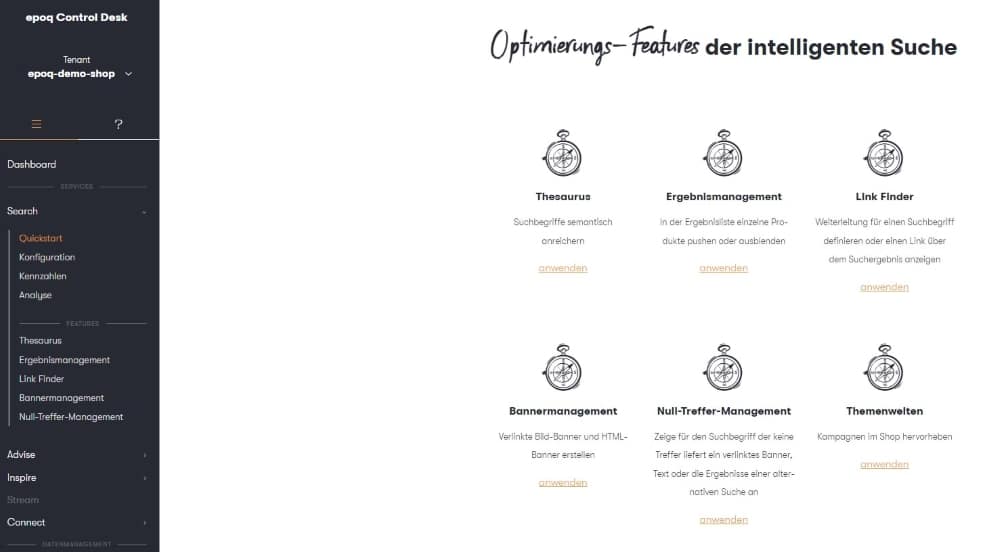
Features in Epoq Control Desk for Searchandising
Here are some features you can set up via Search in Control Desk:
Result management: This feature is designed to prioritize or hide certain products in the results list. To do this, simply enter the relevant search term and use drag & drop to prioritize or hide the desired items. You can find more detailed instructions in our blog article: Result management: How you can now optimize your results even more precisely.
Note: More exciting features are coming before the end of the year, so stay tuned. We will let you know as soon as the features are available.
Banner management: Banners are a popular marketing tool in e-commerce for visually promoting campaigns. Banners are usually integrated on the home page, category page, or product detail page, but can also be displayed on search results pages. For a Christmas campaign, e.g., "20% discount on handbags," it makes sense to display a banner with this information when searching for handbags and related search terms. To do this, simply enter the relevant search terms and the banner URL in the Banner Management section and the banner will appear when the search query is entered. You can find more information on banner management in our blog article: Banner management for promoting campaigns.
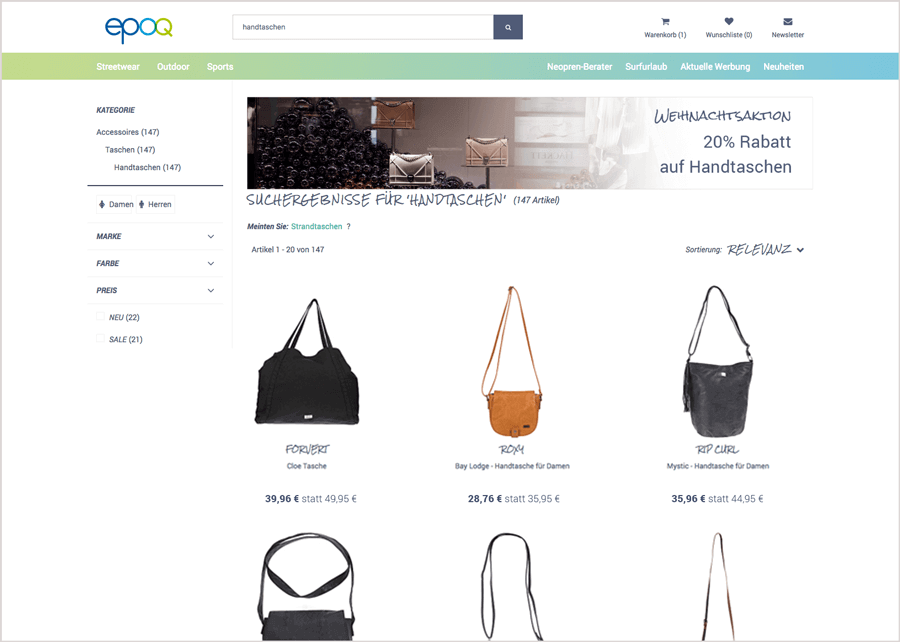
Results list with integrated banner for the Christmas campaign for the search term "handbags"
You also have the option of integrating banners via your autosuggest preview window to draw attention to your Christmas promotion. To do this, select the Autosuggest field in the Banner Management section when creating an entry. If you would like more information about autosuggest, take a look at our blog article: Why autosuggest is an important part of ecommerce search engine.
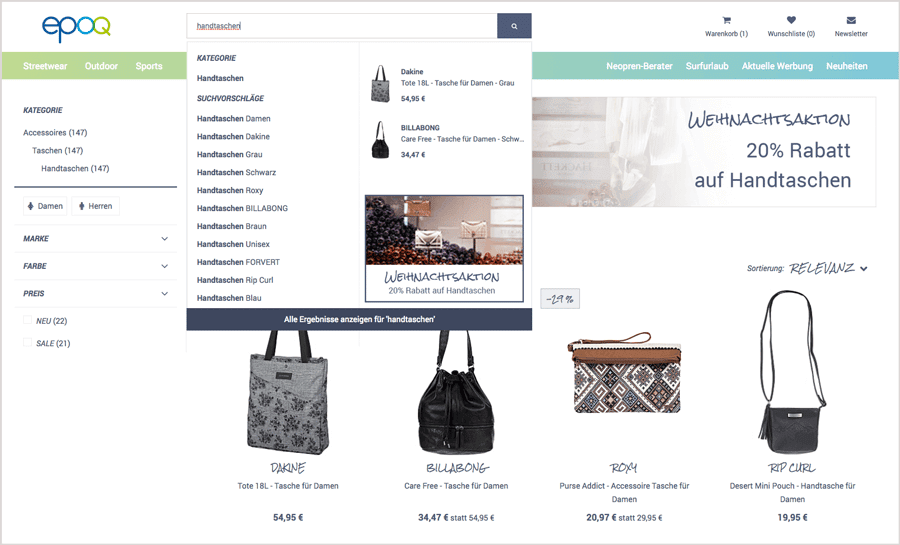
Autosuggest for the search term "handbags" with integrated banner
Link Finder: The Link Finder is designed to find content pages such as delivery terms, FAQs, terms and conditions, etc. All you need is the link to the relevant content. For your Christmas campaign, you can create a landing page and store the corresponding search term. You can also choose whether your online shoppers should be redirected directly to the corresponding landing page when they enter the search term (direct link) or whether the entry should appear as a note in the results list (promoted link).
Have you already set up searchandising measures for Epoq Search? Which of the features described have you implemented in your online store? We’d love to hear about your experiences!
Tip 2: Feature discounted items in your recommendations
In addition to onsite search, it also makes sense to promote your Christmas campaign via recommendations in your online store. The product detail page is ideal for this. You can place your Christmas banner in a suitable location and display the discounted items next to it in the form of cross-sell recommendations . In our example, these are the handbags. You should integrate the recommendation widget as a tile, as a flexible layout is required for a mix of banners and recommendations. For more information on the various recommendation widgets, see our blog article: Recommendation Widget: Variants and Implementation.
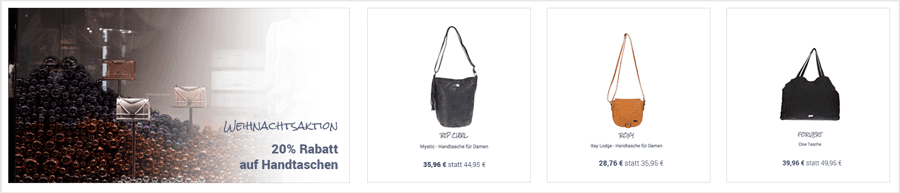
Example Christmas banner with recommendations
To display the discounted handbags in the recommendations, you no longer need to mark the corresponding products in your product catalog for the Christmas promotion. It's much easier than that. You can do it using the Theme Worlds feature in the Control Desk.
Implementation in Epoq Control Desk:
With the Theme Worlds feature, you can implement your Christmas campaign via your recommendations. Simply create a theme world, select the appropriate recommendation widget for the product detail page, and then specify the products based on the following criteria:
- gender
- brand
- Product ID
- Category
- Color and
- Extras (New products, sale items, etc.)
For our example with the handbags, the categoryandproduct ID are relevant. In addition to the product detail page, it is also possible to create theme worlds for other shop pages, such as the home page. More detailed information on the theme worlds feature can be found in our blog article: Recommendation Management Part 3: Theme worlds.
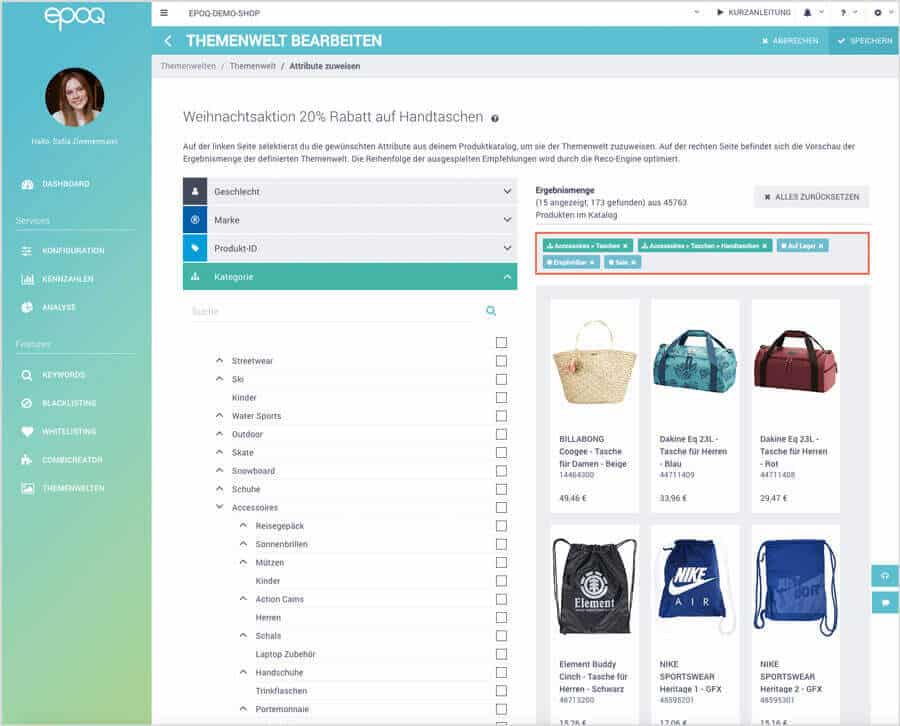
Theme Editor in Epoq Control Desk
Tip 3: Offer a gift finder
If you always knew exactly what you wanted to give someone, no one would feel stressed at Christmas. But since we ask ourselves every year what we could give our relatives and friends, the whole gift-hunting process can be quite exhausting. To prevent this, you can offer a gift finder in your online shop that makes it easy for your online shoppers to find the right gifts.
Implementation with Epoq Advise
Epoq Advise is a digital product advisor that works exceptionally well as a gift finder. This is because it brings the in-store sales consultant’s advisory process into the online store. It does this by asking the online shopper questions, such as about the recipient, their personality, the desired price range, and so on.
This provides the gift finder with important information that helps it determine the right gift for the recipient. Products from the range that match the answers are then recommended. Each additional click by the online shopper on further answers optimizes the result, as more and more information becomes available. A clear explanation for each product in the results list explains how well the gift matches the recipient's wishes.
Of course, integrating a gift finder like this requires some lead time to select the right questions and adapt the tool to your online store. But once it's integrated, it will quickly and easily help your online shoppers find the perfect gift. If you'd like to learn more about implementation, we recommend reading our blog article: Online product advisor: Help your customers choose the right product.

Example view of a gift advisor
Tip 4: Use email campaigns to draw attention to your Christmas promotion
Once you've implemented the three tips above, your preparations for the Christmas season will already be in full swing. Nevertheless, you shouldn't forget to notify your online shoppers about your Christmas promotion via email. This will encourage your customers to return to your online shop and motivate them to make a purchase.
An email campaign is particularly well suited for drawing attention to promotions in your online shop and strengthening customer loyalty. By subscribing to your newsletter, your customers have already established a connection with you and want to receive messages from you.
In your email campaign, you can integrate your Christmas banner as you would on the product detail page and display the appropriate product recommendations for the Christmas promotion via an additional theme world in the Control Desk.
Stay up to date on personalization: Sign up for the Epoq newsletter. Register now!
Implementation in Epoq Control Desk:
To integrate the discounted handbags into your email campaign, use the Theme Worlds feature again. To do this, simply select the corresponding email widget instead of the onsite widget.
You can insert the banner into your email template via your email delivery system. This way, your Christmas campaign will be visible not only in your online shop, but also via email. You can also promote the gift finder via email.
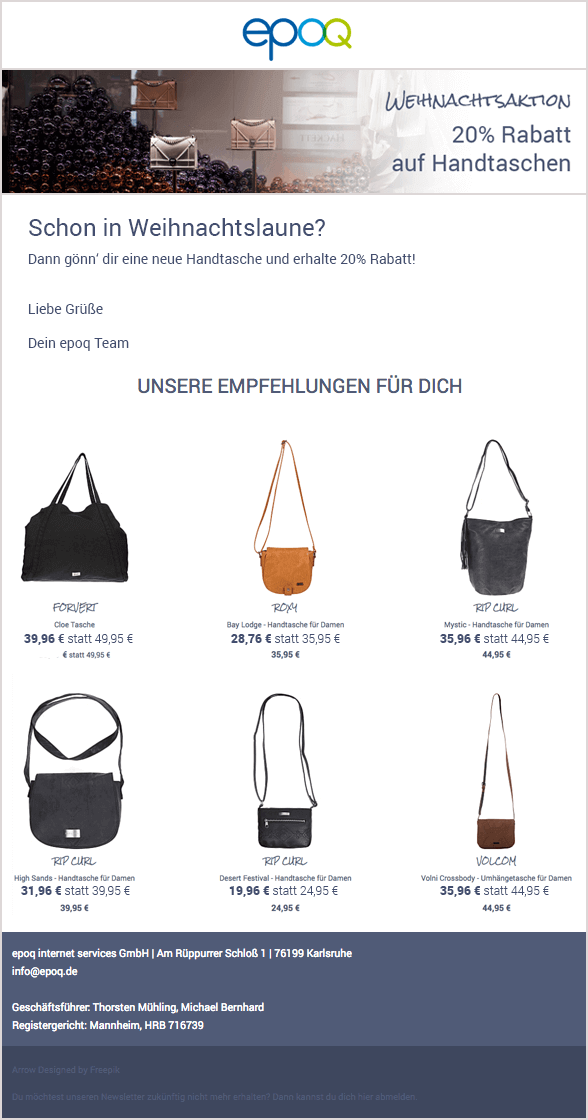
Sample email for promoting the Christmas campaign
Our conclusion: More Christmas sales in no time at all
To increase Christmas sales, the Control Desk offers you various options for promoting your Christmas campaigns. You can use search merchandising, create themed worlds for your recommendations, integrate a gift finder, and draw your customers' attention to your Christmas campaign via email campaigns. After all, during the Christmas season, your online shoppers need more guidance, advice, and inspiration than ever before. You can also strengthen your connection with them.
Source: ¹ Statista
Log in to yourControl Desknow and start your Christmas preparations. Don't have Control Desk access yet? You can apply for an account here »Apply for a Control Desk account

Daniela Ilincic
Head of MarketingYou are currently viewing placeholder content from HubSpot Embedded Content. To access the actual content, click the button below. Please note that doing so will result in data being shared with third-party providers.
More InformationYou are currently viewing placeholder content from HubSpot. To access the actual content, click the button below. Please note that doing so will result in data being shared with third-party providers.
More InformationYou are currently viewing placeholder content from HubSpot Meetings. To access the actual content, click the button below. Please note that doing so will result in data being shared with third-party providers.
More Information