
Success factor product data: How inadequate product data affects the performance of online shops
The product data of an online shop is the foundation for selling products. You can find out what sources of error you need to watch out for on page 62.

Product data is important—there's no question about that. Among other things, it forms the basis for successful personalization. But how should the product data feed be prepared so that it can be used optimally for personalization? We would like to explore this question in more detail below. We will also show you how you can use an enriched product catalog and what advantages you can benefit from in order to get the most out of your online shop.

Here's what you can expect to find in this blog article:
Preparation of the product data feed
Identifying attributes
Extracting properties
Combine properties
Using the optimized product data feed
Optimize search function and suggestions in autosuggest
Optimize search results page / category page
Optimize product detail page
Optimize product advisor
Conclusion: Preparing the product data feed as the key to success
In order to prepare the product catalog, it must first be available in a suitable format and include all important fields. This includes basic data such as the name, description, and price of the product, the appropriate category, and other attributes such as shape, color, or size. In order to transfer the products to a software service provider, for example, a product export is usually performed. This means that all information about the products is written to a CSV or XML file.
Would you like to learn more about the basics and find out which important fields you should include in your product data feed? Then read our blog article Product data – sales booster for your online shop.
Stay up to date on personalization: Sign up for the Epoq newsletter. Register now!
Once you have the basics right, you can start preparing your product data feed and enriching it with important attributes. We will now show you where to find additional attributes.
Let's first take a look at the product detail page. If you look closely, it quickly becomes clear that there is often untapped potential in the product description of an item. This is because interesting attributes are often hidden in the body text. It is therefore worth taking a closer look at the product description. You should ask yourself the following question: What information is relevant but not yet included in the feed?
In the example of the Tamaris pumps shown, characteristics such as "metallic look," "straps," or "glitter" would be relevant additional information that should be maintained as attributes in the product data feed.
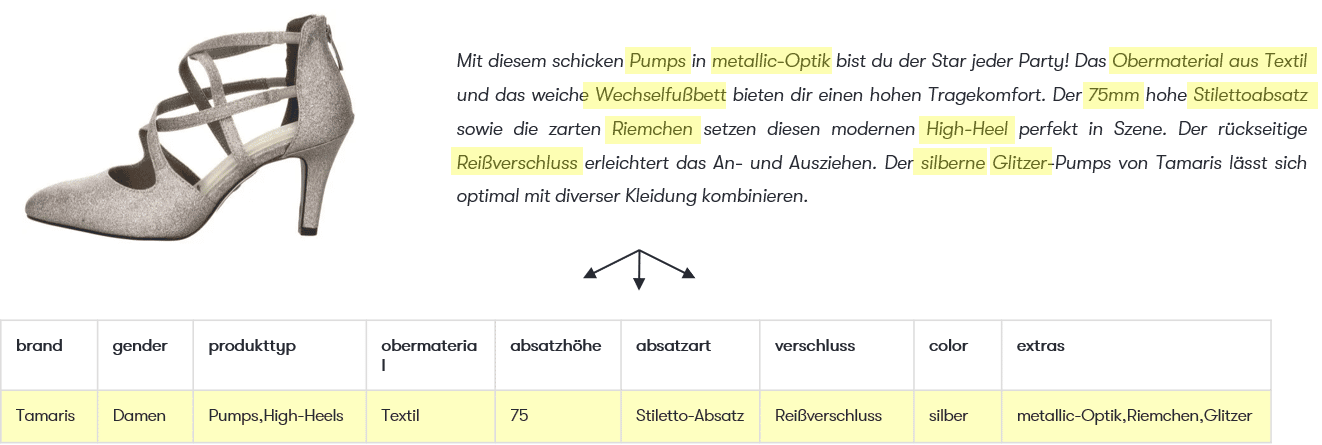
Example of additional attributes identified from the product description (source: screenshot from salamander.de)
Even outside the fashion sector, interesting characteristics are often hidden in the text, such as specific ingredients, skin type, or the "vegan" characteristic of the organic cream shown.
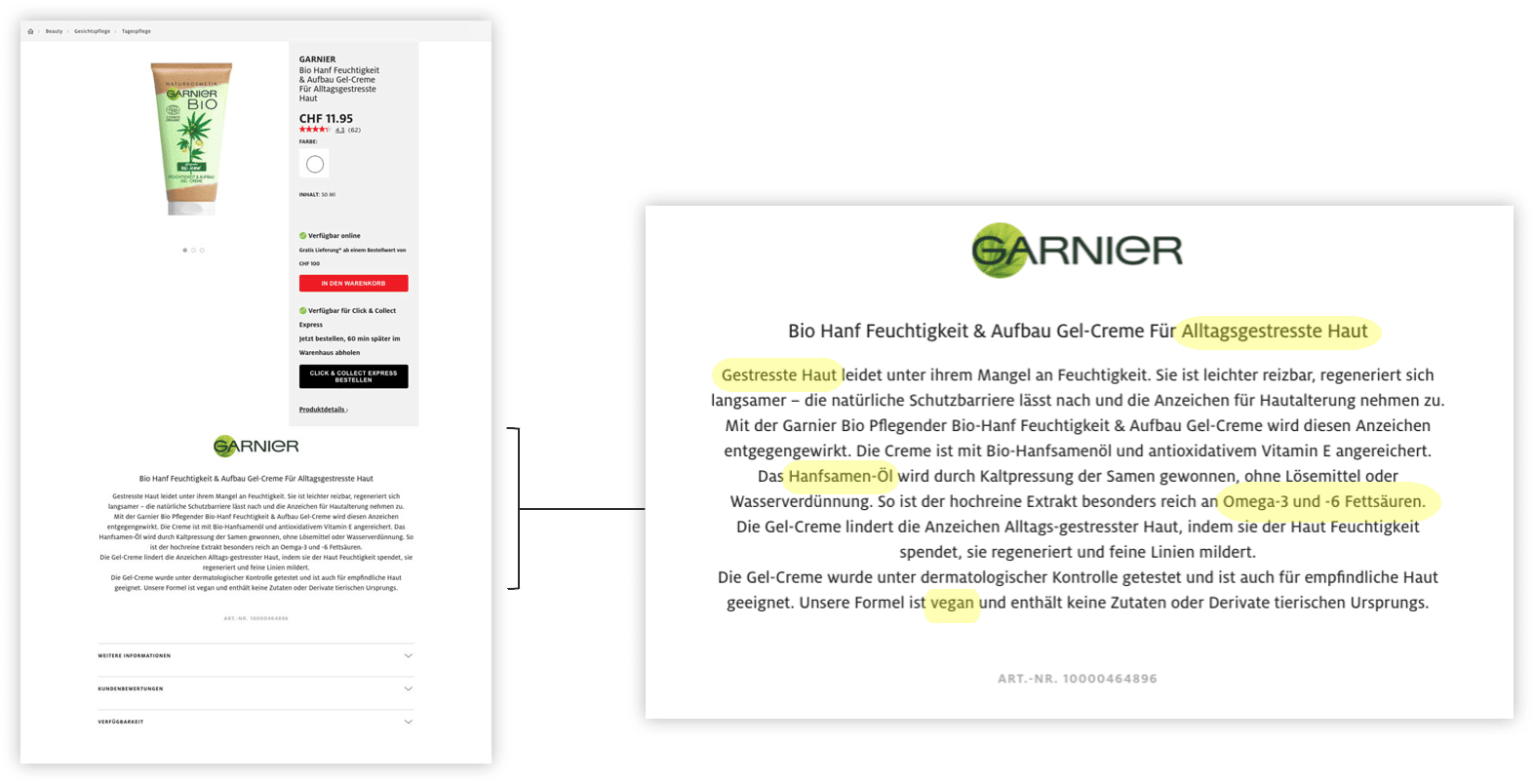
Example of a product description with additional interesting attributes for an organic cream (source: screenshot from manor.ch)
"The product description is a good, if not the most important, basis for finding out what else I would like to use."
Stephanie Obergfell | Frontend Developer at Epoq
To get the desired properties into the feed, you can ideally maintain them yourself and add them to your product catalog. However, you can also use external tools and services for this purpose. These tools extract values from existing texts such as product descriptions or crawl the page. It is also possible to assign specific tasks to service providers (clickworkers) and instruct them to review and classify the products according to specific criteria.
Algorithms that scan images to extract colors or patterns are yet another way to read attributes that can be included in the product data feed.
To enrich the product data feed with additional new attributes, you can also merge or combine properties. This allows you to create themes or artificial categories.
Example: The attributes "New Products," "Business," "Blouses," and "Shirts" can be combined into a new artificial category with the theme "Stylish Back to the Office."
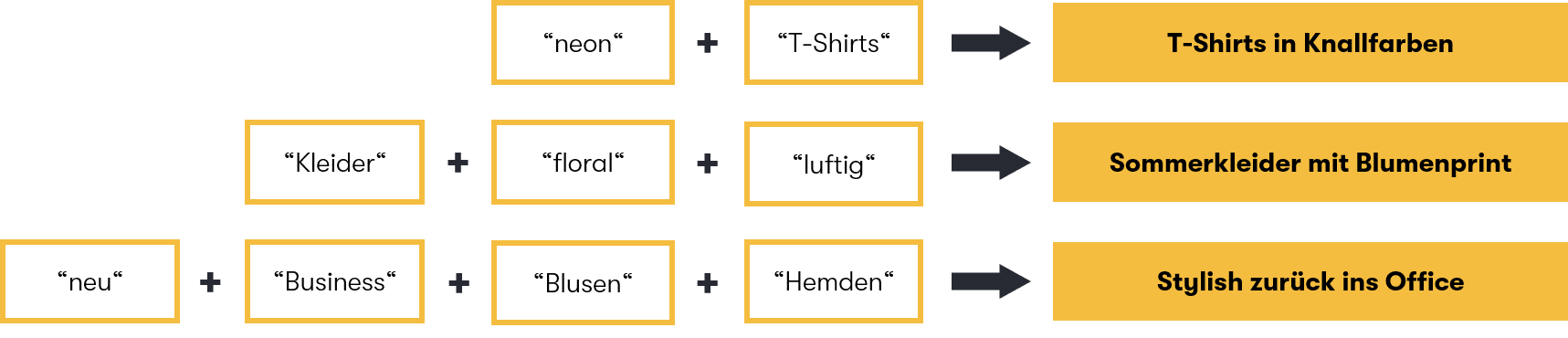
Various possible artificial categories as examples (source: own representation)
You can use this approach to create theme pages in your shop. The advantage is that you no longer have to select all the products for your artificial category individually, but can select them directly based on their characteristics. This offers the additional advantage that new items in your range that meet the selected criteria are automatically placed in your artificial category.
Now you have seen where relevant information is hidden and how you can extract it and use it to enrich your product catalog. But why go to all this trouble? What can you achieve with additional properties, and what are the benefits?
Additional attributes are helpful for the autosuggest function of the search, among other things. This is because the search should ensure a quick start to the shopping process . If the product data is maintained accordingly, a shop customer can also search for the desired properties (such as "dry skin" in the following example). In addition to product suggestions, customers can also find the characteristic "dry skin" directly in the search suggestions in Autosuggest. This gives them a faster start without having to commit to a product right away.
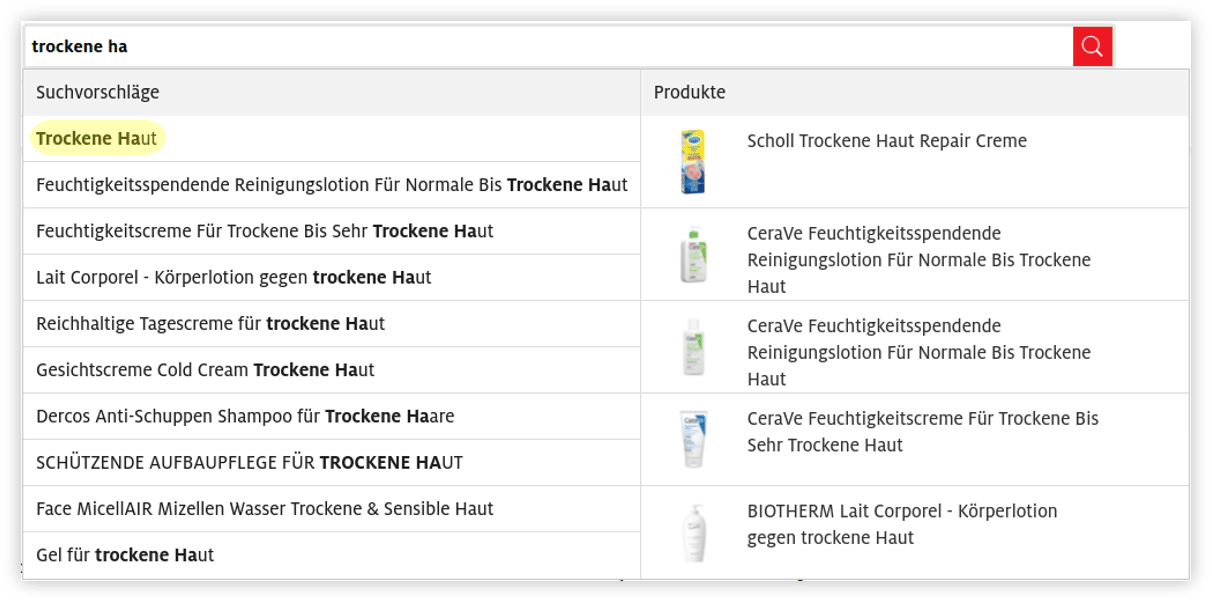
Example of an autosuggest function with various search and product suggestions (source: screenshot from manor.ch)
Thanks to well-maintained product data, Autosuggest also allows for combinations such as "products for dry skin Nivea" or "products for dry skin body lotion."
Search results pages or category pages can also be optimized using a prepared product data feed by offering your shop customers appropriate filters. These filters can be displayed both above the results list and directly on the product page.
On search results or category pages, customers are initially shown products that match their search query or category. To make it easier for online shoppers to select their desired product, you have the option of highlighting certain characteristics above the results list. Here, you can offer skin type as an explicit filter, for example. Shop customers can select this directly without having to scroll down or expand specific filters.
Additional filters can be displayed to match the results displayed (e.g., "dry skin," "anti-aging," etc.). Ingredients or properties such as "vegan" would be further possible filter values that could be specified here. It is important that the filters adapt depending on what the customer is currently viewing.
By prominently placing attributes as filters on the category page, you make it easier for your customers to make their selection.
If you would like to learn more about filter options and are interested in faceted search, please read the blog article Filter search results in a targeted and flexible way: What you need to consider when creating your faceted search.
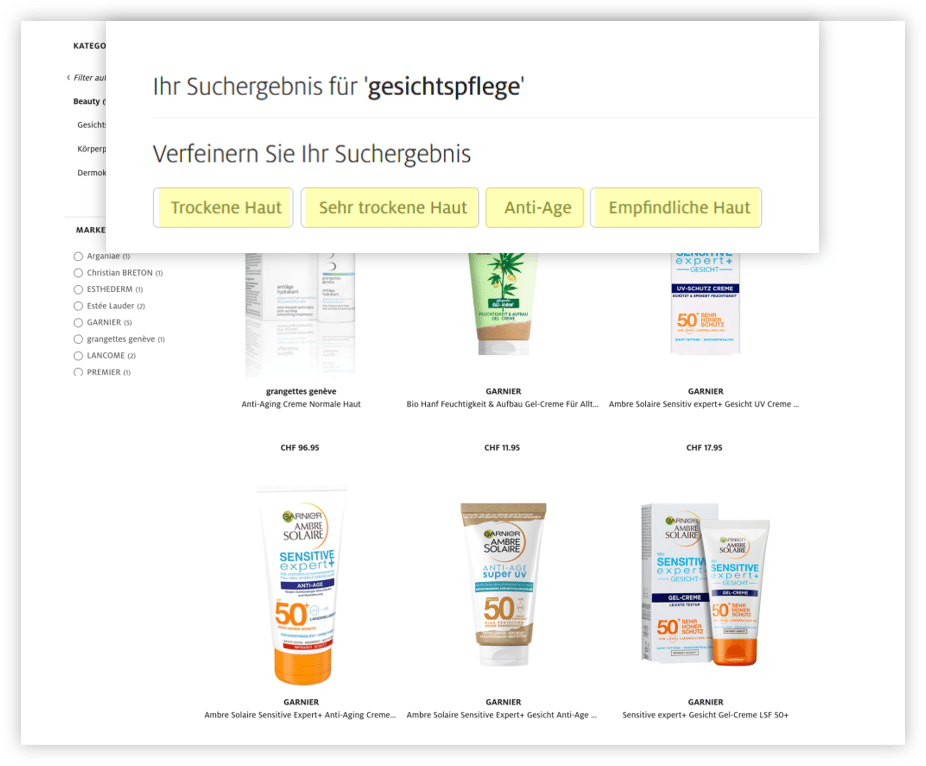
Filter options on the category page above the results list (Source: Screenshot from manor.ch)
While there is already a context product on the product detail page (the product being viewed), there are many different products to choose from on a category or search results page. As a shop operator, it is therefore difficult to immediately identify which of the products displayed the customer is interested in. The shop customer can express interest in a product by clicking on a specific product and going to the product detail page. At that moment, the clicked product becomes the new context product.
Another option is to place attributes as filters on an item so that shop customers can indicate what they like directly on the product page. Clicking on a product alone reveals potential interest in a particular item, but it does not immediately reveal what exactly the customer likes about it. Is it the brand, the color, or perhaps the cut of a dress?
If you, as a shop operator, indicate the characteristics of a product directly on the product page, you can let the user decide and choose what they like about that particular item, such as the cap sleeves.
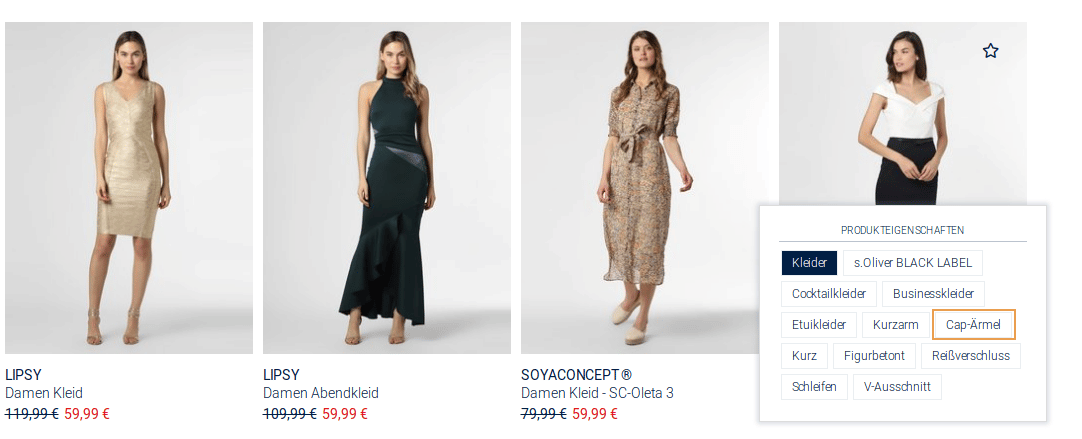
Filter options directly on the product (Source: Screenshot from peek-und-cloppenburg.de)
When a customer selects a preferred feature, the listing adjusts accordingly and the customer sees other matching items (in our example, these would be dresses with cap sleeves).
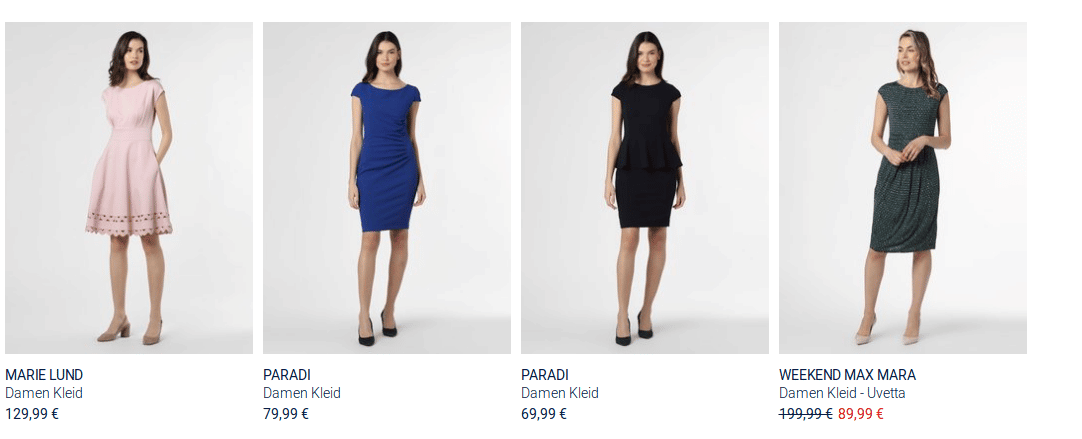
Products matching the selected feature (dresses with cap sleeves) (Source: Screenshot from peek-und-cloppenburg.de)
Shop operators benefit from a well-prepared product data feed not only in terms of search and search results. A well-maintained product data feed also brings considerable advantages for the product detail page.
Stay up to date on personalization: Sign up for the Epoq newsletter. Register now!
The product detail page often features recommendations for alternative items that are similar to the product being viewed. Similarities can be determined based on various characteristics, such as the category or color of the product. This means that the properties maintained in the product feed can be used to display suitable product recommendations. This is also clear in the following example of Tamaris pumps. Here, it can be seen that some properties that were enriched as described above (such as "straps," "heel height," or "glitter") were taken into account for the alternative recommendations.
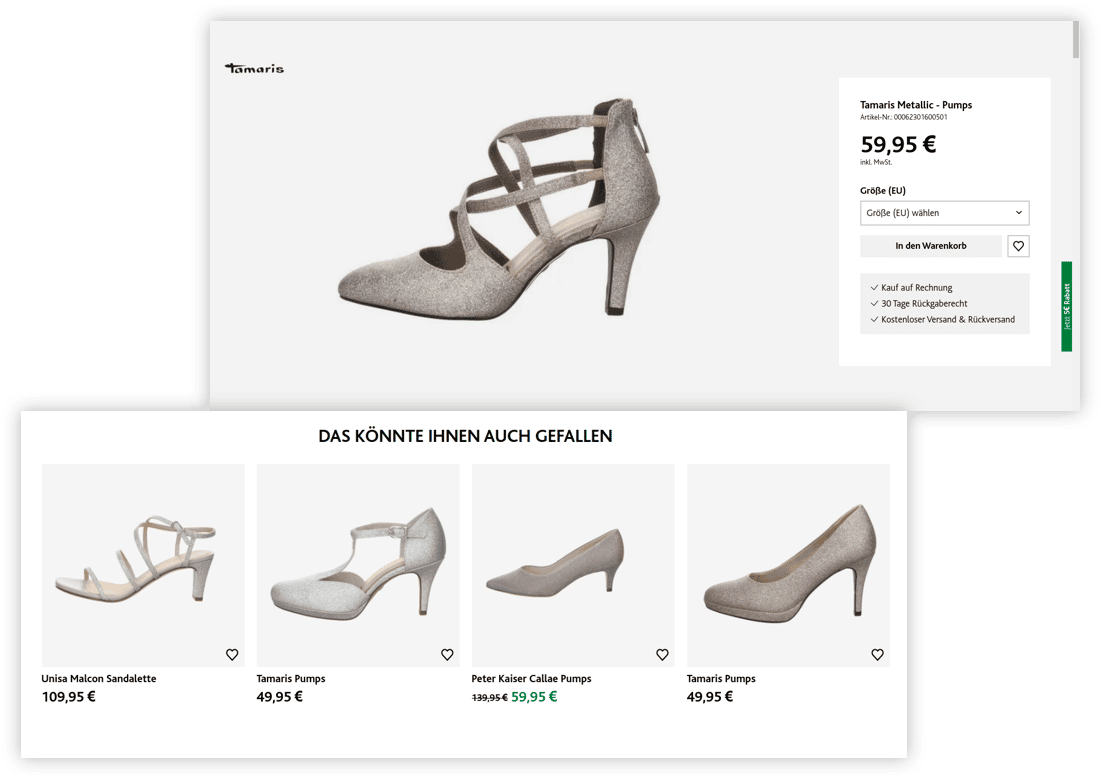
Example of alternative recommendations on a product detail page (source: screenshot from salamander.de)
The attributes also play a central role for additional items, such as bags that match a pair of shoes that have been viewed. The more attributes are available, the better the recommendations will be. This means that they play an important role in personalization. If it is recognized during a session that a shop visitor is interested in a particular style (e.g., western/biker), this can be taken into account when displaying recommended additional items thanks to the available attributes.
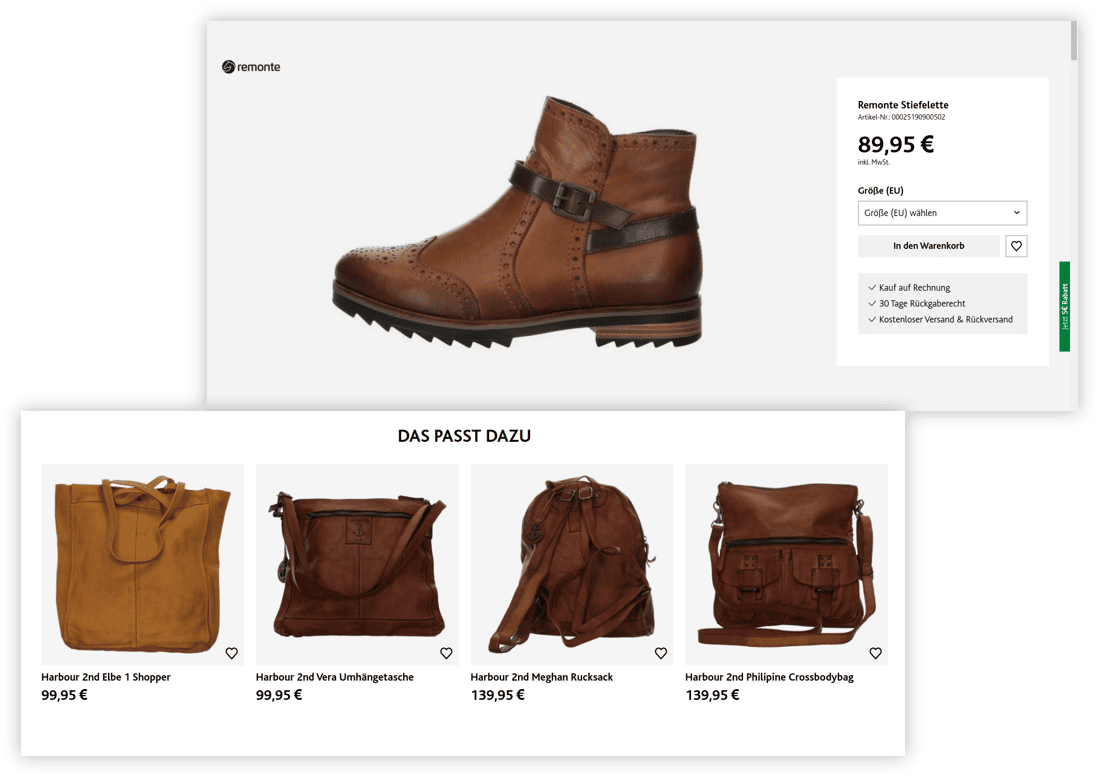
Example of recommendations in the form of additional items on a product detail page (source: screenshot from salamander.de)
Another touchpoint where a well-prepared product data feed can benefit you is a product advisor. If you sell products that require a lot of advice in your online shop, it is worth using an online product advisor. To do this, you first need to come up with an advisory concept and then determine which attributes you need. You can then check whether all the necessary attributes are already available or whether you need to enrich the product catalog.
The situation is somewhat different for self-explanatory products such as books or films. Here, there is no concept that defines how the shop customer is guided step by step through the consultation process. Instead, it makes sense to offer the customer as many characteristics as possible in the form of "tags" so that they can click through the product range themselves and navigate based on the desired characteristics.
Would you like to learn more about context-based consulting? Then take a look at our blog article Guided Selling UX: How context-based consulting works.
Example: Ex Libris offers customers advice on self-explanatory products in the form of a gift finder. If a customer clicks on the tag "For children," the products on the right-hand side and the other filter options are updated. Topics are displayed, as well as various tags, such as topics related to "For children" or children's series. If a customer selects "Soccer" and "The Three Investigators Kids," they will receive products that match the selected characteristics.
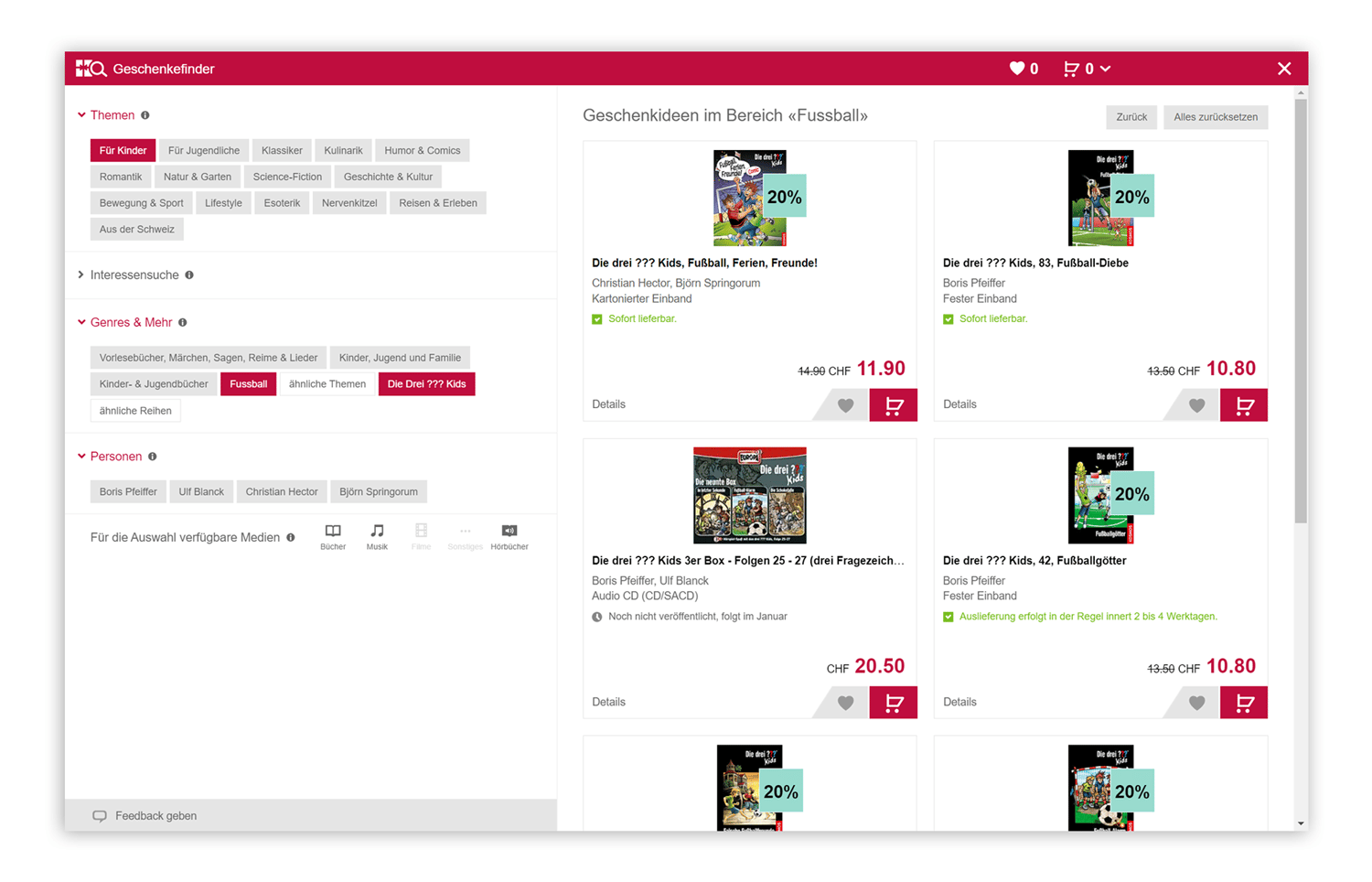
Gift finder in the Ex Libris online shop as an example of an online product advisor for self-explanatory products (source: screenshot from exlibris.ch)
Product data is important, there's no question about that. But it's only with the right care and preparation that your product data feed becomes a factor for success. A well-prepared product catalog offers many advantages, especially for personalization. Thanks to prepared data, you can quickly optimize the search function, search results or category pages, the product detail page, and the product advisor. Don't miss out on this potential!
Would you like to learn more about product data as a success factor?
Check out our publication on the topic!

You are currently viewing placeholder content from HubSpot Embedded Content. To access the actual content, click the button below. Please note that doing so will result in data being shared with third-party providers.
More InformationYou are currently viewing placeholder content from HubSpot. To access the actual content, click the button below. Please note that doing so will result in data being shared with third-party providers.
More InformationYou are currently viewing placeholder content from HubSpot Meetings. To access the actual content, click the button below. Please note that doing so will result in data being shared with third-party providers.
More Information