
- Increase Shopping Cart Value
The wish list in the online shop – everything you need to know about it
The wish list is a helpful feature for your online shoppers. It makes shopping easier for your customers and offers them a positive shopping experience. For this reason, many online shops have integrated this feature as standard. In this article, you will learn exactly how this feature can benefit you and how you can use the wish list to increase sales in your shop.

Here's what you can expect to find in this blog article:
What a typical example scenario might look like
What is the wish list and what exactly are its advantages?
Benefits of the wish list for your customers:
Benefits of the wish list for you as a shop operator:
How can you best design your wish list?
Positioning and functionality of the wish list:
Information that should be included in the memo pad:
Access options for the wish list:
The shopping cart as a substitute for a shopping list?
Other things you can do
Wish list
Price trends
Email personalization
Comparison option
What a typical example scenario might look like
Hannah is on the go, sitting on the train or at the bus stop, passing the time by browsing her favorite store. As she scrolls through the selection, a few products catch her eye that she really likes. However, since the internet is often not very fast when she's on the go and she prefers to do her shopping from the comfort of her own home anyway, she would like to save the products for later. She is therefore delighted when she discovers that the online shop offers a wish list feature. When she gets home, Hannah sits down comfortably at her laptop, opens the online shop's website again, and navigates to her personal wish list. She can now take her time to review all the products she has saved, carefully select what she wants to order, and finally complete her purchase.
Every day, many similar scenarios play out in which potential customers are about to make a purchase but cannot or do not want to complete it immediately. There can be many reasons for this: indecision, distraction, or technical problems, for example, can prevent a purchase from being made immediately.
And that's precisely why it makes sense from a shop operator's perspective to integrate a wish list function into their own online shop in order to make the shopping experience as positive as possible for customers and thus encourage them to make a purchase.
What is the memo pad and what exactly are its advantages?
The wish list feature in an online shop is a preliminary stage of the purchasing process. As in the example described above, online shoppers are often distracted before completing their purchase, or they do not complete the purchase immediately because they have not yet finished selecting products or searching for information and are therefore still undecided. The wish list is a kind of note for your customers to refer to later. However, the wish list can also be seen as an individual area for each customer in an online store. This is because only products personally selected by the online shopper are stored there. The wish list therefore contains a small selection of products from the entire range of an online store that correspond to the personal interests of a customer.
Stay up to date on personalization: Sign up for the Epoq newsletter. Register now!
In an online shop, the wish list is integrated into the respective product page via a call-to-action, e.g., in the form of a button labeled "Add to wish list." Many shop systems already offer the wish list function as standard.
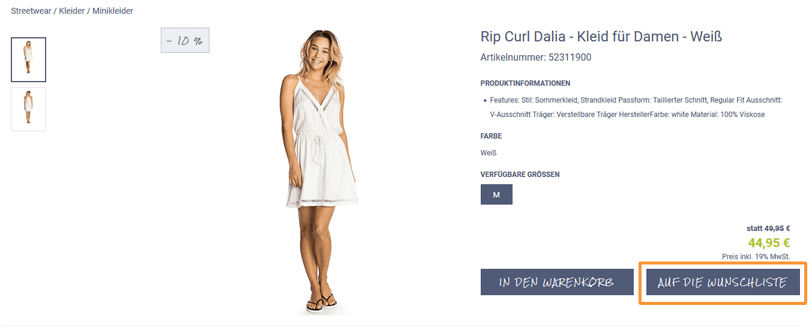
Example of a call-to-action button on a product detail page in the Epoq demo store, which customers can use to add a product to their wish list
Advantages of the wish list for your customers:
As you have already learned, a wish list feature is a great advantage for your customers. They can save products for later and enjoy a positive shopping experience, as they don't have to laboriously search for their favorite products again after leaving the store. The wish list enables quick preselection and later refinement, thereby increasing customer satisfaction. But you, as a shop operator, can also benefit from an integrated wish list.
Advantages of the wish list for you as a shop operator:
- A positive shopping experience for your customers also means that customers enjoy spending time in your store and make repeat purchases because they have had good experiences with the product selection and the ordering process.
- A wish list feature increases customer satisfaction, which in turn leads to more purchases.
- The online shop remains in your customers' minds thanks to items saved in the wish list section. This means that orders are only postponed and fewer purchases are abandoned. If you want to know what you can do if purchases are frequently abandoned in your online shop and how you can still increase your sales, read our article Increase sales with personalized shopping cart abandonment emails.
- You also have the option of using the wish list section in your online shop to show your customers relevant recommendations that match or complement the items stored in their wish list. This allows you to use the wish list directly as a sales booster.
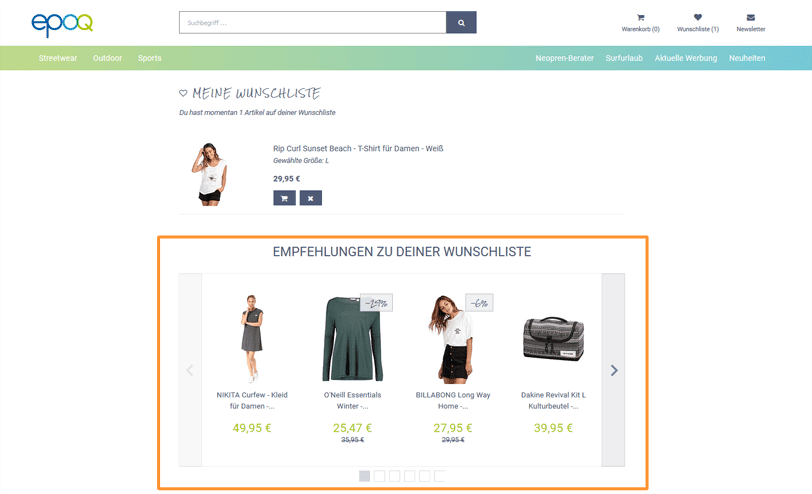
Example of personalized recommendations based on a customer's wish list in the Epoq demo store
How can you best design your memo pad?
There are numerous and varied design options for a wish list. Often, the saved items are displayed in a list view. However, there are also shops that display the selected products in a tile-like format, for example. In addition to the wide range of display and arrangement options for products in the wish list area, there are a few other points that will help you ensure that the wish list is actually used and offers your customers added value.
Positioning and functional scope of the memo pad:
- Position the wish list function prominently and clearly visible. The button is often positioned on the right-hand side of the page, near the shopping cart .
- Allow your customers to easily delete products that are no longer relevant to them. This gives your customers a clear overview of the products they are interested in at any time.
- Offer your customers the option to add an item to their wish list on both the product detail page and the product overview page. Especially when your customers are browsing your online store on a mobile device, they often limit themselves to the product overview page at first in order to make a preliminary selection, as clicking on each individual product is tedious and time-consuming.
- Allow your customers to move items from their wish list directly to their shopping cart. This saves your customers the intermediate step of going to the product detail page.
- In addition, a sorting function is recommended to provide customers with the best possible overview of the selected products.
- Make it clear which products your customer has already added to their wish list by highlighting them in color or labeling them with text such as "already saved."
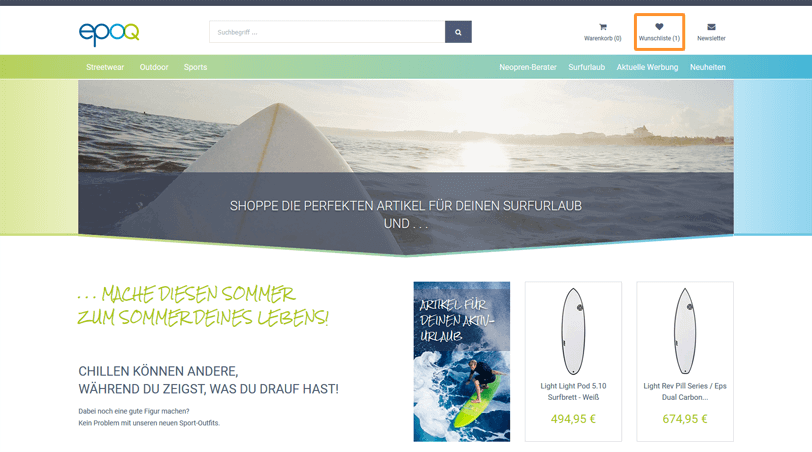
Example of how the wish list is positioned in the right-hand section of the Epoq demo store, near the shopping cart button
Information that should not be missing from the memo:
- Relevant product information about the saved items should be included, such as a descriptive headline.
- Options such as color, size, or quantity should be visible and changeable.
- The price should be clearly visible.
- The delivery status should be displayed.
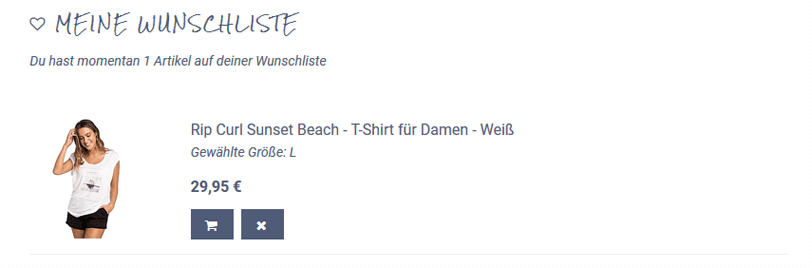
Example of a product in the wish list with relevant product information about the item, details of the selected size, color, and price
Access options for the memo pad:
You should also consider how your customers can access and save their personal wish lists. Do they need to be registered and logged in to your online shop, or is the wish list available without registration?
There are various implementation options for this point. Cookie-based solutions are available to every shop visitor. They are particularly advantageous for new customers, as they do not require immediate registration in the online shop. If the wish list function is only available to registered users, this has the advantage that the saved products can be viewed and edited on different devices.
Stay up to date on personalization: Sign up for the Epoq newsletter. Register now!
You can find interesting features for designing your wish list, such as creating several different wish lists or the option to move products around, as well as examples of online shops that have implemented this, at usabilityblog.de.
The shopping cart as a substitute for a shopping list?
If there is no wish list function, many shoppers often use the shopping cart as a place to find specific products. One problem that can arise when customers use the shopping cart for this purpose is that they have to delete all items they do not want to order directly from the shopping cart before completing their order. Depending on the situation, this means that these items disappear from the online shoppers' memory. As a result, your customers may forget products they wanted to remember for a later order, causing you to lose sales. In addition, customers become "shopping cart abandoners" even though they only wanted to save certain items for a later date. It is therefore important that you offer your customers a separate place to save products and do not simply let them use the shopping cart as a wish list.
The ultimate goal is always for the saved products to end up in the shopping cart and ultimately be ordered. But there are still a few things to consider here. If you are interested in how you can optimize your shopping cart, we recommend our blog article Effective Strategies for Shopping Cart Optimization.
What else you can do
In addition to the wish list, there are other features you can use to create a positive shopping experience for your customers.
wish list
For example, you can set up a wish list section that is very similar to a memo pad. Here, your customers can save all the products they would like to have but don't necessarily want to buy themselves. It therefore makes sense to offer your users the option of sharing their wish list with others. This way, friends or family can quickly find a suitable gift, your customer is happy to receive a product they wanted, and you, as the shop operator, generate a purchase in your online shop.
price development
In addition, you can show your customers the price development of the products. This creates a sense of transparency and can encourage your customers to buy a product that is now cheaper than it was a few weeks ago. This feature is particularly effective in combination with the wish list. Hesitant customers are more likely to make a purchase when they see that one of their desired products has become cheaper.
Email Personalization
You can also use email personalization to remind your customers about the items in their wish list and encourage them to make a purchase. You can also use the wishlist to alert customers that a product on their wishlist will soon be out of stock. This saves them from disappointment and frustration when they check their wishlist and find that the product—for example, in the desired size—is no longer available. You also have the option to notify your customers when products saved in their wishlist become available again. Notifications of this kind are a helpful service that brings your customers back to the store and encourages them to purchase the products they’ve saved.
comparison option
Another feature you can offer your customers is a comparison option. This is already frequently used in online shops in the technology sector. It offers online shoppers the opportunity to compare different products and directly contrast them with each other based on specific criteria.
Conclusion: The memo pad – a small helper with a big impact
At first glance, integrating a wish list feature into your online store offers many advantages for your customers and provides them with a positive shopping experience. But it's not just your customers who benefit from a wish list—you, as the store operator, can also reap the rewards. Customer loyalty is strengthened, leading to more purchases, which in turn leads to increased sales figures. If you follow our tips and create a visually and contextually appealing place for your customers to store all the products they are interested in, your wish list is guaranteed to become a real sales booster.

Sarah Birk
Online Marketing Manager - Content & SEOYou are currently viewing placeholder content from HubSpot Embedded Content. To access the actual content, click the button below. Please note that doing so will result in data being shared with third-party providers.
More InformationYou are currently viewing placeholder content from HubSpot. To access the actual content, click the button below. Please note that doing so will result in data being shared with third-party providers.
More InformationYou are currently viewing placeholder content from HubSpot Meetings. To access the actual content, click the button below. Please note that doing so will result in data being shared with third-party providers.
More Information