
- Reduce Bounce Rate
- Control Desk
Design custom zero-hit pages with zero-hit management in the Control Desk
It can always happen that customers search for something in your online store that is not (yet) available in your product range. Normally, your customers will end up on a general zero-hit page, which appears to be a dead end. In many cases, visitors will then leave the online store. To ensure you don't lose your customers despite their unsuccessful search, you can use zero-hit management—the new feature in the Control Desk—to design individual zero-hit pages for the respective search terms. By pointing out alternative products here, for example, you can reduce the bounce rate and increase your sales. We will now show you how to do this step by step.

Here's what you can expect to find in this blog article:
Zero-hit management in the Control Desk
Create zero-hit page
Edit zero hits page
Zero-hit searches
Zero-hit pages occur when there are no matching results for a search query. This is the case if the products searched for are not included in the product range or are not yet available at the time of the search query. It also makes sense to design a zero-hit page if the search returns results that do not match the search term entered due to error tolerance. For example, if an online store does not carry "Kindle," then "children's learning cubes" should not be displayed in the search results.
This means that zero-hit pages occur,
1. if there are no results, e.g. because
- a particular brand is not (yet) carried
- a specific product is not (yet) available
- The category or topic does not exist in the shop.
2. if incorrect results are obtained due to error tolerance
Since in these cases the item sought is simply not available or not yet available in the shop, a zero-hit page cannot be avoided. However, you should not simply leave customers on a standard 404 page, as they are then very likely to leave the online shop without purchasing a product. To prevent this, the new zero-hit management in the Control Desk offers you various options for using these unpopular pages to your advantage.
Stay up to date on personalization: Sign up for the Epoq newsletter. Register now!
We have compiled some tips for dealing with zero-hit pages that customers land on even though the product is actually available in the range and just cannot be found using the search term entered in our blog article Reduce bounce rate | Part 1: 4 tips for dealing with zero-hit pages.
Zero-hit management in the Control Desk
You can find zero-hit management in the Control Desk under Search in Features. There you can create new zero-hit pages and view, edit, or delete existing entries. You will also find various examples here that can help you create your own pages.
Zero-hit management offers you the following options:
- Create and manage zero-hit pages for specific search terms
- Integrate linked image banners (Note: The "zero hits banner" function, which was previously located in the banner management area, is now integrated into zero hits management.)
- Enter headline and (individual) text
- Display search results for an alternative search term (alternative list of suggestions with products that your customer might also like).
Create a zero-hit page
First, we will show you how to create a new zero-hit page. To do this, click on the "Create entry" button to open a new window for creating the zero-hit page.
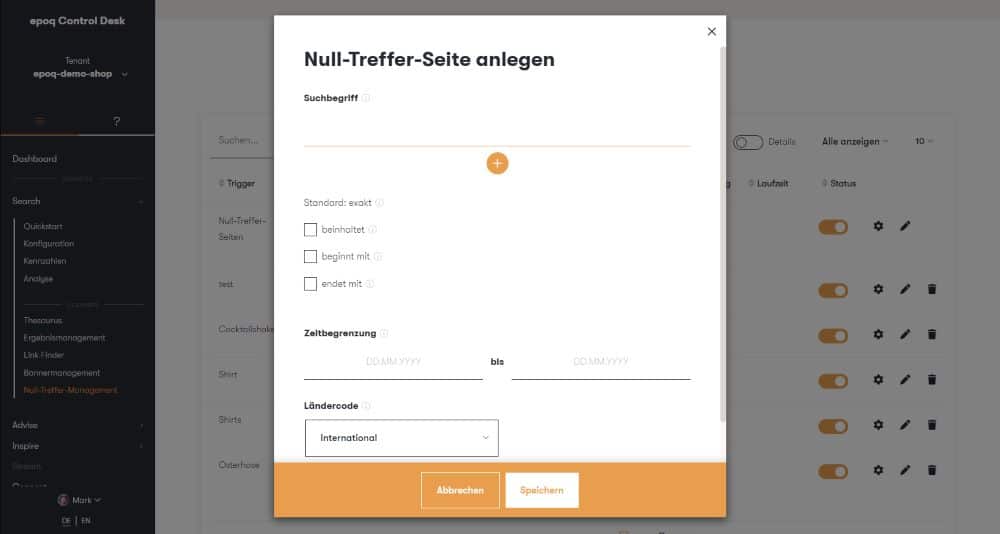
Create a zero-hit page in Control Desk
First, enter the search term for which you want to create a zero-hit page in the field provided. You also have the option of entering multiple search terms directly. You can do this using the plus sign. This allows you to cover both the singular and plural forms of a term (e.g., backpack and backpacks).
You then have further optional choices. You can select one of the search term options (contains, begins with, or ends with). You can also optionally set a start and/or end date for the duration of the entry. Then select the appropriate country code for which the zero hits page should be displayed and click on "Save."
Once you have completed these steps, your zero results page will be created, immediately active, and the appropriate default text will be displayed depending on the country code.
Edit zero-hit page
If you want to edit your zero-hit page, simply click on the "pencil icon" in the row of your created entry in the table. At this point, it is important to know that you can choose a custom design in addition to a standard page.
standard page
After creation, the default text is automatically displayed and all options for customization are hidden. To see what a standard zero-hit page might look like, you can view an example.
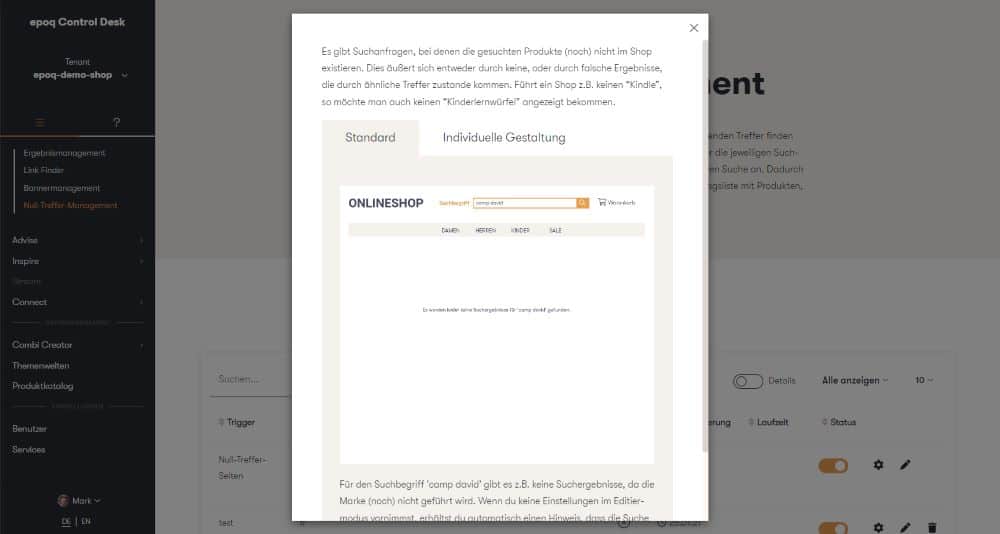
Example of a standard zero-hit page
Custom design
However, if you would like to customize your page, you can simply activate the toggle for this. All fields that you can use for customization will then appear.
Here you now have the option to
- Add an image URL, a destination URL, and text for your banner.
- Create a headline (custom headline or default) and a description for your page.
- point out alternative products and add a title (individual or standard) for your alternative product suggestions.
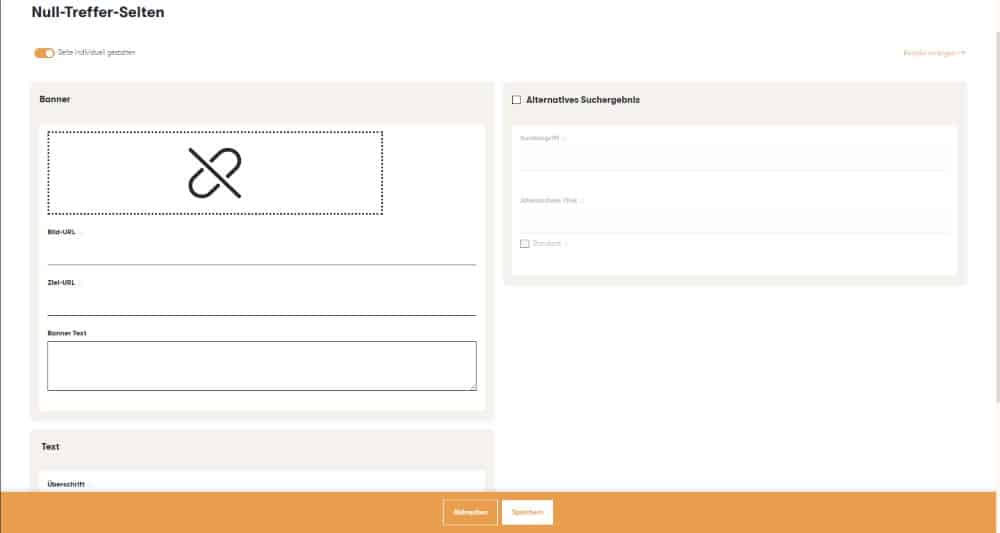
Edit and customize the zero hits page in Control Desk
Set alternative search results
To highlight alternative products, simply check the "Alternative search result" box. Then enter a search term and, optionally, a title for the alternative search result, or select the default option. Finally, click on "Save" to complete your customized zero results page. At this point, you also have the option of viewing an example of a customized zero results page.
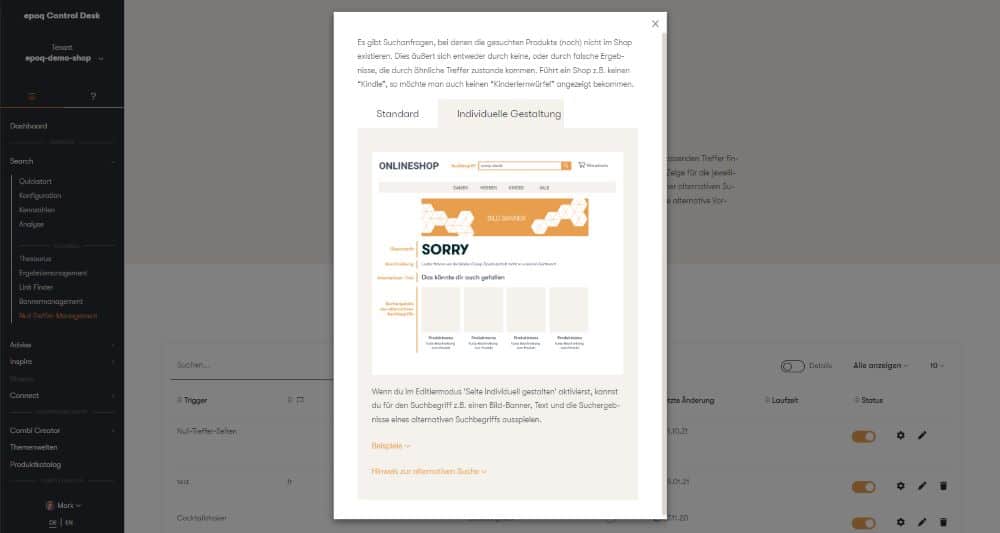
Example of customizing a zero-hit page
Create theme worlds
The Control Desk offers you another way to customize your zero-hit pages.
If there is no search term that can be used to query the alternative products, you can enter any search term and create a theme world with the same name, which will then be searched for automatically. This means that the theme world will be displayed in the search results for the alternative search term.
To do this, you can create a theme world for the search term in edit mode under "Alternative search result." If you select this option, you will be redirected to the "Theme worlds" navigation point in the Control Desk, where you can configure all further settings. The search term is automatically set as the title of the theme world, and the theme world entry automatically has the country code selected that was also specified for the zero-hit entry.
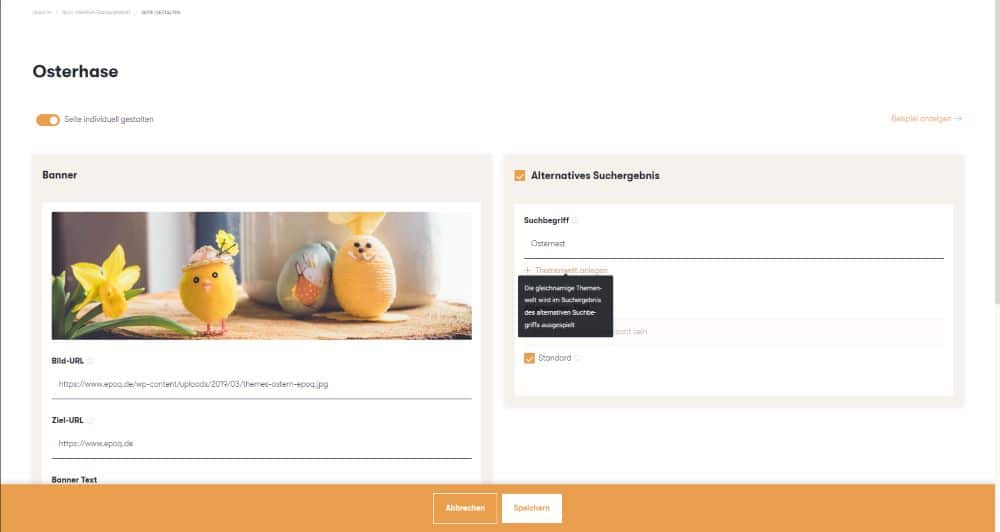
Create a theme world for an alternative search result
We have summarized more about the topic worlds feature in the blog article Recommendation Management Part 3: Topic Worlds.
Combine results management
In addition, you can use result management for the alternative search term to influence the order in which the items are displayed. By creating a result management entry for your alternative search term, you can sort the products individually. The advantage of using any search term is that the changes only apply to the alternative search.
We show you the detailed possibilities offered by result management in our blog article: Result management: How you can optimize result sets even more precisely now.
The customer can view all items from the alternative search in the online shop if they are interested. This is done by clicking on the "more products" button.
Note: This is not a form of personalization. The products/information displayed are the same for every visitor to the shop. Their history, previous click behavior, etc. are not taken into account.
Overview of created zero-hit pages
Once you are in the overview, you can find all zero-hit pages created in the table. Here you can see at a glance all search terms for which zero-hit pages have been created. You can also
- the specified country code,
- a preview of the selected banner,
- the alternative search term,
- an indication of whether the page has been customized,
- the date of the last change,
- the term and
- view the status (active or inactive).
In addition, you can configure, edit, or delete any entry in the table.
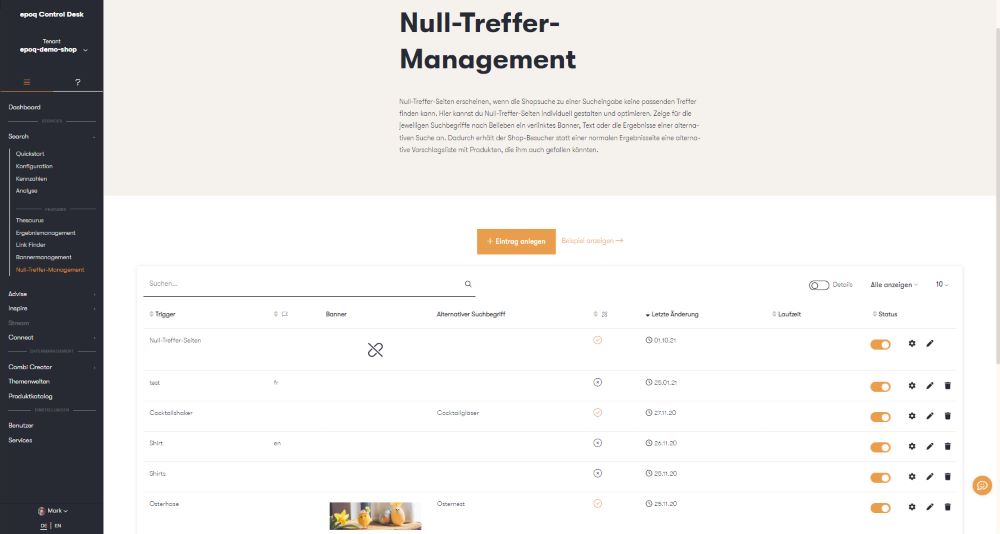
Overview of created zero-hit pages
In the upper section, there is also the option to view further details. If you activate this toggle, you can display useful information about individual designs directly in the table. If you move your mouse over the individual pieces of information, a tooltip will also show you what has been selected or entered for the individual options.
Use cases: Use of individual zero-hit pages
So now you've learned how to create custom zero-hit pages for your own online store in the Control Desk. You're probably wondering when it makes sense to use these custom zero-hit pages and store products under an alternative search term. Here are a few use cases:
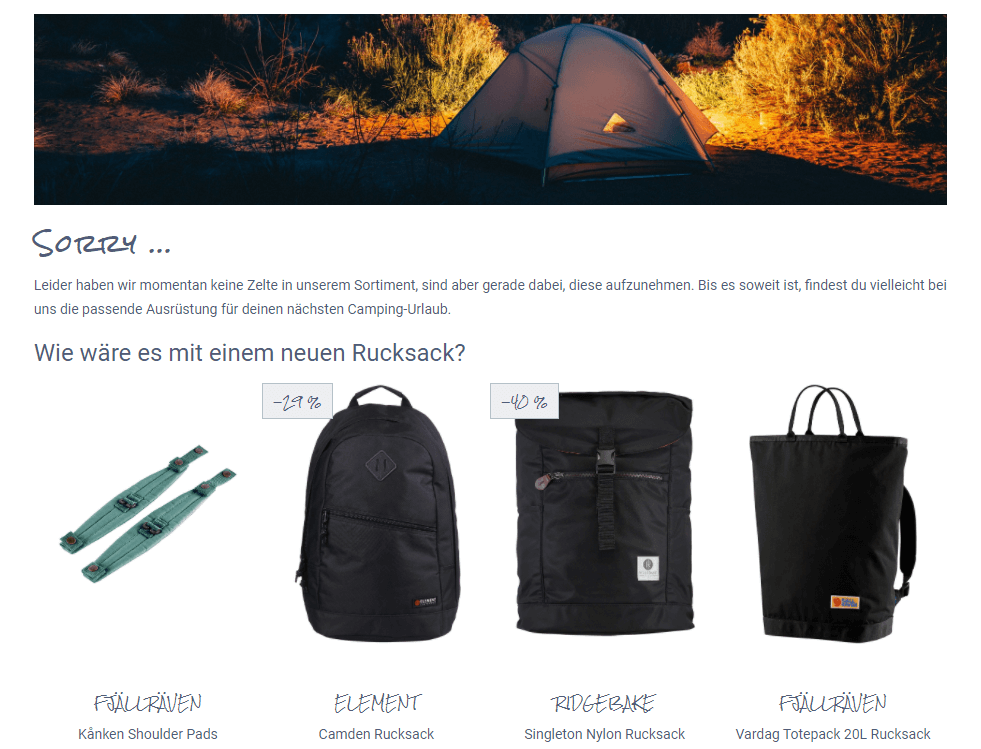
- You have an online shop and sell a range of outdoor products. However, your range does not include tents. Why not offer your customers who are looking for tents other items such as a new backpack for their next outdoor trip?
- Your online shop includes products from the tableware sector, among other things. Unfortunately, you don't currently have any cocktail shakers in your range. A note along the lines of "We'll be happy to let you know as soon as our cocktail shakers are available. Take a look at our new cocktail glasses" informs your customers about the current status of the product they are looking for and at the same time inspires them with other products that may also be of interest to them.
- You run an online fashion store and carry many well-known brands. However, when your customers search for the Prada brand, they are taken to a zero-results page because this brand is not available in your store. Point this out and offer thematically matching products: "Unfortunately, we do not carry the Prada brand in our range. You may also like our other luxury brands."
- In your online shop, customers can find everything related to electronic items. Since a new smartphone model will soon be launched, your customers are already searching for it. After performing a search, it is a good idea to include a note on the zero-results page indicating when the product will be available. In addition, you can display a selection of matching cases in advance, which will encourage your customers to browse and increase their anticipation for the new product.
Stay up to date on personalization: Sign up for the Epoq newsletter. Register now!
Conclusion: Utilize zero-hit pages and avoid bounces
No online shopper likes to land on a zero-hit page. Without information or alternative product suggestions, these pages quickly feel like a dead end and often lead to your customers leaving. However, if you use zero-hit pages skillfully by communicating to your customers why they landed on them, showing them products that match their search term, or creating entire theme worlds for alternative search terms, you can exploit the potential of these pages and avoid abandonment.
Would you like to use the new zero-hit management feature in Control Desk to design custom zero-hit pages? If so, you can request an upgrade for this feature. Simply contact your Customer Service Manager, who will be happy to provide you with all the relevant information.
Increase your personalization success
Do you have any questions or need help with optimization? Our Customer Success Team will be happy to assist you.

Log in to your Control Desk now and start optimizing. Don't have Control Desk access yet? You can request your account here » Request Control Desk account

Sarah Birk
Online Marketing Manager - Content & SEOYou are currently viewing placeholder content from HubSpot Embedded Content. To access the actual content, click the button below. Please note that doing so will result in data being shared with third-party providers.
More InformationYou are currently viewing placeholder content from HubSpot. To access the actual content, click the button below. Please note that doing so will result in data being shared with third-party providers.
More InformationYou are currently viewing placeholder content from HubSpot Meetings. To access the actual content, click the button below. Please note that doing so will result in data being shared with third-party providers.
More Information