
E-book – Personalization in E-commerce
In this e-book, you will learn why personalization is important in e-commerce and what the term personalization actually means.

The checkout process in an online shop should not be underestimated. Missing elements, such as information on shipping costs or payment methods, can lead to abandoned purchases. These should always be checked to ensure they are up to date. In addition, there is also sales potential that you, as a shop operator, can exploit. In this blog article, we will show you what this potential is and how you can exploit it.
Here's what you can expect to find in this blog article:
The checkout process in a nutshell
Stage 1: The shopping cart
Stage 2: Delivery and payment
Step 3: Payment process
Stage 4: Thank you page
Create added value in the shopping cart
What to do if the customer does cancel
Encourage visitors to continue shopping via the thank you page
When an online shopper reaches the product detail page and decides to purchase the product, they can add it to their shopping cart with just one click. They now have the option to continue shopping or go directly to the shopping cart and start the checkout process. In order for them to reach this stage of the customer journey, the product detail page must have already done a good job of preparing them. Read our blog article on this topic: How you can use the product detail page as a conversion lever. If the product detail page has been convincing, the customer proceeds to the shopping cart, the first part of the checkout process.
Stay up to date on personalization: Sign up for the Epoq newsletter. Register now!
In order to guide your customers from the shopping cart to the checkout, certain elements should be clearly visible to them, such as the product image, a brief description of the item, shipping costs, payment methods, etc. You can find out exactly what you need to pay attention to from various statistics. Statista, for example, offers statistics on reasons that lead to abandoned purchases.
At this stage, you need the customer's details so that you can ship the product and process payment. You have the option of offering the customer the chance to log in or register for a customer account. Their details will then be stored and won't need to be re-entered. However, this shouldn't be mandatory, as compulsory registration could lead to customers abandoning their purchase. Instead, you should allow them to shop "as a guest."
On the last page, your customers expect to see an order summary that clearly displays all the purchase details. If everything is complete and correct, there is a high probability that your customers will complete the purchase with just one click and be redirected to the thank you page.
The thank-you page is an important element in the checkout process. You can use it to express your gratitude and reinforce the purchase with positive emotions, e.g., with the teaser "Thank you for your purchase, you made the right decision." The order number, a brief overview of the items purchased, and information for inquiries make your thank-you page informative and user-friendly.
The order confirmation and package tracking should still be sent via email, as these transactional emails are now standard practice and the information should still be available even after the thank you page has been closed.
In addition to product details, as a shop operator, you can use the shopping cart to promote sales, the first step in the checkout process. This is because you can offer your customers additional products that match their selected items in the shopping cart. This offers your customers added value, as they don't have to search for matching additional items in the online shop. But it also gives you the opportunity to increase your shopping cart value and boost sales.
Cross-selling is particularly interesting for products that require additional materials in order to be used correctly, e.g., in the craft sector. If someone wants to hang wallpaper, they will need paste and a wallpaper roller in addition to the wallpaper itself. Online shoppers can be made aware of this in their shopping cart and quickly complete their purchase.
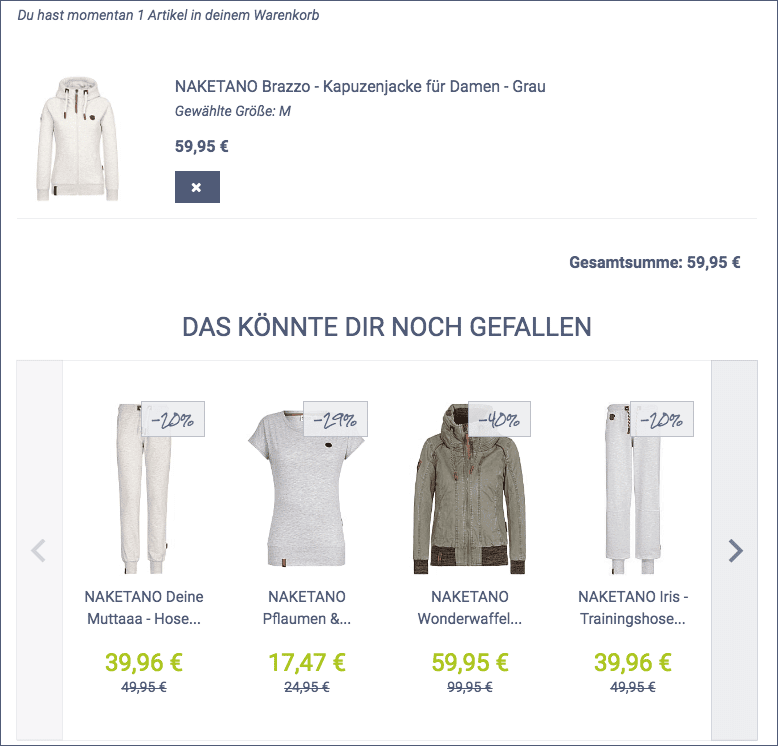
However, it must be clearly indicated that these are recommendations and not products that your customer has selected to purchase, so that they do not become uncertain and abandon the purchase. In addition, the recommendations should appear above the line of sight, as otherwise they may not be noticed. Read our blog article on this topic: Inspiration made easy: How to use product recommendations effectively in e-commerce.
Our experience at Epoq has shown that up-selling strategies in the shopping cart should be used with caution, as they can make customers unsure whether the product they’ve selected is the right one. This could lead to a bounce. Cross-sell recommendations are more suitable here. However, these should not be designed to be inspirational, as the customer might otherwise abandon the purchase—for example, if wall paint is recommended alongside a wallpapering table. Wallpapering tools would be a better choice here.
An alternative to cross-sell recommendations in the shopping cart are cross-sell recommendations in the shopping cart layer. Here, we have recorded the best results for cross-sell products across all industries, as the customer has not yet mentally completed the purchase.
Another way to increase the value of the shopping cart during the checkout process is to set up a checkout area, as in brick-and-mortar stores.Small, inexpensive itemscanbe offeredto go with the selected product, which, as in brick-and-mortar stores, are added to the shopping cart. This is just as effective in online shops as it is in offline retail. In addition, small items can be matched to the selected products online, which is difficult to do in brick-and-mortar stores.
Don't panic. If the customer does abandon the checkout process, you still have the option of discreetly contacting them and redirecting them to their shopping cart. How? With an abandoned cart email. After a few days, you can remind them about their abandoned shopping cart, e.g., with the teaser "Your package is waiting for you" or "Don't forget me," and perhaps entice them to complete their purchase with a discount code. You can find out how this works in detail in our blog article: Increase sales with personalized cart abandonment emails.
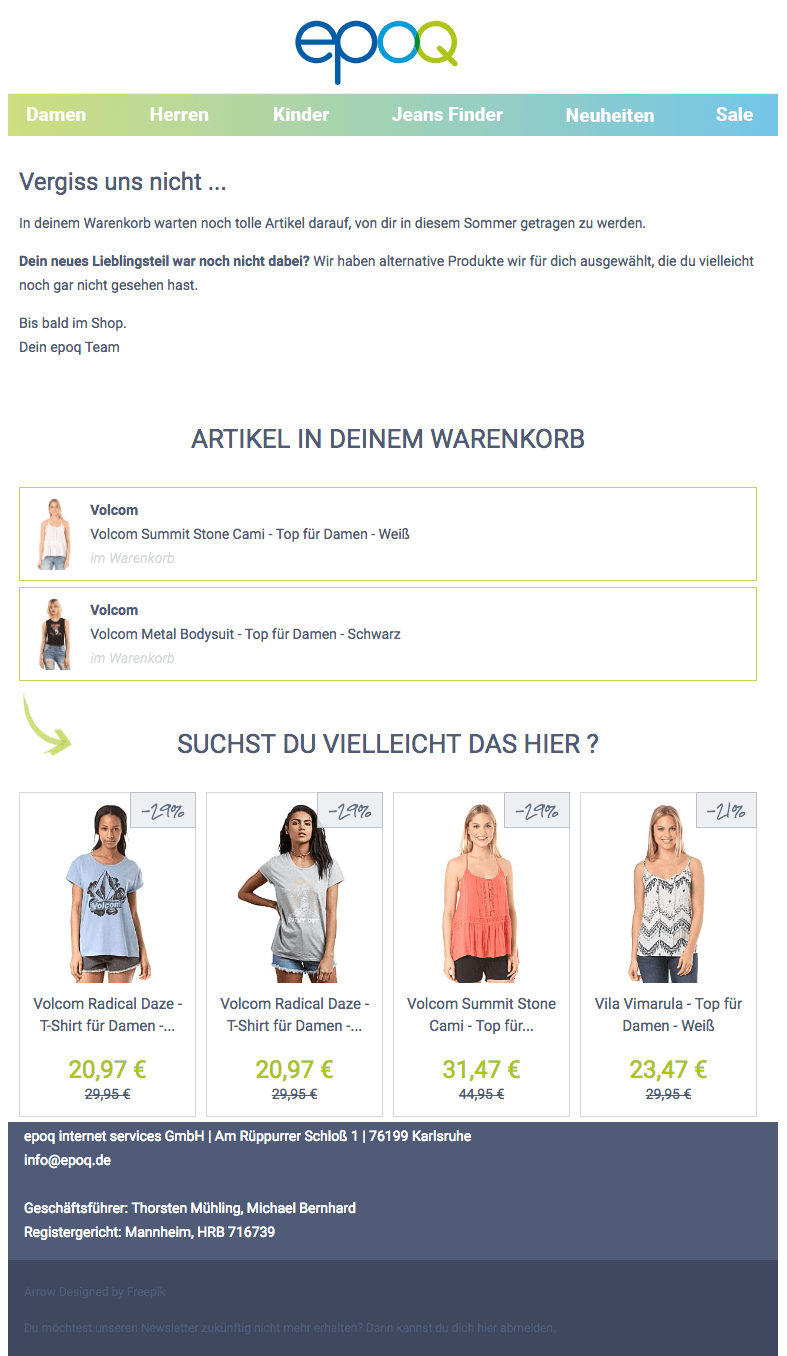
Example of an abandoned cart email from the Epoq demo store
A thank-you page doesn't just have to contain information about the product purchased. You have the opportunity to encourage your customers to continue shopping. You can achieve this with relevant recommendations. By analyzing your customers' online shopping behavior, you can determine which products are most likely to spark their interest. This is usually done with the help of a recommendation system, which usesartificial intelligence to automatically display relevant recommendations in real time in the shop.
With the teaser "Have you seen these products yet?", you could integrate a widget on the thank-you page and redirect your customers to the product detail page. Another option would be to redirect them to a special landing page that matches their purchase. For example, if a customer has bought ski goggles, you could redirect them to a landing page about skiing vacations and use digital storytelling offer them additional products.
Our experience at Epoq has shown that recommended items from categories the customer didn’t view during their visit were the most effective. Since the customer has already placed an order at this point, you can’t go wrong by showing them everything else your store has to offer.
When you send out the order confirmation, why not include cross-sell products related to the items purchased? This way, you can draw your customers’ attention to complementary items and use email personalizationto guide them back toyour online store. This will increase your traffic and, in turn, your revenue.
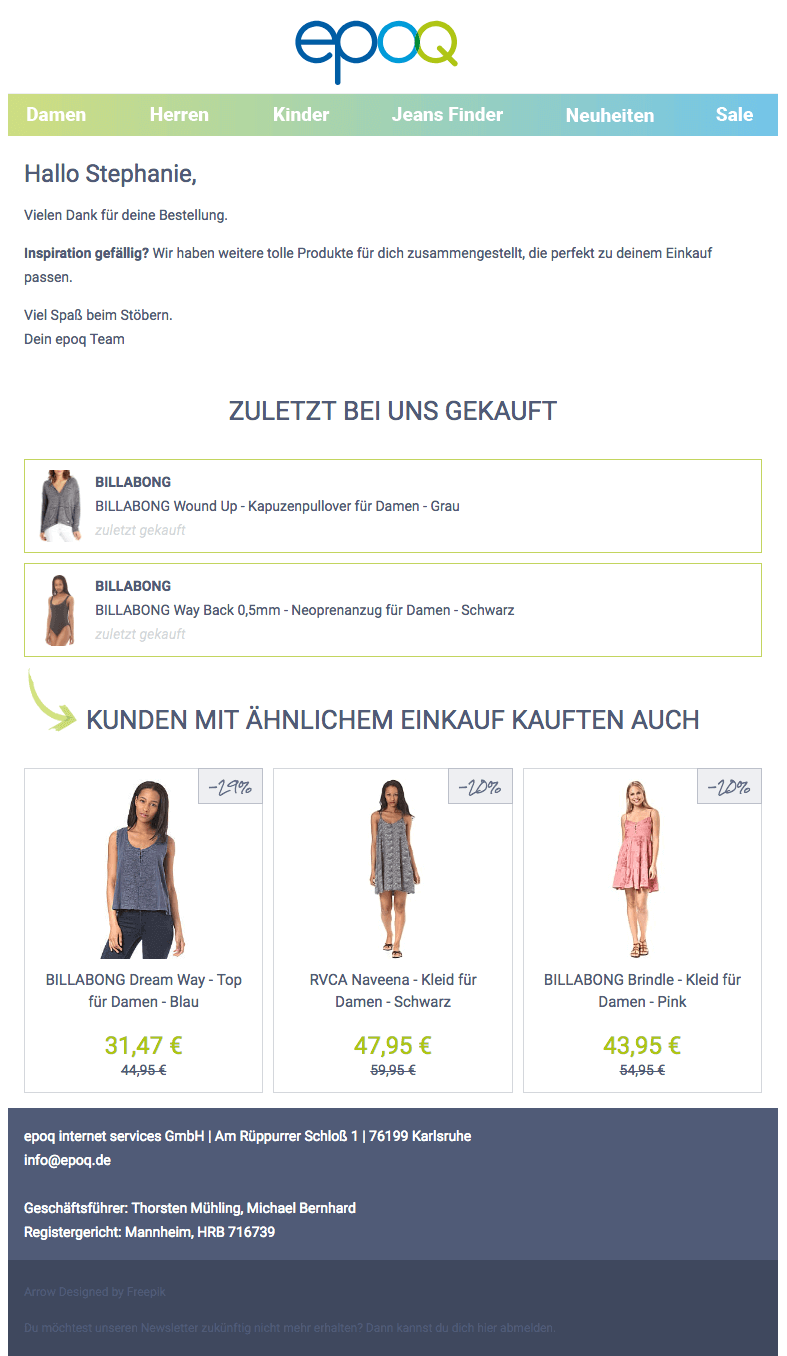
Example of a personalized transactional email from the Epoq demo store
Our experience at Epoq has shown that personalized outfit emails are very successful in the fashion industry.
Stay up to date on personalization: Sign up for the Epoq newsletter. Register now!
In addition to checkout optimization, there are various ways to get your online shoppers to "check in" to your online store again and make new purchases. To do this, use specific stages in the checkout process that you can personalize. This will allow you to create new sources of revenue and services.
Learn how to use personalization profitably:
Download the e-book now!

You are currently viewing placeholder content from HubSpot Embedded Content. To access the actual content, click the button below. Please note that doing so will result in data being shared with third-party providers.
More InformationYou are currently viewing placeholder content from HubSpot. To access the actual content, click the button below. Please note that doing so will result in data being shared with third-party providers.
More InformationYou are currently viewing placeholder content from HubSpot Meetings. To access the actual content, click the button below. Please note that doing so will result in data being shared with third-party providers.
More Information