
E-book – Personalization in E-commerce
In this e-book, you will learn why personalization is important in e-commerce and what the term personalization actually means.

The user experience in a shop determines whether your visitor makes a purchase or whether they abandon the process and leave the shop. User experience should therefore be a top priority if you want to increase your conversion rate and generate good sales. Learn more about the key aspects of good UX and how you can easily optimize it.

Here's what you can expect to find in this blog article:
Why is UX design so important in e-commerce?
Why is the customer journey essential for a good user experience?
What should you pay attention to in terms of UX in e-commerce?
Stage 1: Entering the online store
Stage 2: Searching for a product
Stage 3: Selecting the right product
Stage 4: Purchasing the desired product
How can the UX in e-commerce be optimized?
What does advanced UX design require?
Conclusion: Even the basics of UX encourage your customers to stay and buy.
User experience (UX) refers to the experience of users. A good UX ensures that users can easily find their way around your online shop, enjoy browsing, find the product they are looking for without any problems—and, above all, that they then buy it. The goal is an all-round pleasant and smooth shopping experience —in other words, a good customer experience. This leaves a positive impression and results in a high return rate.
Stay up to date on personalization: Sign up for the Epoq newsletter. Register now!
If you have your UX under control, you have the purchase under control. There is a very simple reason for this: your UX design is, at best, perfectly tailored to your target group. If this is the case, the shop visitor can hardly help but go from touchpoint to touchpoint and finally make a purchase – with the wonderful feeling of having done the right thing and the intention to come back soon to shop again.
According to UX pioneer Peter Morville, the seven most important factors for a good user experience are:
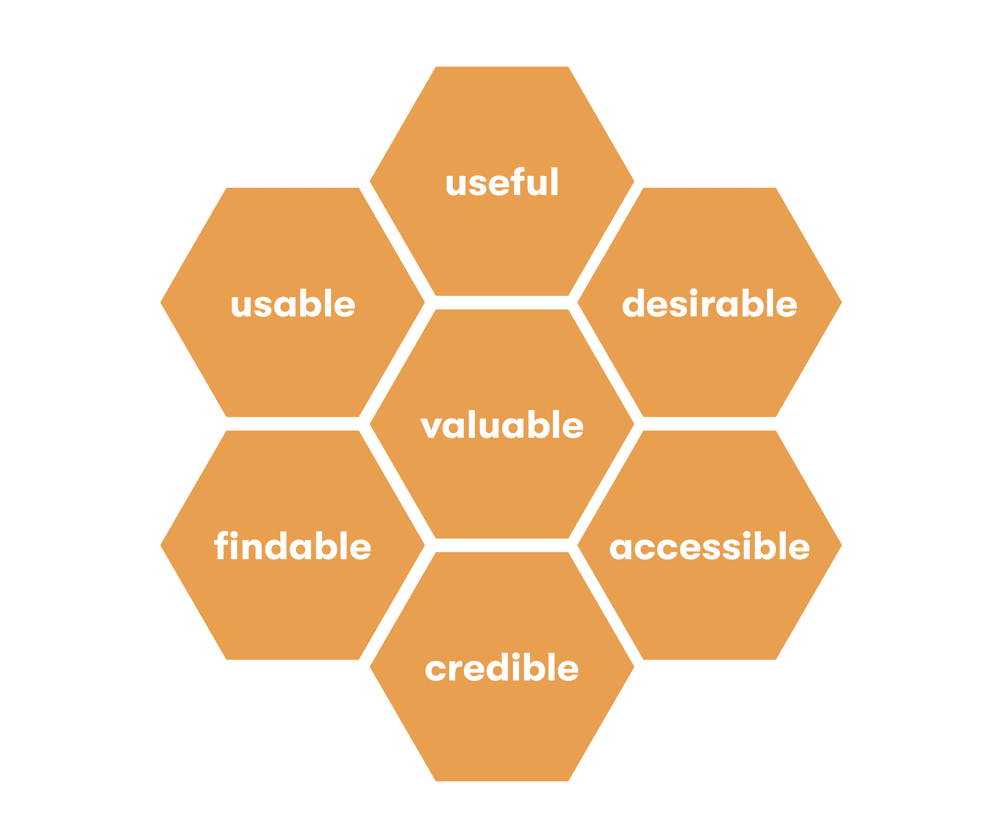
The seven important factors can be represented in Peter Morville's User Experience Honeycomb.
(Source: Own representation based on Peter Morville¹)
As you will have guessed from the above, good UX design in e-commerce ensures a perfect customer experience, i.e., an outstanding customer experience. And that leads to purchases and repeat purchases.
But it's not quite as simple as it seems at first glance. Modern shop customers are becoming increasingly complex, and it is becoming more and more challenging to adapt UX design to their expectations. Understanding the customer experience and continuously optimizing UX design has a lot to do with the customer journey.
The digital customer journey, i.e. your visitor's journey through your shop, is a powerful tool for continuously reviewing and adapting the customer experience and UX design of your online shop. It is important that you accompany prospective customers strategically and sensitively on their customer journey, getting to know their preferences and reflecting the knowledge you gain in the presentation of your offer.
UX is the key element in ensuring that your shop visitors enjoy a smooth online shopping experience and feel comfortable throughout the entire process, from entering the online shop to completing their purchase. The customer journey is the basis for capturing your customers' behavior at the most important touchpoints and staging positive interactions there.
These interactions should be designed in such a way that the customer progresses from stage to stage —until they reach checkout and can look forward to receiving a great product. Below, you can learn more about the four stages that serve as a guide for good UX in e-commerce.
Fast loading times should be a matter of course. And once your shop visitor is on your website, fractions of a second decide whether they stay or quickly leave again.
First impressions are crucial, and users ask themselves: Am I in the right place with my problem? Will I find what I'm looking for here? The answer must be obvious at first glance: Yes, I can find what I'm looking for here – otherwise, you'll lose your visitor in the next moment. To achieve this, you need to be able to accurately assess your target group and their requirements for your offering. How can you convince your shop visitors right away that you are exactly the right provider? A perfect interplay of communication, design, and technology will immediately show them the relevance of your offering.
The importance of white space should not be underestimated. White space refers to areas on a website that are free of any information. These areas do not necessarily have to be white; the important thing is that they stand out clearly from the rest of the content and make it easier to process the visual impressions on the page.
Today's e-commerce customers are bombarded with a multitude of stimuli, and their patience and attention span are correspondingly limited. By using sufficient white space, you can prevent your shop from appearing cluttered and your visitors from feeling overwhelmed. Free space also directs users' attention to the important areas of the website and gives it an air of generosity and professionalism.
And last but not least: even though everyone should know this by now, many online shops still have shortcomings when it comes to handling smartphones. Check how your e-commerce portal appears on mobile devices and, above all, whether the CTAs are clearly visible. Avoid forcing customers to scroll horizontally and stick to the essentials.
You have now gotten the prospective customer to the point where they are starting to search for the desired product. Usability tests show that users repeatedly encounter obstacles at this stage. Ensure that your prospective customers can find the products they are looking for quickly and almost intuitively.
This starts with the navigation structure. It should be so simple and well thought out that your visitors can reach their destination with as few clicks as possible and don't get lost in the depths of your online shop. A sensible division into categories is the first step here.
What a compass is to a ship, the search function is to an online shop. With an ecommerce search engine, you provide orientation and reduce the bounce rate. Make sure that when entering the product in the search mask, synonyms and common spelling mistakes also lead to the desired results. For online shops with a wide range of products, filters and faceted navigation are also an absolute must. For intelligent filter and search functions, you also need to know what is important to your customers and what criteria they use when making a purchase.
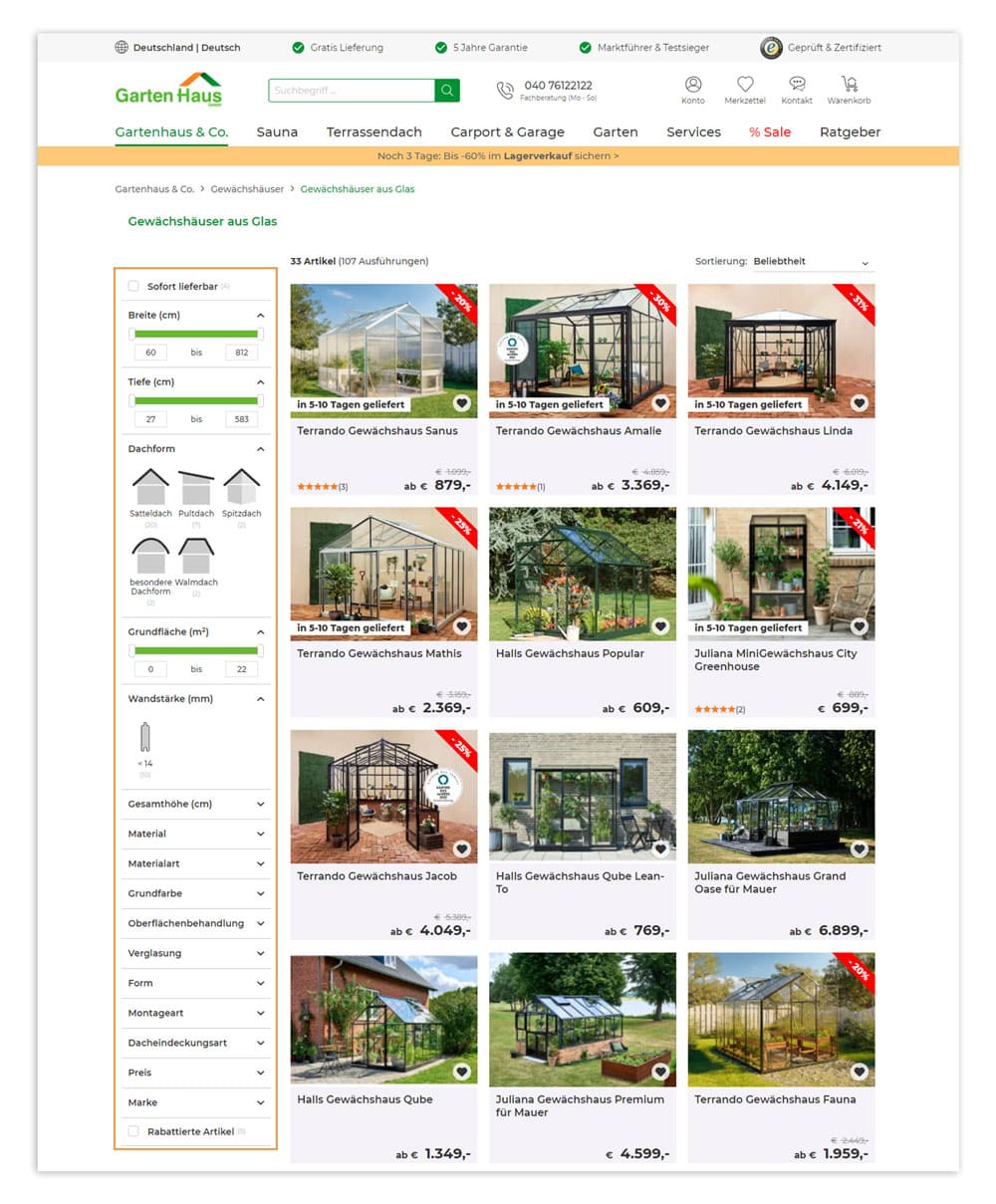
The faceted navigation in the Gartenhaus GmbH online shop makes it easy to narrow down products according to desired characteristics.
(Source: Screenshot from gartenhaus-gmbh.de)
You should also know that information on the left side is perceived better and faster, and that clickable elements should always be highlighted so that they are immediately recognizable as such.
Next, you should take your guest by the hand to help them make their final purchase decision. How can you do this with UX in e-commerce? First, check the textual and visual presentation of your products:
When presenting products, it is becoming increasingly important to make them appear as vivid as they would in a store. This awakens desire by allowing customers to examine an item up close, turn it around, view it from all sides, and quickly grasp the most important information from the details on the packaging. In e-commerce, too, users need strong incentives to feel the desire for a particular product among the mass of offerings. You can also offer your customers further support in selecting the right product in the form of an AI shopping assistant. This guides shop visitors to the right product recommendation in a natural dialogue.
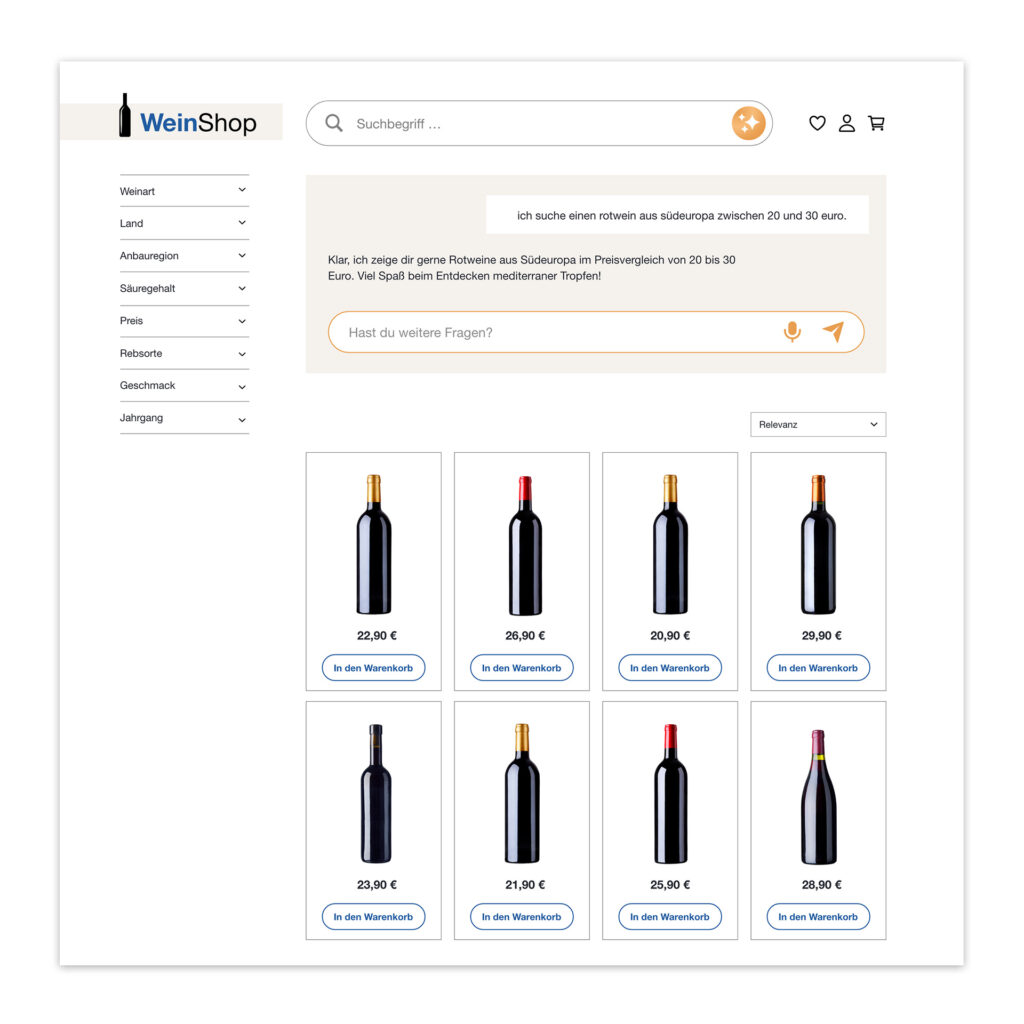
The AI Shopping Assistant uses dialogue to help customers select the right product.
(Source: Own representation)
In addition to desire, trust plays the most important role in the product selection stage. A shop visitor will only decide to make a purchase once you have gained their trust. The most important UX elements for trust are:
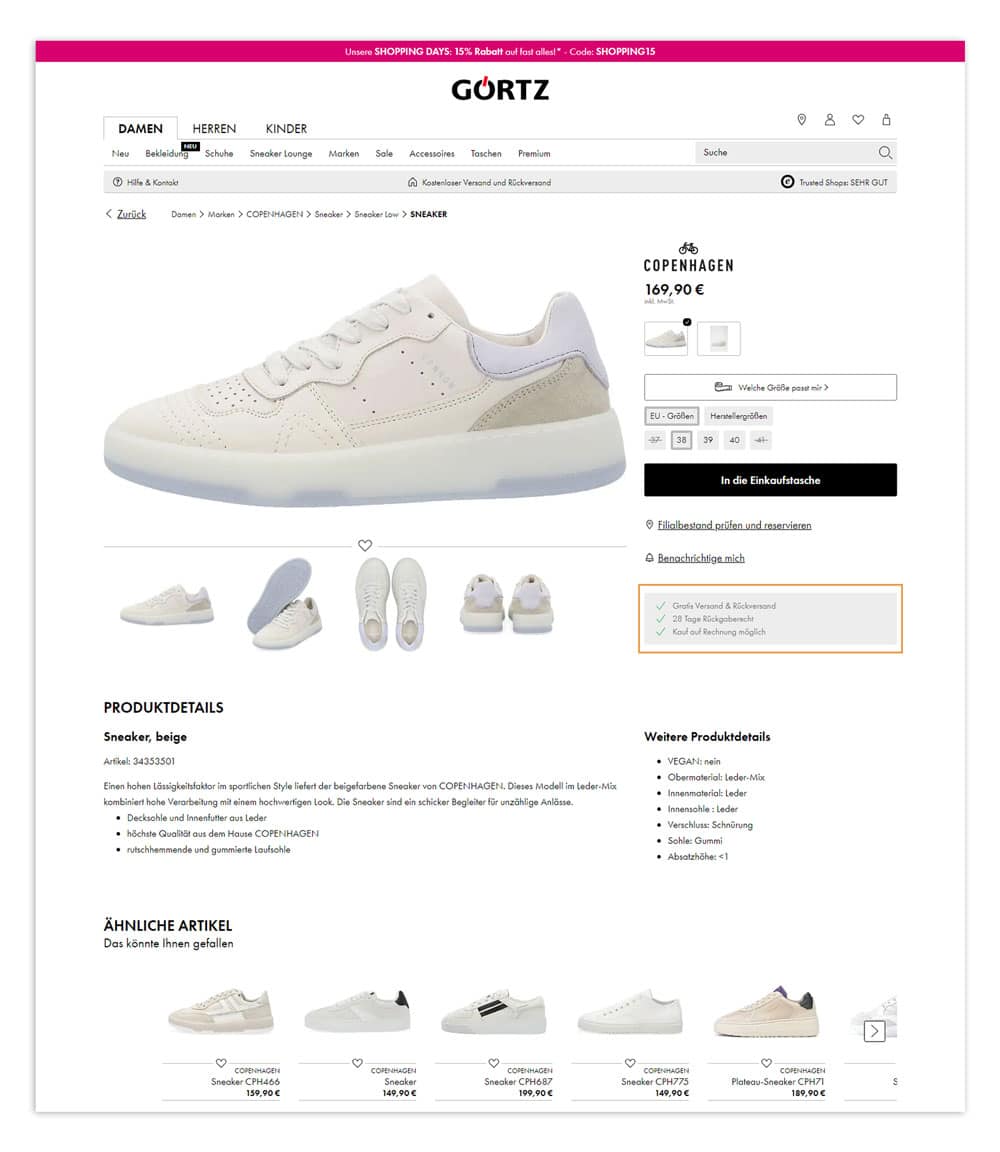
On its product detail page, Görtz provides important information about shipping, returns, and payment.
(Source: Screenshot from goertz.de)
Now we come to the most sensitive part of the purchasing process. Be careful, this is where the biggest hurdle lies! Many users navigate through the online shop, add items to their shopping cart—and then abandon the checkout process. There can be many reasons for this.
As already mentioned, nothing is more annoying than seeing shipping costs only when you get to the payment process. In addition, many users abandon their purchase if they have to create a user account before they can click on the "Buy" button. Guest access for orders can help to offset some of these losses.
Stay up to date on personalization: Sign up for the Epoq newsletter. Register now!
There is also an element of trust that is essential in the payment process: information about data security signals to your customers that you handle their data carefully and responsibly. Information about security measures should therefore be placed in a clearly visible location.
Another basic rule is to keep the forms for your buyers as simple as possible. At this crucial stage of the customer journey, even the smallest obstacle can negate the perfect UX achieved in the previous steps. Checkout must be quick and effortless.
Often, the UX can be significantly improved with a few simple tricks. There are typical adjustments you should focus on. Ask yourself the following questions:
When answering all these questions, you should always keep in mind: Keep it simple! The more functional and minimalistic your thinking, the better. And it is just as important to consider the needs of your target group in every measure you take.
As you will have noticed while reading, the basis for efficient UX in e-commerce is being able to assess the wishes and reactions of your visitors. If you have a good feel for your customers, you can achieve a lot by checking the most important pillars of your UX design and adjusting them if necessary. You don't need sophisticated tools to encourage users to stay on your website and make a purchase.
However, it is undoubtedly also true that the basis for the UX design of the future is a profound understanding of current and future customer requirements. Personalization is the key concept here. In the rapidly growing e-commerce segment, there are plenty of new technologies and tricks. If you want your business to grow in the long term, you will probably have to deal with terms such as data-driven commerce, conduct UX research, and design a proper UX strategy sooner or later.
Do you know your target audience? Then you can use UX basics to make your shop user-friendly so that your customers feel comfortable. And that's half the battle when it comes to getting them to checkout. In plain language: With your UX design, you shape a positive customer experience and put your conversion rates on a secure footing. For a design that is intended to significantly accelerate the growth of your business, you should take a closer look at the topic of personalization.
Source: ¹ semanticstudios
The UX—i.e., the user experience—is essentially the technical and structural basis for a good customer experience. It forms the framework for creating positive customer experiences at every touchpoint.
The customer journey is a valuable guide and a powerful marketing tool for continuously reviewing and adapting the customer experience and UX design of your online shop.
A well-designed UX ensures that users do not get stuck at any stage of the process and abandon it, but are guided safely through to the purchase. This is naturally reflected in pleasing conversion rates.
It's hard to believe how many online shops don't even follow the basic rules of UX design. Yet implementing these basics is not rocket science – as you will have noticed while reading our article. We hope this provides you with a useful guide.
To create such a UX, you need to accurately capture and document your customers' customer journey. Using the appropriate tools, you can generate data that you can then use to integrate personalization elements. Personalization is the order of the day when it comes to responding precisely to the needs of modern consumers in e-commerce.
Read more about personalization in e-commerce in our e-book—for higher sales and inspiring shopping experiences.
Request now!

You are currently viewing placeholder content from HubSpot Embedded Content. To access the actual content, click the button below. Please note that doing so will result in data being shared with third-party providers.
More InformationYou are currently viewing placeholder content from HubSpot. To access the actual content, click the button below. Please note that doing so will result in data being shared with third-party providers.
More InformationYou are currently viewing placeholder content from HubSpot Meetings. To access the actual content, click the button below. Please note that doing so will result in data being shared with third-party providers.
More Information