
- Control Desk
- Increase Conversion Rate
7 control desk tips for a high-revenue Black Friday in e-commerce
On Black Friday, online shop operators compete for online shoppers' purchases with the best offers and promotions. This is because both Black Friday and Cyber Monday are becoming increasingly relevant for e-commerce.¹ That's why you should start preparing your online shop in good time. Wondering what adjustments you can make? In this blog article, we give you seven tips for a high-revenue Black Friday that you can implement in no time via the Control Desk.

Here's what you can expect to find in this blog article:
Tip 1: Make your offers easy to find
Tip 2: Use your banners strategically
Tip 3: Create your own search results page for your offers
Tip 4: Offer a gift finder
Tip 5: Promote your Black Friday offers via recommendations
Tip 6: Offer a wish list
Tip 7: Recommend your offers in your emails
Conclusion: Those who act purposefully will rock Black Friday
Tip 1: Make your offers easy to find
Make it easier for your customers to find your best offers and ensure that they are displayed immediately. To do this, you can create a landing page for your Black Friday promotion, for example. You should make sure that this page can also be found via search.
Implementation in the Control Desk:
In the Control Desk, you will find the Link Finder under the "Keywords" feature. With this tool, you can set up a redirect to a predefined page of your online shop for a specific search term. To do this, simply redirect all relevant search terms to the landing page via direct link in the Link Finder. You can find the relevant search terms for Black Friday in the "Search" analysis area.
It's best to look at the analysis of search terms 1-2 weeks before Black Friday. It would be even better if you could use the experience gained from the previous year.
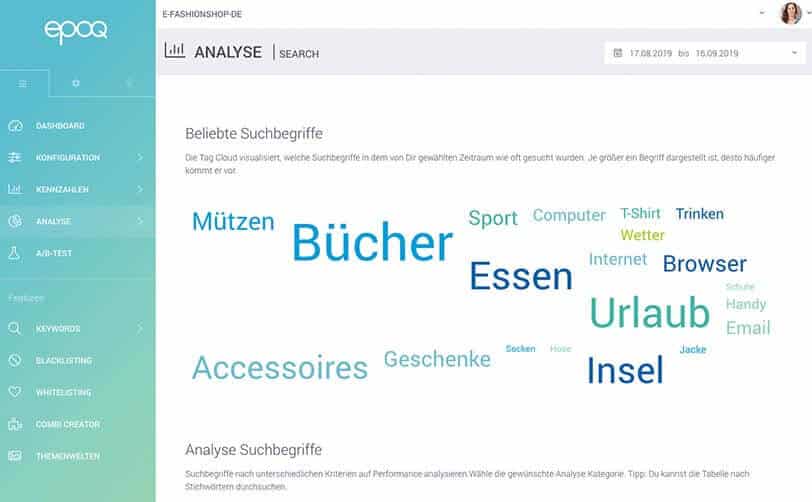
Visualization of the most popular search terms for the selected time period in the Search analytics section of the Epoq Control Desk
Want to know how to create a direct link and what other features Link Finder has to offer? Then check out our blog article How to make pages findable via search terms with Link Finder.
Stay up to date on personalization: Sign up for the Epoq newsletter: Register now!
Tip 2: Use your banners strategically
Banners are an effective marketing tool in e-commerce. They allow you to visually advertise promotions and thus attract the attention of your online shoppers. Banners are ideal for use in high-revenue campaigns such as Black Friday.
Implementation in the Control Desk
With the help of banner management, you can also link individual search terms to a Black Friday banner. The banner appears above the search results on the search results page and directs your customers straight to the Black Friday offers. It is also a good idea to set a time limit for the banner.
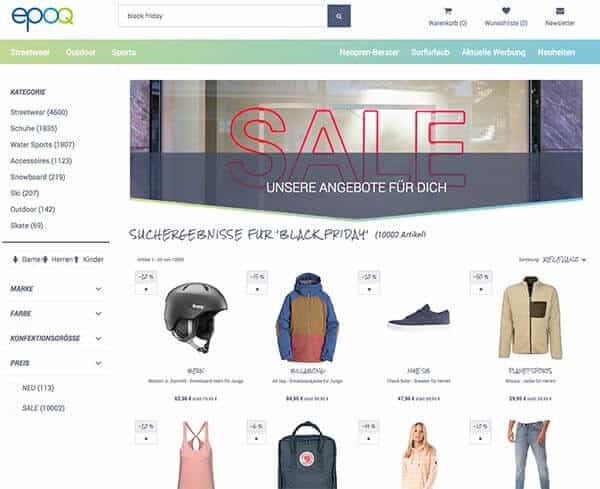
Results list with integrated banner for the search term "black friday"
Banners can be created in Epoq Control Desk underFeatures > Keywords >Banner Management.
For more information about using banners and how you can use banner management in the Control Desk, see our article Banner management for campaign advertising.
Tip 3: Create your own search results page for your offers
As an alternative to a landing page, the Control Desk offers you the option of creating your own search results page for your offers. The Theme Worlds feature allows you to create product groups based on specific attributes, thereby supporting specific marketing campaigns.
Implementation in the Control Desk
To do this, create a new theme world, such as“Black Friday.” Based on the information from the data feed, you can add categories, products, and other attributes to your theme world. When creating the theme world, you can also specify which Epoq service you want to use it for. If the theme world is to be used solely for Epoq Search, check the box next to“Link theme world title to search.” When searching for the term “Black Friday,” the products from your theme world will now be displayed.
You can find the basics of the theme worlds feature in the blog article Recommendation Management Part 3: Theme Worlds.
Tip 4: Offer a gift finder
To escape the stress of Christmas, many people start looking for the right gifts on Black Friday. Nevertheless, gift hunting remains a strenuous activity, which you can make easier with a gift finder.
Implementation with Epoq Advise:
Just as a sales assistant in a brick-and-mortar store asks customers questions about the recipient of the gift, a digital product advisor can take over this process in an online store using an intuitive decision-making process to determine the right gift. Each answer provided by the online shopper narrows down the list of results to match their preferences.
Implementing a gift finder takes some time, as designing it and selecting the right questions requires a lot of effort. This is where industry expertise and technical know-how are needed to optimally adapt the tool to the online shop. If you need assistance with this, our customer service teamwill be happy to help.
If you want to learn how to use a product advisor in your online store, we recommend reading our blog article Online Product Advisor: Help Your Customers Choose Products.
Tip 5: Promote your Black Friday deals through recommendations
To further promote the products from your campaign via recommendations, you can also use the "Black Friday" theme world and the corresponding banner. To do this, you should integrate your recommendation widget as a tile, as a flexible layout is required for the mix of banners and recommendations. You can find out which variants of recommendation widgets are available to you in our blog article Recommendation Widget: Variants and Implementation.
Implementation in the Control Desk:
Once you have created your theme world, all you have to do is select the appropriate recommendation widget for the product detail page and define a product group using the following attributes, for example:
- gender
- brand
- Product ID
- Category
- Color
- Extras (New products, Sale items, Clearance sale...)
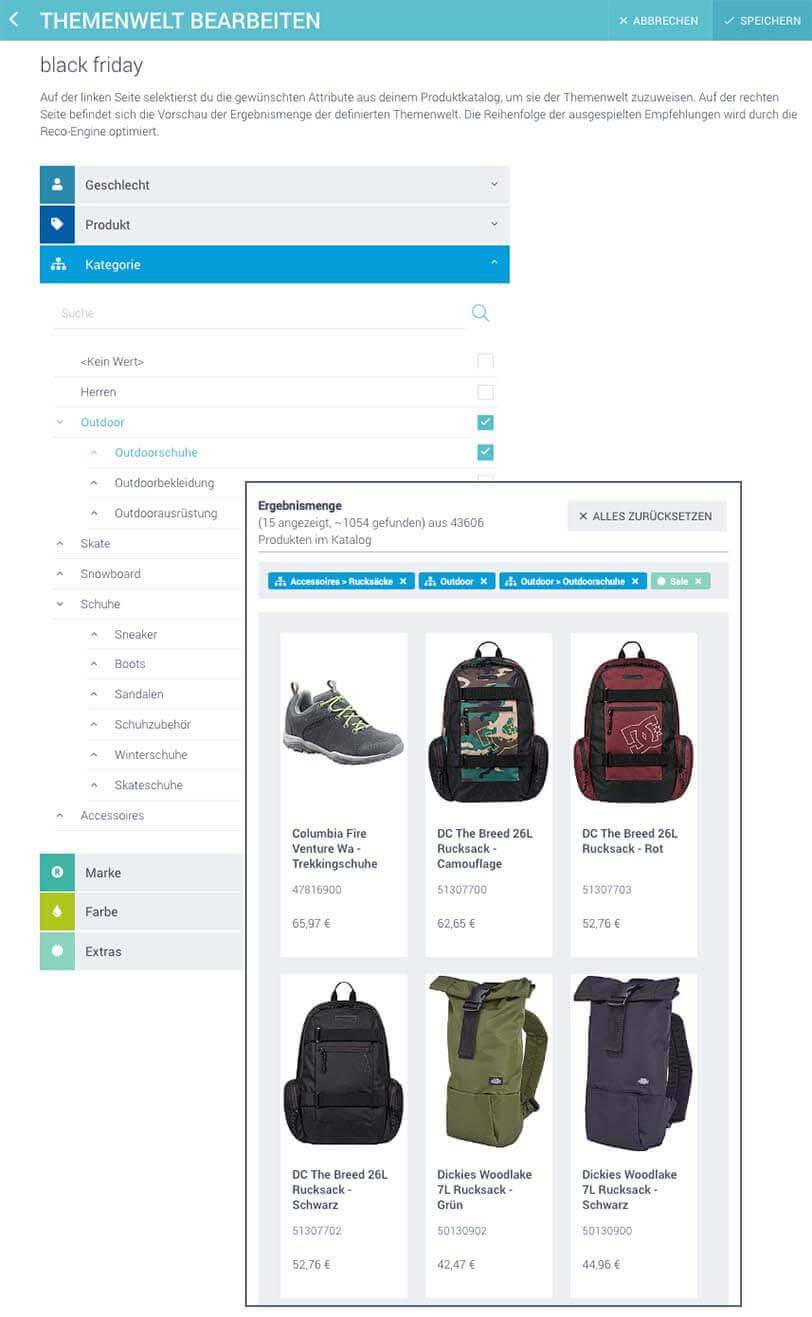
Theme Editor in Epoq Control Desk
Simply link the theme world with the desired widgets so that the products in the theme world are included in the recommendations.
If you want to promote individual products, you can also create a whitelist for the desired widget. The whitelist ensures that the selected products are displayed at the top of the recommendation widget.
Stay up to date on personalization: Sign up for the Epoq newsletter: Register now!
Tip 6: Offer a wish list
Online shoppers plan which products they want to buy weeks before Black Friday. This is particularly relevant in e-commerce, as online retailers usually herald the "hot phase" of the Christmas shopping season before brick-and-mortar retailers.² To help your customers quickly find the products and offers they want on Black Friday, you can support them with a wish list feature. You can also use the wish list section of your online shop to display relevant recommendations from your Black Friday promotion. For example, recommendations that match or complement the items already stored in the wish list section. Want to learn more about the wish list feature? Then we recommend the blog article The wish list in the online shop – everything you need to know about it.
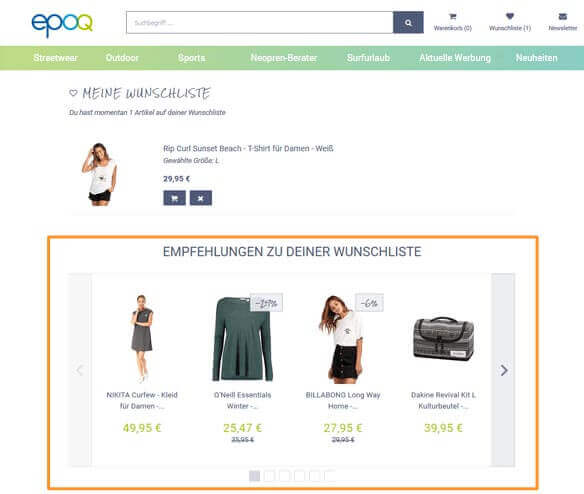
Example of personalized recommendations based on a customer's wish list in the Epoq demo store
Tip 7: Recommend your offers in your emails
Email campaigns are an effective tool for drawing your online shoppers' attention to your promotions. This brings your customers back to your online shop and encourages them to make a purchase. We would like to present two alternatives that will help you achieve this.
- Themed worlds newsletter: Use your Black Friday theme world in the newsletterby linking the theme world to your newsletter widget. The recommendations will still be personalized, as the service selects the most relevant products from the theme world for the recipient. Here, too, you can use a whitelist to recommend certain products first. Make sure that your theme contains enough relevant products so that the algorithm can compile suitable recommendations.
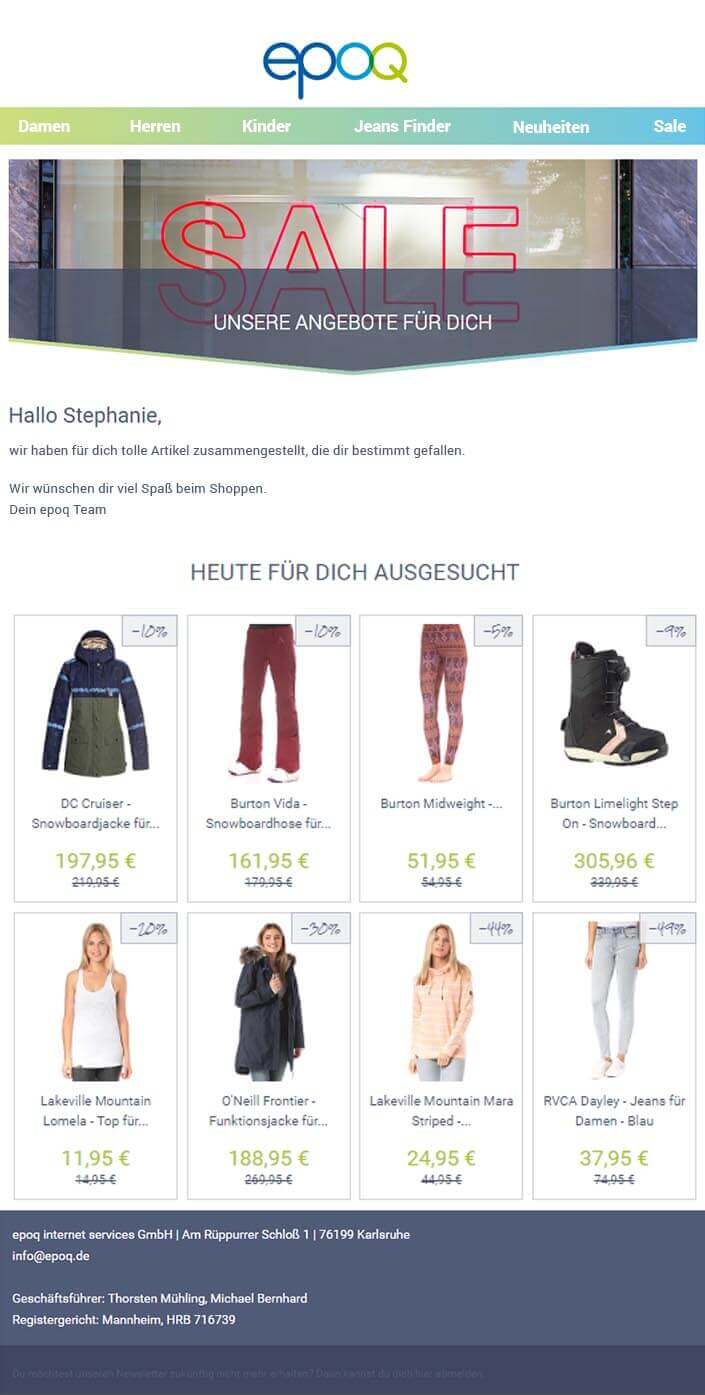
Example of an email with relevant recommendations from the Black Friday promotion
- Abandoned cart emails: The number of shopping cart abandonments is particularly high on Black Friday. Take advantage of this opportunity and target these online shoppers with shopping cart abandonment emails. Include personalized recommendations for the recipients in the emails to increase the chance of a purchase. You can find more information about shopping cart abandonment emails in our blog article Increase sales with personalized cart abandonment emails.
Conclusion: Those who act decisively will rock Black Friday.
Black Friday is becoming increasingly important for online retailers. Therefore, it is essential to start planning and preparing your online shop in good time to ensure that you are ready for this shopping event.
In our experience, the following features and tools in Control Desk are among the most important tools for preparing for any shopping event. With the Theme Worlds feature, you can showcase your promotion through search and your recommendations, for example. With a suitable banner, you can attract more attention, and the integration of a gift finder makes it easier to search for gifts. Email campaigns bring your customers back to your online shop. If you want to know what else you should pay attention to before, during, and after Black Friday, we recommend our blog article Valuable tips for a successful Black Friday.
Take advantage of the possibilities in the Control Desk and rock Black Friday!
Sources:
¹ t3n: Black Friday shopping: A flop for brick-and-mortar retailers, but a hit for e-commerce
² Press portal: Study on the Black Friday shopping event
Increase your personalization success
Do you have any questions or need assistance with the Control Desk? Our Customer Success Team will be happy to help you.

Log in to your Control Desk now and start preparing for a successful Black Friday. Don't have Control Desk access yet? You can apply for an account here » Apply for a Control Desk account

Anne-Katharina Frank
Customer Success ConsultantYou are currently viewing placeholder content from HubSpot Embedded Content. To access the actual content, click the button below. Please note that doing so will result in data being shared with third-party providers.
More InformationYou are currently viewing placeholder content from HubSpot. To access the actual content, click the button below. Please note that doing so will result in data being shared with third-party providers.
More InformationYou are currently viewing placeholder content from HubSpot Meetings. To access the actual content, click the button below. Please note that doing so will result in data being shared with third-party providers.
More Information