
E-book – Personalization in E-commerce
In this e-book, you will learn why personalization is important in e-commerce and what the term personalization actually means.

There are many reasons why visitors leave your shop without performing the desired action. One of the most common is usability. If users find it difficult to navigate your shop, they will leave before completing a purchase. In the following article, we explain what usability means in an online shop and how you can optimize it to increase your conversion rate.

Here'swhatyou can expect to find in this blog article:
What is meant by the usability of an online shop?
Good usability in your online shop for more conversions
The best tips for optimizing usability in your online store
Simplify the design of your online shop
Engage users with interactive content
Use simplified and short forms or multi-step forms
Keep your animations simple and understandable
Ensure meaningful internal linking
Optimize your store for mobile devices
Build trust with social proof
Use a clear navigation structure
Avoid zero-hit and 404 error pages
Improve the loading time of your online shop
Optimize the search function for a positive user experience
Focus on personalization to increase usability in your online store
The usability optimization process
Identify optimization potential and determine core tasks
Analyze your users' behavior
Test your hypotheses to gain deeper insights
Implementation and ongoing optimization of usability in the online shop
Conclusion: Take advantage of the many opportunities to improve usability in your online store.
Frequently asked questions about optimizing usability in online shops
Translated into German, usability means "user-friendliness." The term must be distinguished from user experience, which deals with the user's experience. The usability of your online shop includes all areas that the user must navigate in order to perform a desired action, such as making a purchase. It ranges from the navigation of your site to the handling of category and product detail pages to the checkout process.
Poor usability in an online store is often noticed more by users than a user-friendly site. In e-commerce, this can lead to your customers leaving the store without completing a desired action in many cases. Consequently, poor usability lowers the conversion rate of your online store. A difficult-to-use site is frustrating for many potential customers, causing them to look elsewhere and shop elsewhere. This makes it all the more important to provide your users with clear and simple navigation throughout your shop. This is the only way they can find their way around optimally and complete their purchases quickly.
Stay up to date on personalization: Sign up for the epoq newsletter.Register now!
There is plenty of room for improvement when it comes to the usability of your online shop. Below, we have compiled the best tips on how you can improve the user-friendliness of your e-commerce site.
Less is sometimes more—this also applies to the design of your online shop. When designing your shop, you should therefore ensure that it is appealing but also easy to use. Only if users can quickly and easily find their way around your shop will they find what they are looking for and complete their purchase.
By providing interactive content, you integrate the user into your online store. For example, you can offer customers added value by integrating a short quiz or a product configurator. These interactive elements should not only entertain your customers, but also be used to provide them with the best product recommendations.
Outletcity Metzingen, for example, offers an interactive element that allows shoppers to browse their favorite brands in a playful way:
Most users don't like having to fill out long forms, such as those required for registration. Therefore, try to keep your forms concise. With multi-step forms (forms divided into several steps), you can offer your customers forms that are clear and easy to understand. By dividing them into smaller blocks, the form immediately appears much shorter and less intimidating. This reduces the risk of customers leaving your online shop. But it's not just forms that contribute to usability during the checkout process. In our article on sales potential at checkout, you can find out how to further optimize this touchpoint.
The elements of your online shop should always offer added value to the user. When using animations, make sure they are simple and easy to understand. Only include them if they can be of use to your potential customers.
Internal linking is an area of e-commerce that is often underestimated. By linking pages in a meaningful way, you not only help search engine crawlers find their way around your online store more easily, but also your users. Therefore, make sure that you include meaningful links to other pages in your store in the content areas to significantly improve usability.
It is particularly important that your online shop is also optimally displayed on mobile devices. The best solution to ensure good usability on all cell phones, tablets, etc. is responsive design. Here, the design automatically adapts to the respective end device, ensuring that all elements of your online shop are displayed and operable as desired.
The area of so-called social proof includes signals such as likes, shares, influencers, ratings in search results pages, and on review portals. This enables you, as an online retailer, to build trust in your brand among your customers through third-party recommendations. Since many users today are guided by the experiences others have had with purchasing a product or using an online store, social proof should not be underestimated. Social proof can be integrated into many areas of the customer journey. Among other things, we recommend including product reviews on the product detail page or seals from a review platform throughout the online shop.

Various trust icons inspire confidence throughout the A-Z Gartenhaus online shop. (Source: Screenshot from gartenhaus-gmbh.de)
Navigation is an essential factor in usability. It should be simple and easy to understand, with the aim of helping users find their way around quickly and easily. Therefore, make sure you have a sensible navigation structure. Put yourself in the user's shoes and structure it in the way you would expect as a customer. The depth of navigation also plays an important role, as all pages should be accessible with just a few clicks. In general, navigation should be intuitive to use and not contain too many sub-items, so that it remains clear. To learn more about designing product categories for successful e-commerce, read our article here.
Error pages and zero-hit pages have a negative impact not only on your search engine ranking, but also on customer satisfaction. If a user calls up a category or product and then lands on a so-called 404 error page, this leads to frustration. Once you have piqued the customer's interest and they are ready to find out more about a product, there is nothing worse than them not being able to access the desired product. Therefore, avoid such pages. You can fix them by redirecting to alternative pages, among other things.
The loading time of your shop also has a major impact on your customers' behavior. Who wants to wait forever for a page to load completely, a product to be displayed, or an item to be added to the shopping cart? Optimize the loading times of your online shop to offer your users the best possible shopping experience and avoid bounce rates.
The search function plays an important role in terms of usability. Therefore, ensure that the search function in your online store works as intended and that users can quickly and easily find the information and products they are looking for. You can find out more about onsite search in e-commerce in this article.
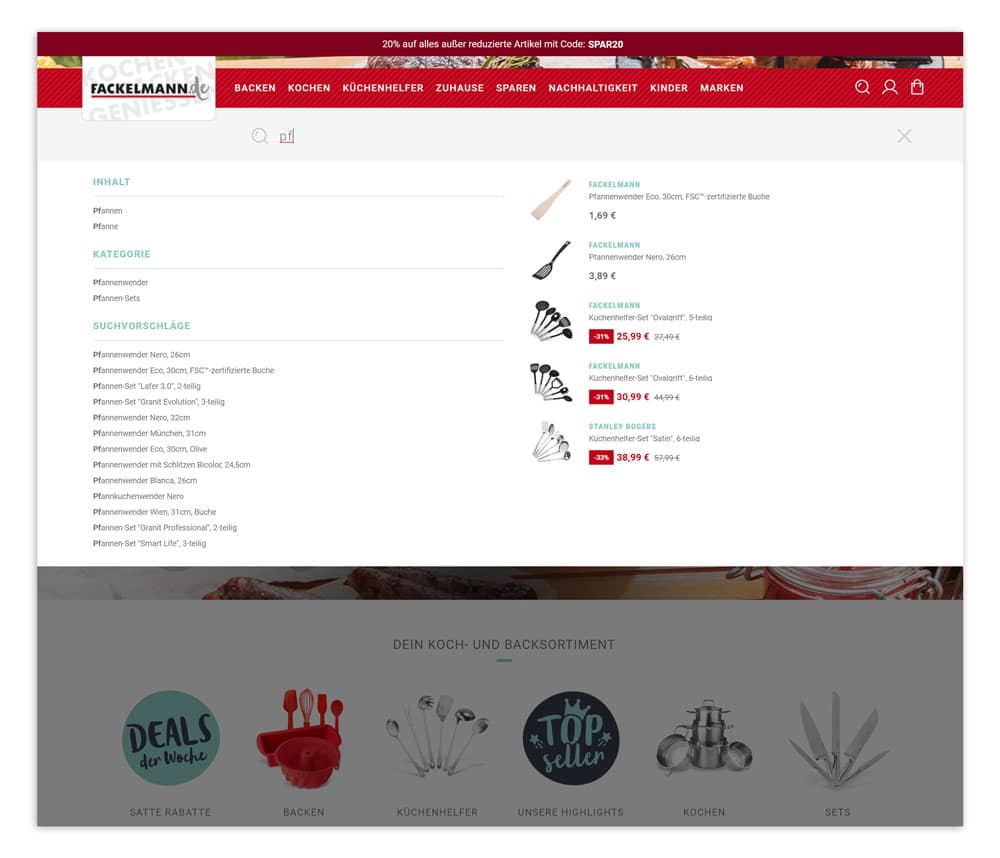
Thanks to an intelligent search function, customers visiting the Fackelmann online shop are shown relevant search suggestions, content, and categories as soon as they start typing in the search field.
(Source: Screenshot from fackelmann.de)
Would you like more information about user guidance in general? Then we also recommend our article Everything you need to know about user guidance in online shops.
Every customer is different – that's why the behavior, habits, and demands of each user are also different. By personalizing your online shop , you can design the user guidance and layout in such a way that each customer can find the desired product and complete their purchase as quickly as possible, based on their behavior.
You now know what usability means and why it is so important for your online store. You are also already familiar with some optimization options. But what could such an optimization process look like for your e-commerce business? Below, we briefly outline the individual steps.
Before you start the optimization process, you should first define the individual areas that you want to optimize. Optimizing without a plan usually yields little success. That's why it's important to examine your online shop closely and identify areas with potential for optimization.
The next step in the optimization process is to understand your users and their behavior. Ultimately, you are optimizing your online store for your potential customers, so all measures you take should be tailored to their behavior and requirements. The best way to get an overview is to carefully analyze all the data you have collected about your users so far.
Once you have defined your measures and analyzed user behavior, it is important to test your assumptions before implementing them in your online store. We recommend testing individual changes step by step to obtain clear results. You can use A/B testing for this purpose. Testing your measures is important because a change may not have the desired effect, but instead have an unexpected negative impact on usability.
Stay up to date on personalization: Sign up for the epoq newsletter. Register now!
Once you have evaluated the results of your tests, you can implement the changes in your online store. You should keep an eye on the usability and key performance indicators of your e-commerce site after implementation so that you can quickly reverse any changes if they have a negative impact. However, a one-time optimization is not enough. So try to continue checking your online shop for optimization potential and constantly improve the user experience.
Online shops offer plenty of opportunities to continuously improve usability. You should take advantage of this potential to offer customers the best possible user experience. From the navigation structure to the content to the checkout, there are many areas where usability can be improved. By implementing a wide range of measures to optimize usability, you can ultimately retain customers in your shop and significantly increase your conversion rate.
Usability refers to the user-friendliness of your online shop. This means how easily users can find their way around your shop and how pleasant it is to use the various touchpoints within the shop.
Good usability ensures that your users can easily navigate your shop and find it pleasant to use. This means they are more likely to stay in your shop longer and not bounce, which ultimately results in a higher conversion rate.
There are many ways to improve usability. Here are some tips for optimization:• Use a simple design
The optimization process should be well planned. It is divided into the following four phases:
Responsive design is used to ensure optimal display on all devices. This type of design adapts to the characteristics and size of the device used by the user.
Learn everything about personalization in e-commerce in our guide.
Request your e-book now!

You are currently viewing placeholder content from HubSpot Meetings. To access the actual content, click the button below. Please note that doing so will result in data being shared with third-party providers.
More Information